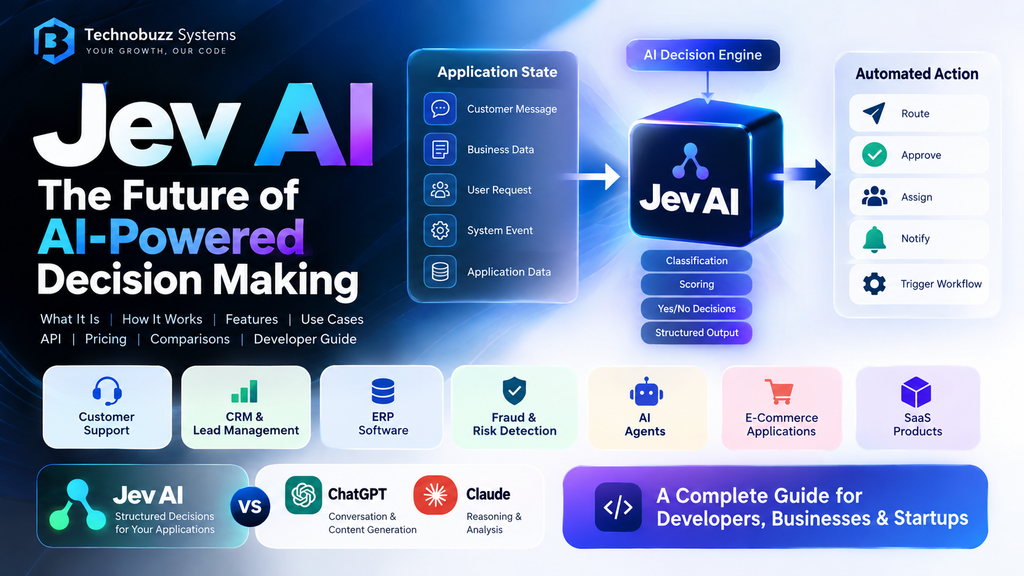
Jev AI is changing how developers can use AI inside software applications—not by trying to replace ChatGPT or Claude, but by focusing on a different problem: making structured decisions that software can act on.
Traditional AI applications often work like this:
Input → AI → Text → Application interprets the text → Action
Jev takes a different approach:
Application State → Jev → Typed Decision → Application Action
That difference is especially interesting for developers building CRM systems, ERP platforms, SaaS products, customer-support systems, AI agents, workflow automation, and enterprise applications.
Current Jev documentation describes it as a decision model designed to transform application state into typed decisions such as classifications, scores, and yes/no decisions.
In this guide, we will explore what Jev AI is, how it works, its features, use cases, API integration, pricing, limitations, and how it compares with general-purpose AI systems.
What Is Jev AI?
Jev AI is a specialized AI decision model designed for software systems that need structured answers instead of long-form generated text.
Imagine a customer sends this message:
“My internet has stopped working again. I have already contacted support twice and I need this fixed immediately.”
A traditional language model might generate a response such as:
“I’m sorry to hear that you’re experiencing connectivity issues…”
That can be useful for customer communication.
But your backend application may actually need answers to several operational questions:
- Which department should handle this?
- How urgent is it?
- Does the customer require immediate attention?
- Should the ticket be escalated?
- Does this request require human review?
This is where a decision-focused model can become useful.
Jev’s current documentation describes three major question styles:
- Choice — select one option from defined choices
- Score — evaluate something against ordered levels
- Noul — a yes/no-style decision
The model can return the selected result along with probability and confidence information where supported.
The fundamental idea is simple:
Don’t ask AI to write an answer when your application actually needs a decision.
How Does Jev AI Work?
The basic Jev workflow can be represented as:
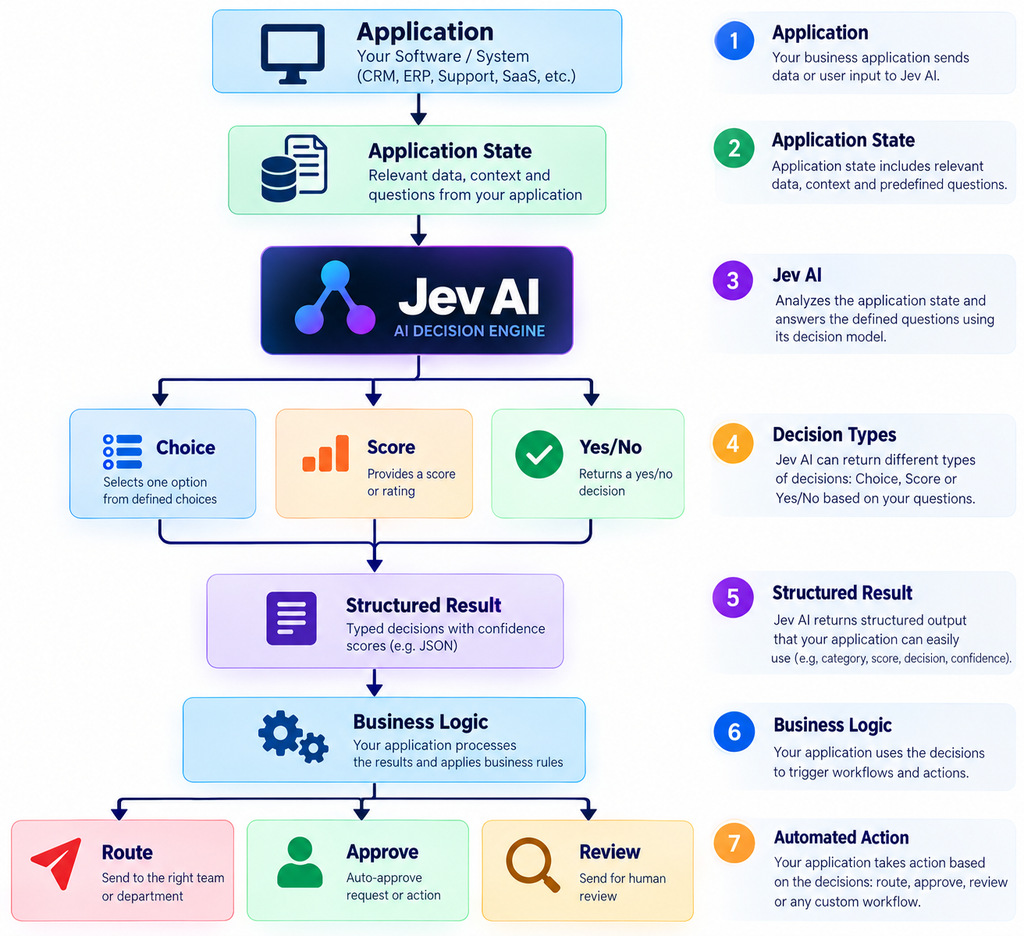
Instead of asking the model to invent a response, the developer defines the possible decision space.
For example:
State:
"My production server has failed three times
and customers are receiving HTTP 500 errors."

Question:
"Does this incident require immediate human escalation?"

Possible answer:
Yes / No
The application can then use the result.
IF needs_human = YES
    → Create high-priority incident
    → Notify engineering team
    → Escalate
ELSE
    → Continue automated workflow
This is fundamentally different from asking a general-purpose chatbot to generate a paragraph and then trying to determine what the application should do with that paragraph.
Why Is a Decision Model Different From a Traditional LLM?
Large language models are extremely useful when you need:
- Text generation
- Conversation
- Summarization
- Coding
- Explanation
- Brainstorming
- Long-form reasoning
- Content creation
But many enterprise workflows don’t actually need a paragraph.
They need something like:
{
  "category": "technical",
  "priority": "high",
  "needs_human": true
}
The software already knows what to do with those fields.
Jev’s current model documentation describes the model as a decision model, with typed outputs rather than conventional free-form language generation.
This makes Jev particularly interesting for backend developers.
Key Features of Jev AI
1. Structured Decisions
The biggest concept behind Jev is structured output.
Instead of:
"Based on the customer's message, I think
this should probably be handled by technical support."
Your application can work with a defined decision such as:
Category = TechnicalThat is much easier to consume programmatically.
2. Classification
Classification is one of the most obvious use cases.
For example:
Customer message
       ↓
     Jev AI
       ↓
 ┌─────┼──────┐
 ▼     ▼      ▼
Sales Billing Technical
A support system could automatically classify incoming tickets into:
- Sales
- Billing
- Technical
- Account
- General
The backend can then route the ticket automatically.
3. Scoring
Not every decision is simply yes or no.
Sometimes an application needs a score.
For example:
Customer frustration:

1 → Low
2 → Moderate
3 → High
4 → Very High
5 → Critical
A CRM could use this score to prioritize customer-service workflows.
4. Multiple Questions From the Same State
One useful feature described in the current documentation is the ability to ask multiple focused questions using the same state rather than creating a separate request for every question.
For example:
State:
Customer complaint

Question 1:
Which department?

Question 2:
How urgent?

Question 3:
Does this require human review?

Question 4:
Is the customer at risk of churn?
This can produce several structured decisions from one shared context.
Jev AI Use Cases
The real value of Jev becomes clearer when it is placed inside business software.
Customer Support
Consider an organization receiving thousands of support requests.
Instead of manually reviewing every ticket:
Customer Ticket
      ↓
    Jev AI
      ↓
 ┌────┼──────────┐
 ▼    ▼          ▼
Team Priority Escalation
The system could determine:
- Department
- Priority
- Customer urgency
- Escalation requirement
- Human-review requirement
The ticket can then automatically enter the correct queue.
CRM and Lead Management
Jev can also fit naturally into CRM workflows.
For example:
Lead Information
      ↓
    Jev AI
      ↓
Lead Classification
      ↓
Hot / Warm / Cold
      ↓
CRM Workflow
A sales application could evaluate:
- Lead intent
- Lead quality
- Purchase urgency
- Follow-up requirement
- Customer segment
The CRM then executes the appropriate workflow.
Jev AI for ERP Software
ERP systems are another interesting application.
An ERP contains large amounts of structured and unstructured business information.
For example:
                    ERP
                     │
       ┌─────────────┼─────────────┐
       ▼             ▼             ▼
      CRM          Support       Finance
       │             │             │
       ▼             ▼             ▼
      Jev           Jev           Jev
       │             │             │
       ▼             ▼             ▼
   Lead Score     Ticket Type   Risk Score
Potential applications include:
Purchase Orders
Purchase Request
       ↓
     Jev AI
       ↓
Approval Required?
       ↓
Yes / No
Invoice Processing
Invoice
  ↓
Classification
  ↓
Expense Category
Employee Requests
Employee Request
       ↓
     Jev AI
       ↓
Leave / Payroll / IT / HR
Finance Workflows
Jev could potentially act as a decision layer for:
- Risk classification
- Approval routing
- Exception detection
- Manual-review routing
For high-impact financial decisions, however, AI output should not automatically be treated as authoritative. Appropriate business rules, controls, audit logs, and human review remain important.
Jev AI for AI Agents
AI agents are becoming increasingly capable of calling tools and performing actions.
But that introduces another problem:
Should the agent actually perform the action?
Imagine an agent wants to delete a customer account.
Before executing the operation:
AI Agent
   │
   ▼
Proposed Action
   │
   ▼
Jev AI
   │
   ▼
Safety Decision
   │
   ├── Safe → Execute
   │
   └── Review → Human Approval
This creates a potential decision/guardrail layer between an AI agent and sensitive operations.
Current Jev documentation specifically identifies agent guardrails, safety checks, task triage, queue prioritization, and model routing as potential applications.
Jev AI vs ChatGPT
Jev AI and ChatGPT should not necessarily be considered direct replacements for each other.
They solve different problems.
| Capability | Jev AI | ChatGPT / General LLM |
|---|---|---|
| Open-ended conversation | Limited / not the primary purpose | Strong |
| Content generation | Not the primary purpose | Strong |
| Classification | Core use case | Possible |
| Structured decisions | Core use case | Possible |
| Scoring | Core use case | Possible |
| Coding | Not the primary purpose | Strong |
| Long-form writing | Not the primary purpose | Strong |
| Business workflow decisions | Strong fit | Possible |
| AI agent reasoning | Decision/guardrail layer | Strong |
| Natural-language generation | Not the focus | Strong |
The important point is that Jev does not need to replace a general LLM.
A sophisticated application could use both.
For example:
             User Request
                  │
                  ▼
          General LLM
          Understands
          the request
                  │
                  ▼
               Jev AI
          Makes decisions
                  │
                  ▼
          Business Logic
                  │
                  ▼
              Database
That combination can be more practical than forcing one model to handle every task.
Jev AI vs Claude
The same principle applies when comparing Jev with Claude.
Claude is designed for general-purpose AI interactions, including reasoning, writing, coding, analysis, and agentic workflows.
Jev is much narrower.
Its value comes from focusing on structured decision-making rather than trying to become another general-purpose conversational assistant.
Therefore, asking:
“Which is better, Jev or Claude?”
is often the wrong question.
A better question is:
“Which part of my application requires a general reasoning model, and which part requires a predictable decision?”
For example:
Customer Email
      │
      ▼
Claude / General LLM
      │
 Understand intent
      │
      ▼
     Jev
      │
 Determine:
 Department
 Priority
 Escalation
      │
      ▼
 Business System
How Developers Can Integrate Jev AI
The current developer documentation describes a REST-oriented integration with the core request containing:
statemodelquestions
The documented endpoint is:
POST https://thejevai.com/v1/systemoneand the current model referenced in the playground documentation is:
typesafe/jev-1.13A simplified request can look like:
{
  "model": "typesafe/jev-1.13",
  "state": "Three deploys have failed and production is returning 500s.",
  "questions": {
    "needs_human": {
      "type": "noul",
      "instructions": "Does this incident need immediate human escalation?"
    }
  }
}
The result can then be consumed by application code.
For example:
if (result.needs_human === true) {
    createIncident();
    notifyEngineering();
} else {
    continueAutomatedWorkflow();
}
The exact request and response schema should always be checked against the current official documentation before implementing production code.
Example: Customer Ticket Classification
Suppose your application receives:
"My internet connection has stopped.
I restarted the router twice but it is still not working."
Your application can provide this state to Jev and ask:
Question 1:
Which department should handle this?

Options:
- Sales
- Billing
- Technical
- Account

Question 2:
How urgent is the request?

Options:
- Low
- Medium
- High
- Critical

Question 3:
Does the customer require human intervention?

Yes / No
The resulting decisions can then become application data.
{
  "department": "technical",
  "priority": "high",
  "needs_human": true
}
Your backend can now automatically:
- Create a support ticket.
- Assign the technical team.
- Set priority.
- Notify the support manager.
- Track the event in the CRM.
This is where decision-oriented AI becomes valuable.
Jev AI and Node.js Architecture
For a modern SaaS or ERP platform, an architecture could look like this:
React / Next.js
       │
       ▼
Node.js / .NET API
       │
       ├───────────────┐
       ▼               ▼
   Business Logic   Jev AI API
       │               │
       │               ▼
       │        Structured Result
       │               │
       └───────┬───────┘
               ▼
           PostgreSQL
               │
               ▼
         Application Action
For example, if you are building an ERP system:
CRM
 │
 ├── Lead → Jev → Lead Score
 │
 ├── Ticket → Jev → Ticket Category
 │
 ├── Request → Jev → Approval Decision
 │
 └── Risk → Jev → Review Decision
This architecture allows the AI layer to remain separate from your core business logic.
Security Considerations
AI integration should not be treated as simply adding an API key.
Developers should consider:
Keep API Keys Server-Side
Never expose secret API credentials inside frontend JavaScript.
Use:
Frontend
   ↓
Your Backend
   ↓
Jev API
rather than:
Browser
   ↓
Jev API
Validate Input
Do not blindly send every piece of application data to an AI system.
Validate:
- Data format
- Maximum input size
- User permissions
- Sensitive fields
- Required fields
Protect Sensitive Data
Consider whether the AI service actually needs:
- Passwords
- Authentication tokens
- Payment credentials
- Personal identifiers
- Confidential business information
Only provide the information necessary for the decision.
Keep Human Review
Probability and confidence should be treated as signals—not guarantees.
Current Jev documentation explicitly recommends conservative thresholds, fallbacks, and human review for sensitive operations such as payments, deletion, access changes, and safety-related decisions.
Jev AI Pricing
AI pricing changes frequently, so pricing should always be checked before publishing or implementing a production system.
The current Jev AI pricing page lists:
| Plan | Price | Credits / Capacity |
|---|---|---|
| Starter | $10 | 100,000 credits |
| Pro | $100 | 1,000,000 credits |
| Enterprise | $1,000 | 11,000,000 credits |
The current pricing page also lists different workspace, concurrency, support, and integration capabilities by tier.
The billing documentation describes input-token-based API billing, with output tokens not billed, while failed requests are not charged.
Because Jev’s pricing and product capabilities are evolving, developers should verify the official pricing and documentation immediately before making purchasing decisions.
Is Jev AI Expensive?
The better question is:
How much does the AI decision contribute to the total cost of your workflow?
Suppose an application receives thousands of tickets every day.
If each ticket requires:
Classification
+
Priority
+
Escalation
+
Risk assessment
then using one shared state for several focused questions can be attractive.
Current documentation states that a single request can answer up to 20 questions, subject to the documented limits.
This means developers should think about workflow cost, not simply model price.
Limitations of Jev AI
Jev is not the best tool for every AI task.
1. It Is Not a General Chatbot
If you need:
“Write a 2,000-word article about cybersecurity.”
A general-purpose LLM is the more natural choice.
2. It Is Not Designed for Open-Ended Content Generation
If your application needs:
- Marketing copy
- Emails
- Blog articles
- Creative writing
- Detailed explanations
a general language model is generally more appropriate.
3. Decision Quality Depends on Your Questions
Bad question:
“What should I do?”
Better question:
“Does this request require human approval before execution?”
Good decision systems require well-defined questions and options.
4. High-Risk Decisions Need Controls
Don’t blindly automate:
- Financial transfers
- Account deletion
- Legal decisions
- Security access
- High-impact employment decisions
Use appropriate validation, business rules, logging, and human approval.
When Should You Use Jev AI?
Use a decision-oriented model when:
- Your output needs to be structured.
- You need classification.
- You need routing.
- You need scoring.
- You repeatedly make the same type of decision.
- Your application needs predictable outputs.
- You want AI to control workflow execution.
- You need a decision layer for an AI agent.
Use a general-purpose LLM when:
- You need content generation.
- You need conversation.
- You need long-form reasoning.
- You need coding.
- You need summarization.
- You need creative output.
Use both when your application requires:
Understanding + Decision + Execution
That may become one of the most useful architectures for enterprise AI.
The Future: From LLMs to AI Decision Engines
The AI industry is moving beyond the idea that one model must do everything.
A future enterprise application may look like this:
                     AI APPLICATION
                           │
          ┌────────────────┼────────────────┐
          ▼                ▼                ▼
   General LLM          Jev AI          Vision AI
          │                │                │
      Reasoning         Decisions          Images
          │                │                │
          └────────────────┼────────────────┘
                           ▼
                    Business Logic
                           │
                           ▼
                       Database
Instead of one massive model handling every operation, applications can use specialized models for specialized tasks.
For example:
General LLM
Understands what the customer wants.
Jev
Determines which predefined business decision should be taken.
Vision model
Analyzes an uploaded image.
Business logic
Executes the action.
This architecture could make enterprise AI systems more modular and easier to control.
Jev AI for Startups
For startups, the interesting opportunity is not necessarily building another chatbot.
The bigger opportunity may be embedding AI directly into existing workflows.
Examples include:
AI CRM
Lead
 ↓
Jev
 ↓
Score
 ↓
Sales Workflow
AI Support Platform
Ticket
 ↓
Jev
 ↓
Category + Priority
 ↓
Assignment
AI Finance Platform
Transaction
 ↓
Jev
 ↓
Risk Classification
 ↓
Review / Continue
AI Agent Platform
Agent
 ↓
Proposed Action
 ↓
Jev
 ↓
Safety Decision
 ↓
Execute / Review
This approach allows startups to build AI into the product rather than simply putting a chatbot beside the product.
Frequently Asked Questions About Jev AI
What is Jev AI?
Jev AI is a decision-focused AI model designed to transform application state into structured decisions such as choices, scores, and yes/no-style outputs.
Is Jev AI an LLM?
Jev is positioned as a decision model rather than a conventional general-purpose conversational LLM. Its output is designed around typed decisions instead of free-form prose.
Who developed Jev AI?
Current Jev materials identify TypeSafe AI as the organization behind the Jev model.
Does Jev AI have an API?
Yes. Current documentation describes a REST-oriented API and provides developer integration examples.
Can developers use Jev AI in Node.js applications?
Yes. Jev is designed to be integrated into software applications through an API. Developers can place it between application state and their business logic.
Can Jev AI be used for ERP software?
Yes. Its decision-oriented architecture can be applied to classification, routing, scoring, approval workflows, support tickets, and other structured ERP processes.
Is Jev AI better than ChatGPT?
Not generally. They are designed for different types of tasks.
ChatGPT is better suited to conversational and generative tasks, while Jev is designed around structured decisions.
Jev AI vs Claude: Which is better?
Neither is universally better. Claude and other general-purpose LLMs are useful for reasoning, coding, writing, and conversational workflows. Jev is specialized around structured decision-making.
Can Jev AI work with AI agents?
Yes. Current Jev documentation describes applications including agent guardrails, safety checks, task triage, and model routing.
Is Jev AI free?
Jev currently offers paid plans, and the available product materials also describe free/welcome access through its playground ecosystem. Pricing and access can change, so verify the current official pricing before publishing or purchasing.
Leave a Reply