Technology Insights & Digital Innovation

Featured Article

  • ChatGPT for Sales: How AI Is Transforming CRM, Lead Generation & Sales Automation in 2026

    ChatGPT for Sales is changing how businesses manage customer relationships, generate leads, and automate sales workflows. From missed follow-ups to scattered CRM data, traditional sales processes often consume valuable time that could be spent building customer relationships. On November 17, 2026, OpenAI introduced ChatGPT for Sales, a sales-focused experience featuring a dedicated Sales plugin and…


Blog

  • ChatGPT for Sales: How AI Is Transforming CRM, Lead Generation & Sales Automation in 2026

    ChatGPT for Sales AI-powered CRM dashboard illustrating lead generation and sales automation
 Copy alt text

    ChatGPT for Sales is changing how businesses manage customer relationships, generate leads, and automate sales workflows. From missed follow-ups to scattered CRM data, traditional sales processes often consume valuable time that could be spent building customer relationships.

    On November 17, 2026, OpenAI introduced ChatGPT for Sales, a sales-focused experience featuring a dedicated Sales plugin and more than 30 new and expanded partner plugins. These tools help sales professionals research accounts, prepare for meetings, understand pipeline activity, and draft contextual customer communications.

    In this guide, we explore how AI-powered CRM automation works, the benefits for growing businesses, and how companies can integrate AI into their existing sales processes.

    OpenAI officially announced ChatGPT for Sales on 17 November 2026, describing it as a new sales experience built around OpenAI’s Sales plugin and more than 30 new and expanded partner plugins. The official announcement names integrations spanning CRM, prospecting, customer conversations, analytics, presentations, outreach, quoting, and agreements.

    Your sales team may have hundreds of leads, but how many opportunities become harder to pursue because the relevant information is scattered across customer records, meeting notes, emails, and prospecting tools? OpenAI describes essentially the same problem: answers about which accounts deserve attention, what a buyer needs next, and why a deal is slowing down can sit across the CRM, customer calls, prospecting systems, and different team members.

    That is the problem ChatGPT for Sales is designed to address.

    Rather than positioning ChatGPT as another database that replaces a CRM, OpenAI is connecting AI-assisted sales workflows to the tools where customer information already lives. That creates an interesting opportunity for small and medium businesses, B2B sales organisations and software decision-makers: AI can increasingly help interpret customer context and prepare work, while the CRM continues to serve as the underlying system of record.

    This article explains what OpenAI actually announced, what the partner plugins can do, where custom sales automation may fit, and what businesses should consider before connecting AI to customer data.

    What ChatGPT for Sales actually is

    ChatGPT for Sales is a plugin experience inside existing ChatGPT plans, not a newly launched standalone CRM. OpenAI’s Help Centre says its own Sales plugin contains skills for sales activities such as account research, meeting preparation, and follow-ups, while separate partner plugins connect the sales applications a company already uses. Those partner plugins can also be used independently of the Sales plugin.

    The distinction matters.

    A conventional CRM such as Salesforce, HubSpot, Close, or monday CRM stores structured business information: contacts, companies, opportunities, activities, account ownership, and pipeline status. ChatGPT for Sales can work with permitted context from supported connected tools, allowing a seller to ask questions across that information and create useful outputs without manually assembling everything first.

    OpenAI says the Sales plugin is currently available globally on all ChatGPT plans, including Free. That does not mean every connected sales service becomes free: users may still need the required subscription and permissions for each partner product, and individual plugin features can vary by plan, region and workspace configuration. 

    Six key capabilities announced for ChatGPT for Sales

    Account and customer research. Sellers can combine customer context from their CRM with prospect or account research. OpenAI specifically describes workflows in which users build prioritised account lists, examine why an account fits their criteria and identify missing information before deciding how to approach it. Prospecting tools named in the launch include Apollo, Clay and Common Room, alongside ChatGPT web research.

    CRM context and meeting preparation. The launch explicitly names Salesforce, HubSpot, Close CRM and monday CRM as tools that can provide account context for preparing calls, reviewing customer commitments and planning next steps. OpenAI’s Salesforce documentation, for example, describes permitted access to accounts, opportunities, contacts and activity for tasks such as deal summaries, meeting briefs and pipeline review.

    Personalised outreach and follow-ups. ChatGPT can use available account context to draft customer-specific follow-up emails and outreach. OpenAI’s Sales plugin documentation lists outreach and follow-up preparation among its core workflows, while the launch names Outreach and Salesloft as partner tools for planning outreach. Drafting a message is different from automatically sending it: the setup documentation explicitly tells users to review follow-up messages and proposed CRM changes before approving supported actions.

    Conversation-to-action workflows. Sales teams can bring in call notes through OpenAI’s Meetings plugin or partner products including Gong, Otter.ai, and Granola. OpenAI says these sources can help identify buyer priorities, agreed actions, and material for follow-up messages.

    Pipeline analysis and deal-risk investigation. OpenAI describes using connected sales data with its Data plugin or Hex to analyse what changed in a pipeline, while Backstory can contribute deal signals. Its Salesforce plugin also supports reviewing open opportunities, identifying stalled deals and summarising risk based on permitted CRM information.

    Quotes, proposals and agreements. The announcement names DocuSign, Ironclad, PandaDoc and ServiceNow CPQ for workflows around quotes and agreements. PandaDoc’s official plugin listing says users can prepare agreements, revise proposals and review pending signatures; the precise actions available still depend on the connected application and permissions.

    These are not six features of one monolithic application. Some come from the OpenAI-built Sales plugin, others depend on third-party plugins, and the usable combination depends on what applications a business already uses and is authorised to connect.

    How AI is changing CRM, lead generation and sales automation

    Traditional CRM systems are excellent at maintaining records. Their weakness is often not the absence of data but the effort required to turn numerous records, notes and activities into the next useful decision.

    AI-assisted workflows add a reasoning and summarisation layer over that information.
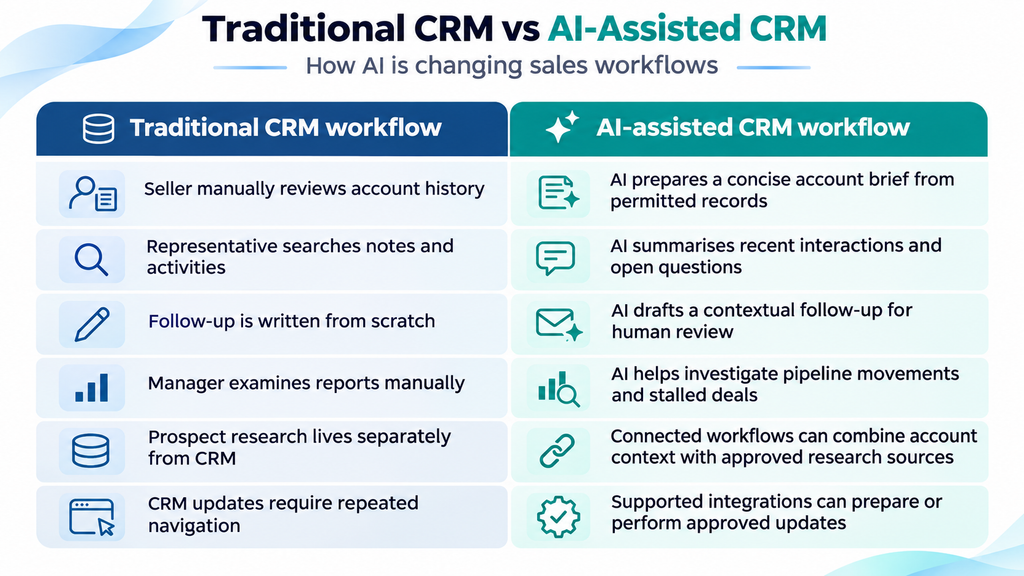
    The important phrase is AI-assisted. A CRM still provides customer records, permissions, ownership, workflow rules, and the operational history of the relationship. ChatGPT can help interpret or act upon permitted information, but it does not make accurate underlying records optional. OpenAI’s own sales guidance tells users to verify customer, opportunity, and pipeline facts against the appropriate system of record.

    AI and lead generation

    AI can support lead generation most effectively after a business defines what a useful lead actually looks like.

    Consider a B2B software company. Instead of treating every enquiry identically, the sales process might evaluate company type, requirement, project urgency, fit with available services and other approved qualification criteria. An AI-assisted workflow could summarise those inputs, surface incomplete information and help a salesperson decide which enquiries deserve immediate attention.

    OpenAI demonstrates a related approach using CRM information and prospect research to build prioritised account lists and explain why particular accounts appear relevant. Its HubSpot integration documentation also describes segmentation and prioritisation workflows using customer and pipeline context.

    AI can then help prepare personalised outreach based on known information rather than generic email templates. It can also turn meeting notes into next steps or draft subsequent follow-ups.

    None of this guarantees a qualified lead or a sale. AI cannot repair a weak value proposition, inaccurate customer data, or an unsuitable targeting strategy. Its practical value is in reducing the effort required to organise information and prepare the next action.

    An illustrative Pune sales workflow

    Imagine a fictional Pune-based software-services company receiving 100 enquiries through its website in a month. The following is an illustrative custom workflow, not a description of functionality OpenAI claims the Sales plugin performs end-to-end.

    Lead captured → CRM record created → AI-assisted qualification → salesperson assigned → follow-up drafted → activity recorded → dashboard updated

    First, an enquiry form captures the prospect’s company name, contact details, requirement, and project context. That information is written to the company’s CRM.

    Second, an AI service analyses the enquiry using qualification criteria defined by the company. It might summarise the requirement and recommend a priority category, while marking missing details rather than inventing them.

    Third, normal CRM automation assigns the opportunity to the correct salesperson according to territory, service category, or workload.

    Fourth, AI prepares a personalised acknowledgement or follow-up using only available customer information and approved sales guidance. A salesperson reviews it before sending.

    Fifth, subsequent customer interactions and approved next steps are recorded against the account.

    Finally, sales managers see updated pipeline information through their normal CRM dashboard, potentially supplemented by AI-generated summaries explaining which opportunities require attention.

    This architecture could involve ChatGPT, an existing CRM, APIs and custom business logic, but it should not be described as an out-of-the-box ChatGPT for Sales feature unless each component is explicitly supported by the relevant plugins.

    Benefits, limitations and the role of a custom CRM

    For smaller sales organisations, the most attractive benefit of AI CRM automation is not necessarily replacing headcount. It is reducing avoidable administrative work: compiling account context, rewriting similar follow-ups, navigating between applications and manually summarising conversations.

    OpenAI includes a concrete customer example in its launch announcement. NeoBid co-founder Prof. Dr Gunnar Gombert says the company uses HubSpot with ChatGPT for Sales to research real-estate prospects, enrich CRM information, prioritise opportunities and prepare personalised outreach, and estimates that this reduces manual effort for those particular activities by around 65%. That figure is NeoBid’s own estimate for its workflow; it is not an industry benchmark and should not be presented as a guaranteed productivity gain.

    Businesses should also distinguish three technologies that are often grouped together:

    Traditional CRM vs AI-assisted CRM comparison showing how ChatGPT for Sales improves account research, follow-ups, and sales pipeline management.
 Copy

    These approaches are complementary rather than mutually exclusive. A company may keep Salesforce or HubSpot as its system of record, use ChatGPT for Sales for permitted AI-assisted work, and add custom APIs or internal applications for workflows specific to its organisation.

    Technobuzz Systems publicly describes capabilities in custom software, AI/ML, web and mobile development, database engineering and API integration, and its own custom-software guidance specifically identifies customised CRM applications as a potential business use case.

    That creates a sensible role for custom engineering where a business needs, for example, a specialised lead intake system, CRM integration, approval workflow, management dashboard, or AI layer that standard products do not provide. Such a project should begin with requirements and security design rather than assuming every sales process should be automated.

    Looking to improve lead management, CRM integration, or sales automation? Technobuzz Systems can help businesses explore custom software, API integration, and AI-enabled workflow options that fit their existing systems and operational requirements. 

    Getting started safely with ChatGPT for Sales

    OpenAI’s current setup guidance suggests a simple adoption path.

    Start by installing the Sales plugin, then choose only the partner plugins needed for the workflow. OpenAI recommends beginning with one tool, such as the CRM, rather than connecting everything immediately. Users then authenticate the relevant work account and review the permissions requested by that provider.

    For Business and Enterprise deployments, administrators can control Sales and partner-plugin availability through the Admin Console. OpenAI says plugin installation and access to an underlying application are separate controls, and Enterprise administrators can use role-based access controls where supported. 
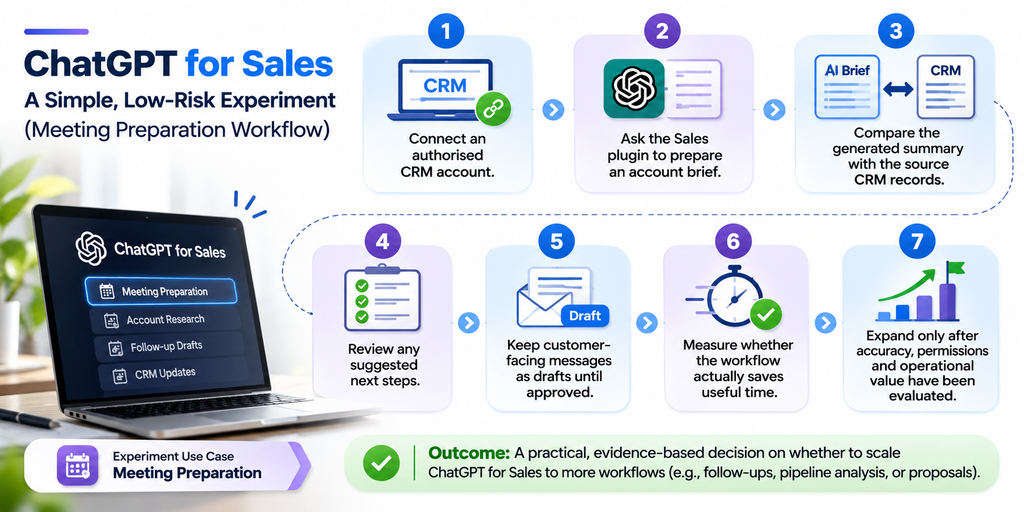
    Seven-step ChatGPT for Sales workflow showing CRM connection, account brief generation, record verification, human approval, and performance evaluation.
 Copy

    OpenAI’s own Academy guidance recommends checking customer and pipeline facts against the system of record, verifying material claims and calculations, and keeping external outreach or CRM updates in draft form until a person has reviewed them.

    Connecting AI to sales systems expands what the AI can see and, for some integrations, what it can do. Permission design therefore matters as much as prompt design.

    OpenAI states that plugins cannot access content beyond the permissions granted through the relevant provider account or administrator-managed source. Workspace administrators can separately control plugin installation, app access, supported actions, and role permissions.

    For ChatGPT Business, Enterprise and Edu, OpenAI says workspace content — including information accessed through apps — is not used to train its models by default. However, information transmitted to a connected third-party service is also governed by that provider’s own storage, processing, privacy and data-residency policies.

    Businesses should therefore apply familiar security principles: least-privilege access, role-based permissions, accurate source records, appropriate customer-data handling, logging where required and human approval before consequential external actions.

    Consent requirements depend on the data collected, jurisdiction, communication method and a company’s legal obligations, so organisations should apply their own privacy and compliance policies rather than assuming that installing an AI plugin provides permission to process or contact every customer.

    What comes next for AI-powered sales

    The direction of travel is already visible, but it is important to separate current capabilities from reasonable future expectations.

    Today, OpenAI has announced plugin-based sales workflows, connected customer context, and an always-on agent called a dot that can use plugins to prepare meeting briefs, track deal updates, and surface proposed next steps for review.

    From that foundation, it is reasonable to expect sales software to become increasingly context-aware: fewer manual searches, richer account summaries, more proactive pipeline monitoring, and greater movement between research, meetings, CRM activity, and follow-up. That is an inference from the direction of current products, not a guarantee that any specific future feature will appear.

    For businesses, the more useful question is not, “Can AI automate sales?” It is, “Which parts of our sales process are repetitive, information-heavy, and sufficiently controlled to automate safely?”

    That distinction keeps AI focused on operational value rather than novelty.

    Frequently asked questions about ChatGPT for Sales

    What is ChatGPT for Sales?
    ChatGPT for Sales is a plugin-based sales experience inside ChatGPT. OpenAI’s Sales plugin provides reusable workflows for account research, meeting preparation, outreach, follow-ups, and pipeline analysis, while partner plugins can connect CRM and other sales systems.

    Can ChatGPT integrate with CRM software?
    Yes. OpenAI’s November launch explicitly names Salesforce, HubSpot, Close CRM, and monday CRM among the CRM integrations available through partner plugins. Capabilities and availability vary by plugin, plan, region, connected account permissions, and workspace configuration.

    Does ChatGPT for Sales replace Salesforce or HubSpot?
    No. OpenAI presents Salesforce, HubSpot, and other CRMs as connected sources of customer context. They continue to perform the system-of-record functions on which the AI-assisted workflow depends.

    How can AI help with lead generation?
    AI can help research accounts, combine permitted prospect and CRM context, organise opportunities, identify missing information and prepare contextual outreach. OpenAI demonstrates prioritised account-list workflows using CRM data and prospect research.

    Can small businesses use AI sales automation?
    Potentially, yes. OpenAI says its Sales plugin is available on all ChatGPT plans globally, including Free, although third-party subscriptions and partner-plugin availability may impose separate requirements. A small business can start with one narrowly defined workflow rather than automating an entire sales operation.

    Is ChatGPT for Sales free?
    The Sales plugin itself is currently available across ChatGPT plans, including Free. That does not include paid subscriptions to third-party CRM or sales applications, and individual partner-plugin capabilities may depend on plan and workspace settings.

    How secure is AI-powered CRM automation?
    Security depends on configuration as well as technology. OpenAI provides workspace controls, provider-account permissions, and action controls, but explicitly notes that third-party and prompt-injection risks are not eliminated. Organisations should limit access, review permissions, and retain human oversight for consequential actions.

    Can a business build a custom AI CRM system?
    Yes, technically. A custom system can combine conventional CRM functions with AI services, databases, APIs, and business-specific automation. Technobuzz Systems publicly lists custom software, AI/ML, API integration, and database engineering among its capabilities and specifically cites customised CRM software as a custom-development use case.

    ChatGPT for Sales is significant not because AI has suddenly replaced CRM software, but because the boundary between storing customer information and working intelligently with that information is becoming much thinner.

    OpenAI’s November 2026 launch brings a dedicated Sales plugin together with more than 30 new and expanded partner plugins spanning CRM, prospect research, meetings, outreach, analytics and agreements. The opportunity for sales teams is practical: spend less time assembling context and more time deciding what to do with it.

    The businesses likely to benefit most will be those that combine AI with strong fundamentals — accurate CRM data, clearly defined sales processes, appropriate permissions and human judgement.

    For organisations whose workflows do not fit neatly into standard applications, custom CRM development and AI integration can add another layer: software designed around the way the business actually qualifies leads, assigns opportunities, follows up and measures its pipeline.

    Publishing, linking and structured-data recommendations

    For internal linking, the supplied Technobuzz Systems URLs were checked before inclusion. The following pages are currently accessible and relevant: Agentic AI in Business Workflows for the anchor “AI agents and business workflow automation”; Custom Software Development for “custom CRM software development”; AI Agent Security for “AI automation security risks”; AEO Optimization Guide for “optimising content for AI search”; and the Technobuzz Systems contact page for “discuss your AI automation requirements”.

    For structured data, use BlogPosting or Article JSON-LD and include accurate headline, author, datePublished, dateModified and representative image information. Google says Article structured data can help it understand a blog page and its title, images, and publication information, but structured data does not guarantee a particular search appearance.

    The eight FAQ answers should remain visible on the page because they are useful to readers, but do not depend on FAQPage schema for a Google FAQ rich result. Google’s documentation now says the FAQ rich-result feature has been discontinued for general sites; its 2026 documentation update notes that the feature is no longer shown in Google Search. QAPage is also inappropriate for this article because Google reserves that markup for pages where users can submit answers to a single question. 

  • How AI Can Help Grow Your Business in 2026: 10 Powerful Ways

    How AI can help grow your business through automation, increased sales, improved customer support, and smarter business decisions Copy ALT Text

    Why AI Is Becoming Essential for Business Growth

    What if your business could answer routine customer questions around the clock, prepare sales follow-ups automatically, analyse thousands of transactions in minutes, and give employees more time for work that genuinely requires human judgement?

    For many small businesses, that is no longer a hypothetical scenario.

    The Federal Reserve Banks’ 2026 Report on Employer Firms, based on the 2025 Small Business Credit Survey, found that 46% of responding employer firms were already using artificial intelligence, while another 15% planned to begin using it within the following 12 months. Among businesses that used AI, 71% reported increased productivity, 39% reported improved quality of goods or services, and 31% reported increased sales. These figures reflect businesses’ self-reported experiences rather than guaranteed results from adopting AI.

    The same survey found that writing and marketing were the most common AI applications among AI-using firms, followed by individual productivity and planning or analysis. Only 7% of AI-using firms described AI as fully integrated into their business, showing that adoption remains relatively early even as usage becomes widespread. The survey was conducted among 6,525 US employer firms with between one and 499 employees and used a convenience sample, so its findings should be interpreted in that context.

    That gap between experimentation and full integration creates an important opportunity. The real benefits of AI in business increasingly come not from using an isolated chatbot, but from connecting AI with customer data, workflows, CRM systems, analytics and everyday operations.

    Understanding how AI can help grow your business therefore starts with understanding what different forms of AI actually do.

    Traditional automation follows predefined rules: when event A happens, perform action B. It is ideal for predictable processes such as moving form submissions into a CRM or sending an invoice reminder.

    Generative AI creates or transforms information. It can draft emails, summarise documents, generate images, analyse text, and help employees work with large amounts of information.

    AI agents go a step further. An agent can potentially interpret a goal, decide what actions are necessary, and interact with authorised software or data sources to complete a multistep workflow. Today’s platforms increasingly combine agents with rules, permissions and human approval checkpoints rather than relying on unrestricted autonomy. McKinsey’s 2026 global survey found growing deployment of agentic systems, although scaling was significantly more common at large organisations than at smaller ones.

    For SMEs, the goal does not need to be “use AI everywhere”. A better question is: Where can AI remove a bottleneck, improve a customer experience, or help us make a better decision?

    Powerful Ways AI Can Help Grow Your Business

    Automate repetitive business tasks. One of the easiest applications of AI automation for small businesses is reducing time spent on repetitive administrative work. Depending on the systems involved, businesses can automate activities such as classifying enquiries, extracting information from documents, updating CRM records, scheduling follow-ups, and routing requests to the correct employee. Workflow platforms including n8n, Zapier and Make now combine conventional automation with AI-enabled workflows and agents, while still supporting rules or human intervention where appropriate.

    The important point is not simply to automate more tasks. Automate tasks where the process is repeatable, the output can be checked, and the time saved can be measured.

    Generate more leads and improve sales follow-up. Sales teams frequently lose opportunities because enquiries are not followed up quickly, customer information is scattered, or employees spend too much time preparing for calls. AI can help analyse customer information, summarise previous interactions, prioritise prospects, and prepare personalised outreach for review. Modern AI-powered CRM platforms are increasingly embedding these capabilities directly into sales workflows. For example, HubSpot documents AI functionality for summarising CRM information, preparing for meetings and generating content, while Salesforce combines CRM data with AI-generated insights, predictions and agent capabilities.

    AI should support the sales process rather than replace sound sales judgement. A useful implementation may be as simple as automatically summarising a new lead, suggesting the next action and reminding a salesperson when follow-up is due.

    Provide faster, more consistent customer support. AI assistants can answer frequently asked questions, retrieve information from an approved knowledge base, categorise support tickets and collect details before handing a conversation to a human employee. This can extend service availability without requiring every enquiry to be handled manually.

    The safest design is usually a hybrid one: allow AI to resolve low-risk, repetitive requests while providing clear escalation paths for complicated, sensitive, or high-value conversations. Salesforce, HubSpot, and several workflow platforms now support variations of AI-assisted or agent-based customer service, illustrating how these capabilities are moving into mainstream business software.

    Improve digital marketing productivity. Marketing is already one of the most common small-business applications of AI. The Federal Reserve’s 2025 survey found that 83% of firms using AI used it for writing or marketing tasks.

    AI can help teams brainstorm campaign ideas, create first drafts, repurpose existing content, analyse customer feedback, develop audience variations and produce creative assets. Canva’s Magic Studio incorporates AI-assisted creative functions into its design environment, while Adobe provides the Firefly family of generative AI tools for creative work.

    AI-generated content still requires editorial judgement. Google explicitly recommends creating content primarily for people rather than producing large volumes of search-engine-first material. Google also encourages original information, substantial analysis, reliable sourcing, and clear evidence of expertise.

    That means the most effective use of AI in marketing is usually AI-assisted expertise, not mass-produced generic content.

    Make smarter decisions with data. Businesses often possess useful information but struggle to convert it into timely decisions. AI-assisted analytics can help users explore business data using natural-language questions, identify unusual patterns, and create summaries of reports. Microsoft, for example, now incorporates Copilot into Power BI and Microsoft Fabric, including capabilities for asking questions of business data and generating report narratives.

    For a small business, useful questions might include: Which products have the highest repeat-purchase rate? Which customers are becoming inactive? Which months experience the strongest demand? Which marketing channels generate profitable customers rather than simply generating clicks?

    The value comes from connecting AI to trustworthy data and defining the business decision the analysis is intended to support.

    Reduce operating costs without treating AI simply as a head-count tool. AI can lower the cost of completing certain processes by reducing manual handling, shortening turnaround times and helping employees complete routine work faster. However, cost savings are not automatic.

    The Federal Reserve survey found that 77% of AI-using firms that answered its labour-cost question reported no change in labour costs, while 16% reported a decrease and 7% an increase. That is a useful reminder that increased productivity does not necessarily translate immediately into lower expenditure.

    McKinsey found a similar distinction at a larger organisational level: 80% of respondents to its 2026 survey said AI had improved their individual productivity, yet only 37% attributed at least some organisation-level EBIT impact to AI.

    Businesses therefore need to connect productivity improvements to measurable outcomes such as greater capacity, faster delivery, lower cost per transaction or additional revenue.

    Personalise the customer experience. When businesses have appropriate customer data and permission to use it, AI can help segment audiences, identify relevant products or services and adapt communications to different customer needs.

    An e-commerce company, for instance, might use purchasing patterns to determine which categories should be highlighted to a returning customer. A service business could use CRM history to provide employees with a concise summary before a customer conversation. Personalisation works best when it makes an interaction more useful rather than simply inserting someone’s name into automated content.

    Improve inventory and supply-chain planning. AI-assisted forecasting can help businesses analyse historical sales, seasonality and other relevant variables when planning purchasing or inventory levels. The purpose is not to predict the future with certainty; it is to help decision-makers consider more information consistently.

    For example, a retailer could compare stock levels with recent demand and lead times to identify products at risk of running out. A manufacturer could combine equipment data with maintenance records to help prioritise inspections. These are illustrative examples, and the appropriate approach depends on the quality of a company’s data, operating environment and forecasting requirements.

    Increase employee productivity. AI can function as a work assistant for drafting, summarising, research, document analysis, meeting preparation and other knowledge-intensive tasks. The Federal Reserve found that 61% of AI-using small firms in its survey used AI for individual productivity, while McKinsey’s broader 2026 survey found that 80% of respondents said AI improved their own productivity.

    Tools in this category include ChatGPT, Gemini and Claude. OpenAI offers ChatGPT Business as an organisational workspace; Google provides Gemini capabilities across its business ecosystem; and Anthropic offers Claude for work and small-business use cases. Features, pricing and data policies vary, so businesses should evaluate the specific plan they intend to deploy rather than assume that consumer and business offerings have identical controls.

    Scale workflows with AI agents. AI agents are one of the most consequential developments for businesses because they can potentially move from generating an answer to carrying out authorised actions.

    Consider an illustrative sales workflow. A prospect submits an enquiry. An agent categorises the lead, retrieves relevant CRM context, drafts a response, creates a follow-up task, and prepares information for a salesperson. High-value actions can remain subject to human approval.

    Platforms such as n8n, Zapier, Make, Salesforce and HubSpot now provide agent or AI-workflow functionality, although their architecture, permissions and intended use cases differ considerably.

    For SMEs, this is likely to be more valuable than pursuing “autonomy” for its own sake. The objective should be a reliable end-to-end business process with appropriate controls.

    Practical AI Examples Across Industries

    The following scenarios are illustrative rather than claims about specific companies.

    A retail business could combine sales history and stock data to support demand forecasting, while using AI-generated product descriptions as editable first drafts. An e-commerce company might use an AI assistant to handle common delivery questions and recommend relevant product categories based on customer behaviour.

    A healthcare organisation could use carefully governed automation for appointment administration or internal documentation workflows, while keeping clinical decisions and sensitive patient interactions within appropriate professional and regulatory controls.

    A manufacturer could analyse equipment data to help prioritise predictive maintenance and use demand information to support inventory planning. A real-estate company could automatically classify new enquiries, summarise prospect requirements and remind agents when follow-up is due.

    An IT services firm could use AI to assist developers with coding, documentation, software testing and internal knowledge retrieval. McKinsey’s 2026 survey found that software coding agents were among the agentic applications organisations were already scaling.

    These examples illustrate an important principle of AI for business growth: the best application usually begins with a specific business workflow, not with a particular AI product.

    How Small Businesses Can Start Using AI

    For companies wondering how to use AI in business, a controlled six-stage approach is more practical than attempting a large transformation at once.

    Start by identifying the bottleneck. Look for processes that consume significant staff time, create delays, generate repetitive work, or cause customers to wait. Examples might include manually qualifying enquiries, preparing weekly reports, or repeatedly answering the same support questions.

    Choose one high-value use case. Estimate the volume of work involved, current time or cost, potential improvement, and consequences if the AI makes a mistake. A process that happens hundreds of times each month and is easy to verify may be a better first project than a rare, high-risk decision.

    Decide whether a ready-made tool or custom integration fits the problem. Ready-made AI tools for business can be ideal for individual productivity. Workflow tools can connect existing applications. A custom integration becomes more relevant when AI needs to interact with proprietary data, specialised workflows, CRM or ERP systems.

    Run a limited pilot and establish controls. Define what information the system may access, what it is permitted to do, and when human approval is mandatory. Train the employees who will actually use it.

    Measure the before-and-after result. Record your baseline before implementing the system so that you can determine whether it created measurable value.

    Scale what works. Successful pilots can be expanded to adjacent workflows, while unsuccessful experiments should be revised or stopped rather than maintained simply because they use AI.

    This gradual approach also addresses one of the biggest adoption barriers. The San Francisco Fed’s 2026 research found that small businesses reported difficulty knowing where to start, alongside concerns involving cost, staff capacity, system upgrades, accuracy, intellectual property, and implementation knowledge.

    Choosing tools should follow the same principle. ChatGPT, Gemini and Claude can support general knowledge work; n8n, Zapier and Make can orchestrate workflows; HubSpot and Salesforce incorporate AI into CRM activities; Canva and Adobe Firefly provide AI-assisted creative tools; and Power BI incorporates AI-assisted analytics. These categories overlap, and no single product is automatically the best option for every business. 

    Risks, ROI and the Future of AI in Business

    AI adoption comes with genuine challenges. The Federal Reserve’s 2026 survey found that accuracy was the most frequently reported challenge among businesses already using AI, cited by 46%, while 43% cited adapting tools to business needs. Among companies planning adoption, 54% identified finding suitable tools as a challenge and 37% cited the time required for implementation or employee training.

    Businesses should therefore consider data privacy, security, hallucinations or incorrect outputs, intellectual-property implications, system integration, subscription and API expenditure, employee training and human oversight before putting AI into production. The appropriate controls depend on the information involved and the consequences of an error.

    ROI measurement should begin before implementation. Useful metrics may include employee hours per process, average customer response time, lead-to-sale conversion rate, cost per transaction, order-processing time, error rate, customer satisfaction, and incremental revenue.

    Consider a simple illustrative ROI calculation. Suppose a five-person team spends a combined 40 hours each month preparing repetitive reports. If an AI-assisted workflow reduces that work to 15 hours, the company saves 25 hours of capacity per month. If the fully loaded internal cost of that time is £30 per hour, the theoretical value of the time released is £750 per month. If the solution costs £250 per month, the gross monthly productivity value would be £500 before considering implementation costs, maintenance, errors, or other benefits.

    The formula is straightforward:

    AI ROI = (measurable financial benefit − total AI cost) ÷ total AI cost × 100

    The harder part is proving the inputs. That is why businesses should measure actual results rather than assuming every hour theoretically “saved” becomes a financial return. McKinsey’s finding that employee-level productivity gains have outpaced reported enterprise-level financial impact reinforces that distinction.

    Beyond 2026, several developments appear likely to shape business AI, although these should be treated as forecasts rather than certainties. AI agents are likely to become more deeply connected with business applications; CRM and ERP platforms may incorporate more agentic workflows; voice interfaces are likely to become increasingly practical; analytics tools may provide more proactive predictions; and businesses may increasingly combine multiple models, applications and data sources into governed workflows. Current product direction across major CRM, automation and analytics providers supports the inference that AI is moving closer to operational systems rather than remaining confined to standalone chat interfaces.

    The organisations most likely to benefit will not necessarily be those using the largest number of AI tools. McKinsey’s 2026 research found that its highest-performing group was distinguished in part by redesigning workflows around AI rather than merely inserting AI into existing processes. 

    How Technobuzz Systems Can Help Your Business Adopt AI

    For a business considering AI, the technology is only one piece of the problem. The more important questions are what should be automated, which systems need to communicate, what information AI should access, what employees should approve, and how success will be measured.

    Technobuzz Systems can frame its AI offering around those practical requirements: evaluating opportunities for custom AI automation and workflow integration, exploring AI-powered CRM or ERP functionality, designing intelligent chatbot and customer-support workflows, adding AI capabilities to web or mobile applications, and connecting business systems where a packaged tool alone does not fit the process.

    The objective should be to choose the simplest solution capable of producing a measurable business result. Sometimes that may mean configuring an existing AI product. Sometimes it may mean connecting several tools through automation. And where the workflow, data, or user experience is specific to the organisation, it may justify a custom software integration.

    That approach also keeps the conversation focused on business outcomes rather than AI hype: What process gets faster? What customer experience improves? What information becomes more useful? What can the team accomplish that it could not accomplish efficiently before?

    Frequently Asked Questions

    How can AI help a small business grow?
    AI can help a small business automate repetitive work, improve sales follow-up, answer routine customer enquiries, support marketing, analyse data, and increase employee productivity. Federal Reserve survey data indicates that many AI-using small firms report productivity benefits, although results vary by business and implementation.

    What are the biggest benefits of AI in business?
    Potential benefits include faster processes, greater employee capacity, more consistent customer service, improved analysis, better personalisation and the ability to scale certain workflows without increasing manual work at the same rate.

    Can AI increase sales and revenue?
    It can contribute to revenue growth through lead prioritisation, quicker follow-up, personalisation and improved customer experience. In the Federal Reserve’s 2025 survey, 31% of AI-using firms reported increased sales resulting from AI use, but the result was self-reported and should not be interpreted as a guaranteed sales increase.

    Is AI expensive for small businesses?
    Not necessarily. Businesses can begin with individual software subscriptions or limited workflow pilots before investing in custom systems. Costs can rise with usage, integrations, data infrastructure, and more sophisticated agent deployments; McKinsey found that AI operating costs were already constraining AI use for about one in five respondents to its 2026 survey.

    How can AI reduce business operating costs?
    AI may reduce the time and manual effort required for administration, reporting, customer support, and other repeatable processes. Savings should be measured against software, integration, training, monitoring, and maintenance costs rather than assumed.

    What are the best AI tools for small businesses in 2026?
    The right choice depends on the problem. Current options include ChatGPT, Gemini, and Claude for knowledge work; n8n, Zapier, and Make for workflow automation; HubSpot and Salesforce for CRM-related AI; Canva and Adobe Firefly for creative work; and Power BI for business analytics. Businesses should compare current features, security requirements, integration needs, and pricing before choosing.

    How do I start implementing AI in my business?
    Begin with one measurable problem, establish a baseline, select the simplest appropriate tool, run a controlled pilot, train users, measure the result, and expand only after the process has demonstrated value.

    Can AI be integrated with an existing CRM or ERP system?
    Often, yes. Many modern platforms provide APIs, built-in AI capabilities, or automation integrations. Salesforce, for example, documents connections between Agentforce, CRM data, APIs, and other Salesforce tools, while workflow platforms such as n8n and Make are designed to connect applications into automated processes. The feasibility of a specific integration depends on the systems, APIs, permissions, and data involved.

    AI is not a shortcut to business growth, but it is becoming a powerful way to improve how businesses operate. The strongest strategy is to start with a clearly defined problem, introduce AI where it adds measurable value, and keep appropriate people in control of important decisions.

    For SMEs and startups asking how AI can help grow your business, the opportunity is increasingly practical: fewer repetitive tasks, faster customer interactions, better use of data, and workflows that can scale more efficiently.

  • Alibaba Qwen4-Max AI Model: Features, Pricing, Benchmarks & Capabilities

    Qwen4-Max AI Model by Alibaba featuring a futuristic AI chip, multimodal capabilities, 2.4T parameters, 1M-token context, and 71B active parameters.

    Qwen4-Max AI Model is Alibaba’s flagship multimodal artificial intelligence model, designed for advanced reasoning, coding, image and video understanding, and AI-powered automation. With a 2.4-trillion-parameter Mixture-of-Experts architecture, a 1-million-token context window, and 71 billion active parameters per token, it introduces powerful capabilities for developers, businesses, and AI applications. Alibaba has introduced Qwen4-Max, its new flagship AI model for advanced reasoning, software development, multimodal analysis, and long-running agent workflows. The model combines a huge 2.4-trillion-parameter Mixture-of-Experts architecture with a one-million-token context window, native visual understanding, and extensive tool-calling support. Alibaba is positioning it not simply as a chatbot, but as an AI system capable of carrying out substantial professional work across coding, finance, engineering, research, and other domains.

    The launch is also notable for economics. Alibaba lists Qwen4-Max at $1.50 per million input tokens and $4.50 per million output tokens on its international pricing tier, making its standard token rates 25% lower than the $2/$6 rates associated with Qwen3.8-Max. Independent evaluator Artificial Analysis has already tested the model, scoring it 43 on its Intelligence Index and ranking it 38th among 81 models in the comparison displayed on 16 November 2026.

    Those figures require context. Alibaba’s headline performance improvements come largely from its own testing, while Artificial Analysis provides a separate external benchmark perspective. Neither source establishes that Qwen4-Max is universally superior to every competing model. The model’s most interesting proposition is instead the combination of long context, multimodality, agent tooling, and lower published inference pricing. This article draws on Alibaba’s documentation, its Qwen launch materials, Reuters, Artificial Analysis, and the source research supplied for this report. 

    Qwen4-Max release timeline and key specifications

    The Qwen4-Max rollout happened in stages rather than on a single launch date. Alibaba opened Qwen4-Max-Preview at 10:00 UTC+8 on 11 November 2026 through its Token Plan. The preview is scheduled to run until 24:00 UTC+8 on 25 November 2026, after which the qwen4-max-preview model is due to be retired. Alibaba’s documentation explicitly states that the preview is available through Token Plan rather than conventional pay-as-you-go billing.

    The regular model, identified through the API as qwen4-max, became documented as the current production model on 16 November 2026. That distinction matters: the 25 November retirement applies to the preview identifier, not to the regular Qwen4-Max API. Reuters also reported on 16 November that Alibaba had unveiled the flagship model, highlighting its intended use in professional and scientific work and the company’s claims about improved safety controls. 

    Qwen4-Max AI Model specifications and capabilities infographic

    Alibaba Cloud independently confirms the one-million-token context window, text/image/video input, text output, deep-thinking support, function calling, web search, and the major API interfaces. Its international deployment documentation currently covers Singapore as well as global deployments including Frankfurt, Virginia, Tokyo, and Hong Kong.

    The 2.4T backbone, 71B active-parameter figure, and 328B n-gram embedding component are described in the Qwen4-Max launch material and are reproduced in the supplied research dossier; contemporary coverage of the launch reports the same architecture figures.  

    Architecture, multimodality and core capabilities

    At the centre of Qwen4-Max is a Mixture-of-Experts, or MoE, architecture. Instead of engaging every parameter for every token, the system activates a much smaller subset — approximately 71 billion parameters from the 2.4-trillion-parameter backbone for each token processed. This approach is intended to increase model capacity without requiring the full parameter set to participate in every inference step. Alibaba’s reported architecture also incorporates 328 billion parameters devoted to n-gram embeddings, which add representations for recurring local token patterns.

    The model also uses architectural components Alibaba describes as Gated DeltaNet, Qwen Sparse Attention, gated residual connections, and n-gram embeddings. Qwen Sparse Attention is designed to focus computation on relevant parts of a long context instead of applying dense attention uniformly, while the broader architecture is intended to make million-token workloads more practical. These are architectural design claims from Alibaba; real-world latency and throughput will still depend on request length, reasoning settings, provider infrastructure, and application design.

    One of Qwen4-Max’s most important features is its one-million-token context window. Alibaba Cloud lists maximum non-thinking input at 991,808 tokens and thinking-mode input at 983,616 tokens. For the regular Model Studio model, the maximum non-thinking output is 131,072 tokens, while thinking plus final-answer tokens can total up to 262,144. The separate preview endpoint documents a different ceiling of 393,216 tokens shared between reasoning and final output, demonstrating why developers should consult the limits for the specific endpoint they use.

    Qwen4-Max is also genuinely multimodal for understanding. Alibaba documents text, image, and video as supported inputs, with text as the output modality. That makes it suitable for analysing screenshots, visual documents, video material, and mixed text-image prompts, but it does not mean the model natively generates images or videos. Image and video generation require separate generation models or external tools.

    For developers, the model’s capabilities extend well beyond conventional question answering. Qwen4-Max supports deep reasoning with adjustable effort levels, coding, structured JSON responses, function calling, parallel tool calls, web search, and prompt caching. Alibaba positions these features for multi-step AI agents that can plan work, invoke external systems, and keep operating over longer tasks rather than simply return a single answer. 

    Qwen4-Max benchmarks: Alibaba claims versus independent testing

    Alibaba’s most prominent productivity benchmark is Work360, an internal evaluation framework covering professional tasks across numerous industries and specialisms. According to the company’s launch material as captured in the supplied research, Qwen4-Max improved the Work360 score by about 10.4% relative to Qwen3.8-Max. Reported scores were 52.69 for Qwen4-Max and 47.74 for Qwen3.8-Max.

    Alibaba also reports materially lower token consumption. The company’s figures indicate that Qwen4-Max used about 35% fewer tokens at the “high” reasoning setting and 24% fewer at “xhigh” on Work360. On Terminal-Bench 4.0, Alibaba reported reductions of approximately 49% at high and 48% at xhigh compared with Qwen3.8-Max. These should be treated as vendor benchmark results rather than guarantees for every production workload.

    The supplied launch research records another important metric: Alibaba said the average Work360 task cost fell from about $4.43 to $1.67, a reduction of roughly 62% in that particular evaluation. Different contemporary reports give slightly different percentage summaries depending on currency conversion and test aggregation, so the safest interpretation is that Alibaba is claiming a major benchmark-specific reduction in task cost, not that every Qwen4-Max application will automatically be 62% cheaper.

    Independent evaluation paints a more measured picture. As of 16 November 2026, Artificial Analysis gives Qwen4-Max an Intelligence Index score of 43, placing it #38 out of 81 models in the summary comparison displayed on its Qwen4-Max page. Artificial Analysis describes the model as above the median for comparable systems and calculates an average $3.27 cost per Intelligence Index task under its evaluation methodology.

    Artificial Analysis also reports that Qwen4-Max produced approximately 127 million output tokens during its Intelligence Index evaluation, more verbose than the benchmark median cited on the page. That is useful context: lower token use in Alibaba’s specific Work360 and Terminal-Bench comparisons does not necessarily mean the model is universally terse or token-efficient across every benchmark.

    The sensible conclusion is therefore narrower than a “best model” headline. Alibaba’s own testing indicates substantial gains over Qwen3.8-Max in selected professional and agent tasks, while independent testing currently places Qwen4-Max above average but not at the top of Artificial Analysis’s overall ranking. 

    Qwen4-Max pricing and cost efficiency

    For developers evaluating Qwen4-Max commercially, pricing is one of the strongest parts of the proposition. The current international rate associated with the model is $1.50 per million input tokens and $4.50 per million output tokens. Artificial Analysis independently lists the same prices for Alibaba’s API.

    Those rates are 25% lower than Qwen3.8-Max’s $2 per million input tokens and $6 per million output tokens on the comparable international pricing referenced in the launch research. This makes Qwen4-Max unusual in that Alibaba is presenting a successor model that combines architectural and capability upgrades with lower standard token prices.

    Prompt caching can reduce repeated-input costs further. Current published pricing referenced by independent model trackers lists cached input at approximately $0.075 per million tokens, although developers should always check Alibaba Cloud’s current region-specific price sheet before deploying at scale. Alibaba itself notes that pricing and capabilities can differ by deployment region.

    A simple example illustrates the base economics. A request containing 100,000 input tokens and producing 10,000 output tokens would cost approximately $0.195 at the $1.50/$4.50 token rates before cache benefits, tool charges, taxes, or other fees. A one-million-token input plus 100,000 output tokens would cost about $1.95 on the same basis. These are illustrative calculations rather than quoted billing totals.

    Regional differences remain important. The source research records a Frankfurt rate of approximately $1.413 per million input tokens and $4.24 per million output tokens, compared with $1.50 and $4.50 in Singapore. Organisations with residency, latency or compliance requirements should therefore select the deployment region first and then confirm its current rate card.

    The qwen4-max-preview model follows a different commercial arrangement. Alibaba documents it as a Token Plan-only preview, with promotional credit consumption during the 11–25 November period rather than conventional pay-as-you-go access. 

    Qwen4-Max vs Qwen3.8-Max

    Qwen4-Max is not simply a larger Qwen3.8-Max. The two models share a 2.4-trillion-parameter scale, but Alibaba has changed how much of the network is activated and introduced new architectural elements intended to improve long-context efficiency and agent performance. Qwen3.8-Max was documented with roughly 95B active parameters, whereas Qwen4-Max activates approximately 71B per token, around a quarter fewer. 

    Qwen4-Max AI Model versus Qwen3.8-Max features and pricing comparison

    en3.8-Max’s launch explicitly described it as a Max-class model whose weights were planned for release, whereas Artificial Analysis currently labels Qwen4-Max a proprietary model. Publishers should therefore avoid describing Qwen4-Max itself as open-weight unless Alibaba later announces and releases its weights

    How to access Qwen4-Max and where it could be useful

    The primary developer route is Alibaba Cloud Model Studio, where the production model uses the identifier qwen4-max. Alibaba documents compatibility with OpenAI Chat Completions, OpenAI Responses, Anthropic Messages, and DashScope, reducing integration friction for teams already using familiar LLM API patterns.

    Alibaba also supports function calling, structured output, prompt caching, web search, and multi-tool orchestration. That combination makes Qwen4-Max particularly relevant for applications where the model must act on external systems rather than simply generate prose. Examples include CRM automation, research agents, internal document analysis, developer assistants and workflow software that must repeatedly call APIs or enterprise tools.

    Alibaba’s own demonstrations span a broad range of industries. Reuters reports that the company highlighted applications in 3D modelling, game development, precision manufacturing, finance, law, healthcare and scientific discovery. The source research additionally describes demonstrations involving Blender and game engines, multi-source financial research, legal due diligence, materials screening and drug-discovery workflows. These should be regarded as company-provided examples rather than independently validated production case studies.

    For businesses, some of the most credible near-term applications are less dramatic but potentially more useful: analysing large document collections, generating and debugging code, processing screenshots and visual documents, preparing structured reports, orchestrating tools across business software and carrying multi-stage research tasks through a large context window. Those use cases align directly with the features Alibaba currently exposes through Model Studio. 

    Safety, security and practical limitations

    Alibaba says Qwen4-Max’s training incorporated security checks alongside coding evaluations, targeting problems including code injection, memory-safety weaknesses and broken access controls. Reuters also reports Alibaba’s claim that safeguards were strengthened against misuse relating to cybercrime and hazardous materials and that its internal testing found no significant high-risk capabilities. These are Alibaba’s own findings, not independent certification that the model is secure or incapable of harmful behaviour.

    Generated code should therefore still undergo ordinary security review, testing and dependency analysis. Likewise, legal, healthcare, financial and scientific outputs should be treated as decision-support material rather than automatically accepted conclusions. Large context windows and stronger reasoning can increase the amount of evidence a model can consider; they do not eliminate hallucinations, data-quality problems, or flawed inference.

    Several other limitations are worth keeping clear. Qwen4-Max currently produces text output, so native image or video generation should not be attributed to it. Alibaba Cloud’s current documentation does not list fine-tuning or private model deployment as supported capabilities for Qwen4-Max. Feature availability, token limits, and prices may also differ between regions and between the preview and regular model.

    Finally, benchmark scores should not be treated as universal measures of usefulness. Work360 is an Alibaba-created benchmark, while Artificial Analysis’s index combines its own suite of evaluations including coding, knowledge, and agent tasks. They answer different questions, and neither can predict performance perfectly for a specific organisation’s documents, tools, latency requirements, or error tolerance. 

    Frequently asked questions and conclusion

    When was Alibaba Qwen4-Max released?

    Qwen4-Max-Preview opened on 11 November 2026. Alibaba’s documentation identifies the regular qwen4-max model as available on 16 November 2026. The preview is scheduled to retire after 25 November 2026 at 24:00 UTC+8.

    What is the context window of Qwen4-Max?

    The regular Qwen4-Max model supports a one-million-token context window. Alibaba documents maximum input lengths of 991,808 tokens in non-thinking mode and 983,616 tokens in thinking mode.

    Is Qwen4-Max an open-weight model?

    No. As of 16 November 2026, Artificial Analysis classifies Qwen4-Max as proprietary, and Alibaba’s current Model Studio documentation presents it as a hosted model. Qwen4-Max should not be described as open weight unless Alibaba subsequently publishes its weights.

    Can Qwen4-Max understand images and video?

    Yes. Alibaba Cloud documents text, image, and video input, with text output. It can therefore analyse visual material, screenshots, documents, and video content, but the documented model does not natively generate images or videos.

    How much does the Qwen4-Max API cost?

    The widely published international rate is $1.50 per million input tokens and $4.50 per million output tokens. Pricing can vary by region, caching method, and commercial plan, so production users should confirm their selected Alibaba Cloud region before forecasting costs.

    Is Qwen4-Max cheaper than Qwen3.8-Max?

    At the standard international rates reflected in the launch research, yes. Qwen3.8-Max was priced at $2 per million input tokens and $6 per million output tokens, compared with $1.50 and $4.50 respectively for Qwen4-Max — a 25% reduction on both base rates.

    Is Qwen4-Max better than ChatGPT, Claude or Gemini?

    There is not enough evidence to make a universal claim. Alibaba reports large improvements over Qwen3.8-Max on its own Work360 and token-efficiency tests, but Artificial Analysis currently scores Qwen4-Max at 43 and places it #38 of 81 models in its displayed Intelligence Index comparison. Relative performance depends heavily on the task, model configuration, and evaluation method.

    Can developers use Qwen4-Max in existing applications?

    Yes. Alibaba Cloud supports OpenAI Chat Completions, OpenAI Responses, Anthropic Messages, and DashScope interfaces, as well as function calling, structured outputs, caching, and web-search capabilities. That makes the model suitable for integration into websites, internal tools, agents, and enterprise applications. 

    Conclusion

    Qwen4-Max represents a meaningful shift in Alibaba’s flagship AI strategy. Its 2.4-trillion-parameter MoE backbone, 71B active parameters, 328B n-gram embedding component, million-token context, multimodal understanding, and agent tooling give it a technical profile aimed at complex work rather than simple conversational use. At the same time, a published rate of $1.50 input and $4.50 output per million tokens makes cost a central part of the proposition.

    Alibaba’s own Work360 and token-efficiency results suggest sizeable gains over Qwen3.8-Max, but those vendor claims should be kept separate from external evidence. Artificial Analysis’s early evaluation shows a competitive, above-median model rather than an unquestioned category leader. For developers and businesses, that distinction is useful: Qwen4-Max does not need to “beat every model” to be significant. Its combination of long context, visual understanding, coding, tool use, and relatively aggressive API pricing makes it a model worth testing against real workloads — with independent validation, security review, and region-specific cost checks built into the evaluation process. 

  • Microsoft Outlook Outage 2026: What Happened on November 12?

    Microsoft outage on November 12, 2026 affecting Outlook and Microsoft 365 cloud services.

    The Microsoft outage on November 12, 2026, caused significant disruption to Outlook email and other Microsoft 365 services. The incident affected businesses and users who depend on Microsoft’s cloud infrastructure for their daily operations. This outage highlights the importance of cloud reliability, business continuity planning, data backups, and disaster recovery strategies. On November 12, 2026, Microsoft experienced a major global outage impacting its Microsoft 365 cloud services – most notably Outlook email and Exchange Online. The disruption lasted roughly ten hours. It caused widespread connectivity issues for email users and also affected other services like Teams, SharePoint, Copilot, and Defender XDR. In this article, we break down what happened, who was affected, what Microsoft reported, and what businesses can learn about cloud outages and continuity planning.

    Outage Overview

    The outage began around midday Eastern Time on Nov 12 (Thursday). Microsoft initially noticed intermittent Exchange Online mailbox connectivity problems in the Americas. Downdetector – a crowd-sourced outage tracker – showed a sudden surge of reports. Just after 1 pm ET that day, over 130,000 reports of Outlook access problems were logged in the US (Downdetector counts reports of outages, not unique users). Many of those users reported that they couldn’t send or receive mail and could not load their inboxes.

    Within hours, Microsoft’s status updates on social media acknowledged issues with Exchange Online mailboxes and said the problem was “likely contributing to the connectivity errors.” The company pointed to “elevated load” on part of its infrastructure and unexpectedly unavailable servers as the root cause, not a traffic surge. Specifically, Microsoft determined that a number of Exchange Online servers were failing automated health checks and dropping offline, which put extra strain on the remaining systems. Microsoft engineering also noted that a process responsible for establishing secure connections on affected servers was becoming overwhelmed. The firm immediately began rolling back a recent network configuration change and restarting the affected servers to restore capacity.

    Throughout the afternoon and evening, Microsoft paused new software deployments, redistributed network traffic, and gradually brought offline servers back online. By about 6 pm ET, Microsoft reported limited recovery as some servers came back up, though full service had not yet been restored. Downdetector still showed tens of thousands of US reports at 9:30 pm ET (the peak in earlier afternoon was 130,000). By late Thursday night, the bulk of services were back, but gradual recovery continued as clients reconnected.

    In Asia–Pacific markets on Friday (Nov 13) local time, some disruptions lingered at lower levels. For example, Singapore’s outage tracker recorded 502 Outlook reports around 1:08 pm Friday and 299 reports for Microsoft 365 services. Microsoft’s service-health notices confirmed that features depending on Exchange Online remained affected until the issue was fully resolved. Overall, the incident spanned roughly ten hours of disruption on Thursday, Nov 12, with follow-on effects noted early on Nov 13 (Pacific time).

    Affected Services and Features

    The outage primarily hit Microsoft Outlook and Exchange Online email. Exchange Online is Microsoft’s cloud platform for email, calendar, and contacts. Users reported they could not open Outlook mailboxes in any client – web, desktop, or mobile. In its advisories, Microsoft said any service or feature that relied on Exchange Online email was affected, while features independent of email remained functional.

    Several other Microsoft 365 services also saw disruptions. Microsoft confirmed in its service updates that customers might be unable to connect to Teams, SharePoint Online, Microsoft 365 Copilot and Microsoft Defender XDR during the outage. (Defender XDR is Microsoft’s extended-detection-response security service; Copilot is the AI assistant). Downdetector reports and user complaints showed that Microsoft Teams (chat/meetings) also had outages, especially early on. BleepingComputer noted that a concurrent Teams incident earlier on Nov 12 (tracked as TM1550488) affected messaging in the Americas, though that was reported as a separate issue.

    Third-party integrations were impacted too. Users of Google Workspace who accessed email through Outlook clients reported problems, since they were still routed via Microsoft’s mail systems. Companies that rely on Microsoft 365 connectors (APIs) also saw disruptions. For example, OpenAI and Anthropic engineers reported issues with Microsoft connectors during the outage.

    Overall, the core issue was with Exchange Online infrastructure and related networking components. Teams and SharePoint were collateral – not because they were broken internally, but because their authentication or front-end relied on the same platform. Microsoft’s status explained that Exchange Online was down, and “many Microsoft 365 services that interact with Exchange Online and email services are impacted; elements of those services that do not depend on Exchange Online remain functional”.

    Timeline of the Outage

    • Nov 12, ~12:00 PM ET: Initial Exchange Online connectivity issues appear. Users begin reporting Outlook login and mailbox access errors.
    • Nov 12, ~1:26 PM ET: Microsoft officially notes a major M365 incident (ID MO1550821) and says it is investigating Exchange Online disruptions. Downdetector logs surge to ~130,000 US reports for Outlook problems.
    • Afternoon: Microsoft posts service alerts. It attributes the errors to “elevated load” on Exchange servers and notes some servers have become unavailable after failing health checks. Teams issues begin in the Americas (incident TM1550488) but are later reported restored.
    • Late Afternoon: Microsoft halts new deployments, reroutes traffic around affected servers, and starts restarting offline servers.
    • ~6:00 PM ET: Partial recovery. Microsoft says some servers are returning to service, but it’s monitoring stability. Downdetector shows about 25,000 US Outlook reports remaining.
    • ~9:00–10:00 PM ET: Continued stabilization. Microsoft states it is still working on capacity imbalances and alternative workstreams. Many users begin to reconnect as servers come back online.
    • Nov 13 (Asia time): Most North American users are restored. However, morning Downdetector reports show residual issues in Asia-Pacific (e.g., Singapore had 502 Outlook reports at 1.08 pm local time). Japanese officials confirm their government IT was affected. Microsoft’s alerts remain open until all servers stabilize.

    Throughout this timeline, Microsoft kept its Microsoft 365 Status dashboard updated (incident EX1550543 for Exchange Online and MO1550821 for the broader issue) and communicated via social media (X/Twitter). By the end of Nov 12, most services were either restored or in gradual recovery; the formal incident updates were finally closed when stability was confirmed.

    Root Cause and Investigation

    Microsoft’s explanation consistently pointed to an internal technical fault, not an external attack. The crux was servers failing health checks. In official updates, Microsoft said it determined that “the elevated load isn’t driven by an increase in traffic, but by a number of servers being unexpectedly unavailable”. In other words, dozens of Exchange servers dropped offline due to an underlying error, which then overloaded the remaining servers. The fact that overall traffic had not spiked supported this.

    Specifically, Microsoft noted that “a process that establishes secure connections” on those servers was being overwhelmed, causing them to stop handling requests. As a precaution, the team began rolling back a recent network configuration change that coincided with the start of the outage. This rollback and the server restarts were seen as possible fixes. However, Microsoft was careful to describe these actions as troubleshooting steps, not a confirmed root cause. No official statement declared any specific change as the definitive trigger.

    Importantly, Microsoft repeatedly said it found no evidence of malicious activity. The company’s posts made clear that automated health check failures were to blame and that investigations had uncovered no signs of hacking. Australian Cyber Security Minister Tony Burke (whose portfolio includes coordinating major incidents) echoed Microsoft’s stance, telling reporters that “Microsoft believed they were not dealing with a cyberattack”. (Burke likened the situation to an accidental update glitch, not an intrusion).

    Security analysts note that the outage began only two days after Microsoft’s November patch release, which included fixes for many vulnerabilities. One notable patched flaw (CVE-2026-124194) involved Outlook spoofing, but Microsoft has not linked any vulnerability or attack to this outage. All available reporting from Microsoft’s engineering suggests a benign network/health-check issue. Until Microsoft publishes a detailed post-mortem (if it ever does), the community only has these clues – elevated load, failed health checks, and a cautious rollback – to explain the outage.

    Business and Government Impacts

    The disruption had significant business and government impacts. Email-dependent workflows ground to a halt for many organizations during those hours, as employees could not use Outlook or Exchange Online. Essential communications (billing, customer support, logistics) were delayed or rerouted. For example, OpenAI and Anthropic reported internal systems (like chatbot interfaces) breaking when Microsoft connectors failed. The Japanese government publicly acknowledged that its IT infrastructure was hit – officials said they were “keeping a close eye” on developments because internal email and systems were affected. The U.S. House of Representatives also reported that the outage “impacted its users” and its engineers were coordinating with Microsoft to restore services.

    One high-profile business impact was Workhorse Group, an electric truck manufacturer. It had planned to release its quarterly earnings on Nov 12 but postponed the announcement to Nov 16, explicitly citing “business disruptions caused by the global Microsoft outage”. This highlights how even companies not directly affiliated with Microsoft can be affected by downtime in cloud services they rely on.

    Downdetector’s large number of reports – over 130,000 at peak in the U.S. – indicates this outage affected tens of thousands of users, if not more. However, it’s important to clarify that Downdetector reports are user-submitted problem reports, not a count of distinct organizations or users. In practice, one large organization’s outage (like a government department) could generate many reports. Business owners and IT managers should interpret such figures as a hint of scale, not a precise metric.

    In short, the outage crippled Microsoft 365 email services globally for most of one business day. It delayed decision-making, customer communications, and any workflows tied to Exchange or Outlook. For businesses and governments reliant on Microsoft cloud, it was an unwelcome reminder that no cloud service is 100% immune to disruption.

    Response and Recovery

    Microsoft’s response focused on technical remediation. The company rapidly mobilized its engineering teams: they rerouted network traffic around the faulty servers, paused any non-essential updates, and restarted the affected Exchange Online servers. The Microsoft 365 Status team posted frequent updates (via their X/Twitter account) on progress. By late Thursday evening, Microsoft reported that about half of the affected servers were back online and stable, and they were “streamlining the process” to restore the rest.

    Aside from the technical fixes, Microsoft also communicated openly with customers. Its status page incident updates and social posts acknowledged the scope of the issue and warned customers that features depending on Exchange might be down. This allowed admins to know what to expect and communicate internally. Importantly, after the incident, Microsoft left the incident pages open until it was confident services had fully stabilized; this meant customers could see the final entries indicating “limited recovery” and then closure once done.

    One investor-impact note: as outages grew, concerns about Microsoft’s reliability occasionally affect stock sentiment. Reuters noted Microsoft CEO Satya Nadella’s assurances in 2024 after the CrowdStrike update incident. This 2026 outage comes amid those concerns. Microsoft’s swift public updates and the absence of any breach (or further outage) will likely reassure stakeholders, but it may also revive calls for contingency planning.

    Lessons and Recommendations

    The November 12 outage underscored a few key lessons about cloud reliance and preparedness:

    • Cloud concentration risk: When critical services (email, productivity apps) are consolidated under one cloud provider, a single outage can have cascading effects. This event is similar to last year’s Microsoft Azure outage – and to other major cloud incidents (e.g., major DNS provider failures) – in showing that even tech giants are not invulnerable. Businesses should recognize that putting “all eggs in one basket” carries risk. As one risk analyst advised, organizations need a “three-part resilience strategy” for cloud dependence – including governance, technical controls, and crisis simulations (similarly to what security guides from CISA and NIST suggest).
    • Alternative communication paths: In a severe email outage, having backup communication channels is vital. This could be as simple as maintaining a phone-tree list, SMS or messaging apps (Slack, Telegram, Signal, etc.) for critical alerts, or even relying on another email service temporarily. For example, a point-to-point VPN or a secure messaging app on personal devices can keep teams coordinated when the primary office email is down.
    • Data backup and recovery: Ensure that email data and other critical data are backed up off-platform. While Microsoft 365 data is generally safe in the cloud, you may want an offline export (e.g., PST archives) for key mailboxes. More importantly, test your restore procedures regularly. A lesson from many outages (and from events like the 2003 Northeast blackout) is that systems need a clear restoration order and a tested recovery plan. Make sure your IT team knows how to recover or switch to backup systems if cloud services go offline.
    • Business continuity planning: Update your continuity plans to account for cloud outages. The plan should list critical functions, dependencies (e.g., which systems and vendors they rely on), and alternate strategies. For example, if the primary identity or email provider is down, have a failover identity system or a secondary email domain. Safeguard’s continuity guidelines emphasize having offline access to key runbooks (procedures, credentials stored securely) and clearly designated decision-makers for activation triggers.
    • Monitoring and alerting: Use multi-vendor monitoring where feasible. Some IT leaders use synthetic transactions (test logins) from third-party monitors. Also, pay attention to public trackers like Microsoft’s own status site or Downdetector – though the latter is community-driven and may lag official info. Quickly knowing there’s a problem (rather than assuming it’s a local issue) lets management react faster.

    In the wake of the outage, many experts are highlighting these points. As one security blog notes, plans should explicitly cover “Alternate communications (phone tree, messaging app) when email/chat are down” and “Backups kept apart from production, with tested restore” procedures. In practice, that might mean running a small alternate email system, or having group-chat channels that use different credentials.

    Conclusion

    The November 12, 2026 Microsoft cloud outage was a stark reminder that even the largest tech provider can have significant service disruptions. Outlook and Exchange Online services were down for many hours, affecting countless businesses and government agencies worldwide. Microsoft quickly identified technical issues (failed health checks, overloaded servers) and worked to restore capacity, ultimately resolving most problems within a day. Importantly, officials confirmed that there was no evidence of foul play or cyberattack – the cause was a technical failure, not a breach.

    For businesses, the incident highlights two main lessons: (1) the need for robust continuity plans that include alternative communication channels and offline backups of critical data, and (2) an awareness of cloud concentration risks. Companies should review how they would cope if Microsoft 365 (or any single cloud service) went down. Using secondary tools (e.g., other email or messaging services), keeping manual processes (like contact lists) accessible, and practicing failover drills can mitigate the impact of such outages.

    In short, while Microsoft has restored its services, this event will likely prompt many IT managers and business owners to double-check their backup plans. A reliable cloud vendor is indispensable, but as this outage shows, it’s wise to prepare for the unexpected.

    Timeline of Key Events

    • Nov 12 (Thu), 1:26 PM ET: Microsoft logs Exchange Online connectivity errors and posts an incident (Downdetector shows ~130k US reports shortly after).
    • Afternoon: Microsoft tweets that Exchange mailboxes are impacted and notes elevated infrastructure load due to unavailable servers. Downdetector shows Teams and Copilot reports rising alongside Outlook.
    • Around 6:00 PM ET: Microsoft reports limited recovery; some servers returned, but issues persist.
    • Late Evening: Services gradually stabilize; Microsoft shifts traffic and restarts servers to increase capacity. Downdetector reports down to ~25k in the US by 9:30 PM.
    • Nov 13 (Fri): By Friday, most users are back online. Asia-Pacific regions see minor lingering reports (e.g., 502 Outlook reports in Singapore at 1 PM Fri). Microsoft closes the incident after confirming full recovery.

    FAQs

    Q: What triggered the Microsoft outage on Nov 12, 2026?
    A: Microsoft’s engineers reported it was an internal infrastructure issue. A critical process on Exchange Online servers became overloaded, causing many servers to fail health checks and drop offline. Microsoft also rolled back a recent network change to see if that fixed the problem. No confirmed root cause was given, but Microsoft stressed the outage was not due to a cyberattack.

    Q: How long did the outage last?
    A: The outage began around midday ET on Nov 12 and lasted roughly ten hours. By late Thursday evening, most affected services were recovering. Remaining issues were mostly cleared by Friday. Microsoft indicated about 10 hours of disruption, though individual user experiences varied as systems gradually came back online.

    Q: Which services were affected?
    A: Primarily Microsoft 365 cloud services. This included Outlook email (Exchange Online mailboxes), Microsoft Teams, SharePoint Online, Microsoft 365 Copilot, and Defender XDR. Essentially, any feature relying on Exchange Online was impacted. Non-email-based elements of Office 365 (for example, standalone apps that don’t hit Exchange) continued to work. Some integrated systems like Google Workspace email via Outlook also saw problems because their traffic went through the same Microsoft servers.

    Q: Was this outage caused by a cyberattack?
    A: No. Microsoft and security officials explicitly said there was no evidence of an attack. Australia’s Cyber Security Minister Tony Burke quoted Microsoft as believing it was not dealing with a cyberattack. All indications are that this was a technical issue (software/hardware fault), not a breach. Microsoft’s status updates did not report any malicious activity at all.

    Q: What was the impact on businesses?
    A: Many companies reliant on Microsoft email and cloud tools were disrupted. Employees couldn’t access corporate email or calendar, causing workflow delays. Some firms reported larger knock-on effects: OpenAI’s chatbots had broken connectors, and Anthropic had to troubleshoot upstream provider issues. In finance, Workhorse Group publicly delayed its earnings release due to “business disruptions” from the outage. Government agencies (like Japan’s government and the US House) also felt delays. In short, any email-based process (orders, support tickets, critical alerts) was stalled during the outage.

    Q: How can organizations prepare for such outages?
    A: Experts recommend having robust business continuity plans that include alternate communications and backups. For example, maintain a secondary way to reach staff (such as phone trees or messaging apps on personal devices) in case email and corporate chat go down. Keep critical contact lists and instructions printed or stored offline. Ensure data backups are kept off the main systems – and test the restore process regularly. In practice, this might mean setting up a failover email provider or an alternate domain, and rehearsing failover drills (e.g., how to switch to backup networks or services). The goal is to be able to function (at least in a limited way) without the primary Microsoft 365 services, so that critical operations can continue until the platform recovers.

  • Claude Fable 5.2

    Claude Fable 5.2 AI model featuring advanced reasoning

    Introduction to Claude Fable 5.2

    Claude Fable 5.2 is a real, state-of-the-art large language model released by Anthropic on November 9, 2026. It is part of Anthropic’s “Claude” series of models and is developed by Anthropic (the same company behind the Claude AI assistant). Anthropic positions Fable 5.2 as its flagship model for the most ambitious, open-ended technical work – tasks that require extensive multi-step reasoning, long-term planning, and continuous supervision. Unlike Anthropic’s “Mythos” variant (which is restricted to vetted organizations for sensitive work), Claude Fable 5.2 is generally available under standard access plans. It carries robust safety controls but still allows broad use (subject to a mandatory 30-day data retention policy; see the Data Retention section).

    Fable 5.2 was built specifically for advanced reasoning and agentic applications. It inherits the massive 1,000,000-token context window of its predecessor and sibling models, but with a focus on handling tasks that span many steps and hours of computation. In fact, Anthropic’s documentation explicitly describes Claude Fable 5.2 as being built “for demanding reasoning and long-horizon agentic work”. In practice, this means Fable 5.2 is aimed at workflows where the AI breaks down problems, coordinates subtasks or agents, and iteratively solves complex problems (see below).

    Anthropic claims that Fable 5.2 brings substantial improvements over its predecessor (Fable 5.1) in reasoning, coding, and even vision. Early reports highlight faster generation speeds (up to ~30% faster per token) at lower cost, better mathematical and logical reasoning, and stronger support for multi-step software and science tasks. In short, Claude Fable 5.2 represents Anthropic’s new “frontier” AI model, and it has drawn attention as one of the first models explicitly designed to serve as a high-level AI agent or orchestrator in complex projects.

    What Is New in Claude Fable 5.2?

    The Fable 5.2 release introduces several major upgrades over previous Claude models:

    • Improved reasoning and problem-solving. Anthropic reports that Fable 5.2 is much better at logical reasoning, mathematical and scientific problems, and understanding complex instructions, compared to Fable 5.1 or even their Opus 5.5 model. In their internal benchmarks, Fable 5.2 consistently outscored its predecessors on agentic coding tasks and research tasks (see Benchmark Performance below). Users have noted that Fable 5.2 can maintain longer chains of logic and handle ambiguous or under-specified prompts more robustly.
    • Advanced agentic capabilities. Fable 5.2 is explicitly designed for agentic AI workflows. Anthropic’s announcement emphasizes that it can orchestrate multiple smaller AI agents, self-verify its work, and execute tasks that span many steps or even days. For example, Anthropic describes giving Fable 5.2 a months-long software development project: with thousands of subtasks run in parallel, it produced a working prototype operating system from scratch. In practical terms, this means Fable 5.2 can plan multi-stage tasks (e.g., coding projects, long simulations, research experiments), delegate parts of the task to copies of itself or other tools, and integrate results.
    • Better coding and software development. According to Anthropic, Fable 5.2 shows large gains in coding performance and software engineering support. It more accurately understands and generates code, reads large codebases, and even debugs or refactors. In their example usage, Fable 5.2 fixed “stubborn bugs in minutes”, optimized services, and guided a production migration from Python to Rust using over a thousand sub-agents working concurrently. In benchmarks, Fable 5.2 scored about 30–50% better than Fable 5.1 on advanced coding tests, approaching or exceeding competitors like GPT-6 and Gemini in agentic coding tasks.
    • Enhanced vision capabilities. While Fable 5.2 is primarily a text model, it also supports image inputs (with one of the largest supported context lengths). Anthropic indicates it has better image understanding than before. In particular, Fable 5.2 can take diagrams, charts, or photos as inputs and reason about them. For example, one of the published benchmarks (Chartography) tests reading graphs without tools; Fable 5.2 performed well on that too. The details on vision aren’t as publicly detailed, but Anthropic lists “vision” among the key improvements in Fable 5.2.
    • Faster generation and new “fast mode.” Fable 5.2 is reported to generate text faster than Fable 5.1 – Anthropic claims up to 30% faster per token under the new model. To further optimize speed, Anthropic introduced a new fast mode: at double the normal price ($16 per million input tokens, $80 per million output tokens), fast mode can generate tokens about 2.5× faster than the default. Fast mode is useful when latency is critical (for example, UI or real-time apps), while default mode balances speed and cost.
    • Lower pricing. Anthropic reduced the base API price for Fable 5.2 compared to Fable 5.1. The standard rates are now $8 per million input tokens and $40 per million output tokens. This is 20% cheaper than Fable 5.1’s $10/$50 pricing. (Fast mode is $16/$80 as noted above.) Cache reads cost $0.20 per million tokens, and batch requests are 50% off. In addition, Anthropic offers an American Cloud Region for an additional 10% cost for lower latency if needed.
    • Stronger safety and safeguards. The Fable 5.2 system card reports that it is safer than previous models on many “alignment” dimensions. In internal tests, it was much less likely than older Claude models (Opus 5.5, Sonnet 5.5) to produce harmful content without prompting. Anthropic also built in new guardrails to prevent misuse: for example, some high-risk content categories (especially advanced cybersecurity and biological engineering) are disabled by default (such tasks are deferred to the more restricted Claude Mythos 5.2 variant). Overall, Anthropic says the model’s misalignment rate is very low, though like all LLMs it is not perfect and still requires human oversight for high-stakes tasks.

    In summary, Fable 5.2 introduces significant upgrades in speed, reasoning, and capability over earlier Claude models. Its focus on “agentic” tasks – complex workflows spanning hours or days – and its lower price make it a standout offering for developers tackling very challenging problems.

    Claude Fable 5.2

    Key points from these specs:

    • Adaptive Thinking & Effort: The model uses an “adaptive” chain-of-thought process that is always on; you cannot disable it. Instead, developers control reasoning depth and computation via the effort parameter. The default high effort yields the most thorough answers (at higher cost), while medium or low effort use less compute and produce faster responses.
    • Long Context: Fable 5.2’s 1M token context window (shared with Claude’s other 5.x models) allows it to consider extremely large inputs, document corpora, or codebases without truncation. This is critical for agentic tasks that involve multi-file code or long dialogs.
    • High Output Limit: It can produce up to 128K tokens of output in a single response – enough to write whole essays, reports, or generate large code modules in one go.
    • Model IDs & Platforms: The official Claude API name is claude-fable-5-2. On Amazon Bedrock, the model is *anthropic.claude-fable-5-2; *on Google Cloud AI Platform and Microsoft Foundry, it is also claude-fable-5-2. The Cloudflare AI docs note the Cloudflare model handle as anthropic/claude-fable-5-2. In practical terms, developers can access Claude Fable 5.2 through Anthropic’s own API or via major cloud AI marketplaces (AWS, GCP, Azure Foundry).
    • Pricing: As noted, the new pricing ($8/$40) is lower than the previous Claude Fable 5.1 ($10/$50). For context, Anthropic’s 5.x family has tiered pricing: Opus 5.5 is $4/$20, Sonnet 5.5 is $2/$10, and Haiku 5.5 is only $0.10/$0.50. (All share the 1M context window and 128K output.) Developers should note the cost of using Fable vs. other Claude models when planning projects.
    • Data Privacy & Safety: Fable 5.2 enforces a 30-day data retention policy by default. Unlike some lighter models, it is not offered under Anthropic’s Zero Data Retention (ZDR) umbrella without special permission. This means any text passed to Fable 5.2 is logged for at least 30 days. Companies with strict data rules may need to consult Anthropic for exceptions or consider the Mythos variant.

    The table above and annotations draw directly from Anthropic’s official documentation. All these specs are confirmed by Anthropic’s product docs and launch announcements. When using the API, developers simply specify model="claude-fable-5-2" in the request and can toggle effort level via the effort parameter in the JSON payload. (See the API Integration section for an example.)

    Advanced Reasoning and Agentic Capabilities

    Claude Fable 5.2 is explicitly crafted for agentic AI tasks – scenarios where the model acts like a high-level planner or “brain” orchestrating many sub-tasks. In Anthropic’s words, Fable 5.2 can serve as an advisor (consulted by smaller models) or an orchestrator (delegating subtasks to others) in a larger AI workflow. It is designed to handle “ambiguous problems” with self-planning and verification.

    In practical terms, this means Fable 5.2 can undertake multi-step tasks that unfold over time. For example, an AI agent built on Fable 5.2 might:

    • Plan and track long-running projects: Break down a big goal (e.g., “build a search engine prototype from scratch”) into steps, generate code, launch simulations, check results, and adjust the plan autonomously. Anthropic explicitly describes using Fable 5.2 in 24-hour “agent session” loops for software migrations and research tasks.
    • Coordinate many sub-agents: A Fable 5.2 agent can spawn numerous specialized sub-agents (which might each be copies of Fable or a cheaper model) to tackle parts of a problem in parallel. The OS-building case is a dramatic example: Anthropic said a team of 1000 sub-agents ran around the clock for 8 days, each writing, testing, or reviewing parts of an operating system, ultimately producing a working OS. This shows Fable 5.2’s ability to serve as a “manager” agent, directing other AIs to cooperatively solve a large-scale task.
    • Iterative self-verification: Because Fable 5.2 can reason about its own outputs, it can continually check and refine results. For instance, in code generation tasks, it can test-run code, spot errors, and debug itself. In scientific tasks, it can run computations or consult tools and then incorporate the results into its reasoning. Anthropic’s benchmarks note that Fable 5.2 is tested with the highest-available “effort” (deep reasoning) settings, suggesting it is indeed geared for exhaustive, iterative problem-solving.

    These agentic capabilities distinguish Fable 5.2 from everyday chatbots. Whereas a normal LLM might answer a question or write a short script, Fable 5.2 is intended to “work on problems”—coherently maintaining context and state across hours of work. The model’s architecture (with adaptive chain-of-thought) and training appear optimized for this: it retains an immense context and can break it into reasoning “chunks” during long sessions.

    In Anthropic’s documentation, Fable 5.2 is not recommended as the first choice for simple tasks. Instead, Anthropic advises developers to start with the more lightweight Claude Opus 5.5 or Sonnet 5.5 for routine coding and knowledge work, and escalate to Fable (or Mythos) only when the task truly demands it. This is because Fable’s strengths (depth of reasoning, agent control) come with higher latency and cost. But for the hardest tasks – e.g., coordinating a full software development pipeline or performing complex scientific research – Fable 5.2 may be the only model up to the challenge.

    Example: Anthropic gives a concrete example of an AI agent using Fable 5.2 to rebuild a production service. In one experiment, engineers tasked Fable 5.2 with migrating a key service from Python to Rust. The model ran dozens of sub-agents in parallel, producing optimized, tested code. The result was a service that started 26× faster than before. This illustrates how Fable 5.2 can tackle software engineering tasks that would be tedious or infeasible for humans alone.

    Coding and Software Development Capabilities

    One of Fable 5.2’s headline strengths is software engineering. Anthropic reports that over 90% of their own code changes are now driven by Claude, and much of that is on Fable 5.x models. In Fable 5.2, these coding abilities are even more advanced: the model can generate code in many languages, refactor large codebases, design system architectures, write tests, and find bugs.

    Key coding-related capabilities and use cases include:

    • Code Generation and Comprehension: Fable 5.2 can read and write complex code. It handles large codebases thanks to the 1M context window. It can be given entire projects, understand them, and generate significant new modules. Users report that it can carry the intent of each prompt without misunderstanding, even as the project evolves.
    • Architecture and System Design: The model has shown strong skills in high-level design. For example, Anthropic says an engineer used Fable 5.2 to outline a multi-service architecture for a new product without needing to constantly correct or clarify the model. Fable 5.2 itself can propose data schemas, API designs, and system workflows when prompted with functional requirements.
    • Debugging and Error Diagnosis: Fable 5.2 excels at identifying and fixing bugs. Because it can self-test code (run it in a virtual environment) and reason about failure modes, it can debug complex issues. Anthropic notes it fixed “stubborn bugs in minutes” in their codebase. In tests, it often finds root causes that prior models missed.
    • Large-Scale Refactoring and Migration: As noted, teams have used Fable 5.2 agents to perform large migrations. Its ability to manage long-running workflows makes it suitable for tasks like rearchitecting legacy software. It can coordinate writing automated scripts, rewriting modules, and verifying equivalence.
    • Coding Benchmarks: In Anthropic’s FrontierCode 2.0 benchmark (an “agentic coding” test using simulated version control), Fable 5.2 scored 49.1% (X-high effort), outperforming both GPT-6 Astra (42.8%) and Google Gemini 4 Carbon (41.1%) on the same test. This suggests Fable 5.2 is currently best-in-class for multi-step coding tasks, at least according to Anthropic’s evaluation.
    • IDE and Tool Integration: The Claude Code tool (an interface for coding tasks) is expected to support Fable 5.2. Developers can thus use it in interactive coding tools or IDEs. Its “thinking” steps will produce structured reasoning that can be rendered as code comments or test results.

    Overall, Fable 5.2 is well suited for engineering-level coding work. It is overkill for simple script-writing or language translations, but for building applications, optimizing performance, or automating DevOps, it offers capabilities far beyond a standard assistant. Anthropic advises using it as the top-tier coding model: start with Opus 5.5 for routine tasks, and switch to Fable 5.2 for truly challenging ones.

    Scientific Research, Mathematics and Engineering

    Claude Fable 5.2 is not limited to coding; Anthropic highlights its potential in science, mathematics, and engineering:

    • Scientific Reasoning and Data Analysis: Fable 5.2 can assist in scientific research workflows. For example, it can write and run simulations, analyze experiment data, or help plan research protocols. The model is reportedly capable of performing advanced mathematical analysis (integrals, differential equations, optimization) with much higher reliability than its predecessors. In benchmarks like “Terminal-Bench-Science” (which simulate coding + terminal + data tasks), Fable 5.2 scored 74.6%, well above competitors. This suggests it can handle tasks like data analysis and scientific computation.
    • Mathematical Theorem Formalization: One of Anthropic’s most publicized achievements is that a Claude model (effectively Fable 5.2) was able to fully formalize the proof of Fermat’s Last Theorem in Lean, a proof assistant language. In about 11 days of continuous work (with many sub-agents and proofs in 29,500 intermediate theorems), Claude produced the first complete computer-checked proof of this famous theorem. (Anthropic’s announcement summarized this as “30 hours of continuous inference” for Fable 5.2, but the research report clarifies it took about 11 days in total.) This result is largely unprecedented – FLT had never been fully formalized by humans in under 30 years of effort – and it demonstrates Fable 5.2’s ability to perform extremely complex mathematical reasoning.
    • Engineering and Design: Fable 5.2 can aid in fields like hardware or mechanical engineering. Anthropic’s internal tests include “BenchCAD” and other design benchmarks (see Benchmarks). For instance, Fable 5.2 can help design circuits or mechanical parts by calculating geometry and constraints. It has been tested on robotic control tasks (“RoboDojo”), where it scored much higher than earlier models (64.9% success vs 39.4% for Opus 5.5). It’s also strong in multidisciplinary reasoning (e.g., “Humanity’s Last Exam”), reflecting its broad knowledge.
    • Robotics and Control: In robotics simulations, Fable 5.2 agents have shown advanced planning capability. The RoboDojo Sim benchmark (robot control in a physics sim) gave Fable 5.2 ~64.9% success compared to GPT-6’s 29.8%. This suggests it can handle tasks like motion planning or automated labs.
    • Practical Research Example – Electronic Device Design: Anthropic states that in pre-release tests, Fable 5.2 designed several working electronic devices from scratch. This implies Fable’s utility in fields like electronic engineering and hardware design. It can reason about schematics, choose components, and draft circuit designs.

    These examples come directly from Anthropic’s reports and serve as a case study of what Fable 5.2 can do beyond text chat. In research settings, it could accelerate theorem proving, data analysis, and computational experiments. In engineering, it could assist with CAD design, system optimization, or even automate parts of R&D. The FLT formalization in particular is a landmark: it shows the model can tackle problems that previously required vast human effort.

    Claude Fable 5.2 Benchmark Performance

    According to Anthropic’s published results (from the official launch post and system card), Claude Fable 5.2 sets new performance records on several cutting-edge benchmarks. It is important to note that these scores are vendor-reported and come from Anthropic’s own tests, often at the model’s highest effort setting. Nonetheless, they provide a useful picture of where Fable 5.2 stands relative to other top models like GPT-6 and Gemini 4 Carbon.

    Below is a summary table of selected benchmark results (higher is better). Each test reflects a complex domain or agentic task. In each case, Fable 5.2’s score is shown alongside Anthropic’s reported scores for GPT-6 Astra (OpenAI) and Gemini 4 Carbon (Google):

    Benchmark comparison from Anthropic’s launch data: Claude Fable 5.2 (red) generally outperforms GPT-6 Astra (green) and Google Gemini 4 Carbon (yellow) on the coding and science tasks shown. (Source: Anthropic’s published scores.)

    In these results, higher percentages indicate better performance on the benchmark tasks. Fable 5.2 leads on FrontierCode (an agentic coding challenge) and Terminal-Bench-Science (complex research tasks), matching or exceeding all other models listed. On OSWorld (a “computer use” benchmark), Fable 5.2 also leads. The only category here where it is narrowly beaten is AutomationBench (simulated business workflows) – Gemini 4 Carbon scored 53.9% vs Fable’s 51.4%. Anthropic’s notes clarify that all models were tested at their highest available effort setting (except Gemini was at Medium effort on FrontierCode).

    These Anthropic scores suggest Fable 5.2 is the strongest model yet for coding and scientific agentic tasks. However, caution is advised: these are not independent evaluations. They are based on one vendor’s testing methodology (as documented in Anthropic’s system card). Independent sources have begun to test these models on their own. For example, the AI testing lab Artificial Analysis reports its own “Intelligence Index” scores: Fable 5.2 scored 65, Gemini 4 Carbon 60, and GPT-6 Astra 57 (on a 100-point scale). Their automation benchmark also shows Fable and Carbon roughly tied (77.8% vs 76.4%). This independent check aligns with the vendor data that Fable leads but is close.

    Other benchmarks from Anthropic’s table (not shown above) include agentic software engineering (FrontierSWE), robotics (RoboDojo Sim), and expert reasoning (Humanity’s Last Exam). Fable 5.2 scored highest on nearly all of those as well. In Anthropic’s words, “Fable 5.2 and Mythos 5.2 are a step above Opus 5.5 in almost all the capabilities we evaluated”.

    Important: When reading benchmark tables, remember these were run by the model vendor. Anthropic even points out that comparing across companies is tricky. For example, Google’s Gemini 4 Carbon report used different tests (SEC-bench, ExploitGym) not in the table. Also, effort settings were sometimes different on different rows. The scores in the table are useful for rough comparison, but real-world performance can vary.

    In summary, Anthropic’s published results (and early independent checks) indicate Claude Fable 5.2 is at or near the top of the class for advanced coding, reasoning, and multi-step tasks. It beats GPT-6 Astra and Gemini 4 on most of the demanding tests Anthropic ran. It is particularly notable that Fable was tested on tasks requiring weeks of agentic work, and it led those fields too.

    Claude Fable 5.2 vs Claude Fable 5.1 comparison showing AI model performance, features, benchmarks, pricing, and improvements

    Comparison with Opus 5.5, Sonnet 5.5, Haiku 5.5 (and other Claude models)

    performance comparison

    Real-World Applications of Claude Fable 5.2

    Given its capabilities, Claude Fable 5.2 can be applied in many industries and domains. Some notable use cases include:

    • Software Development and DevOps: Automating code generation, refactoring legacy systems, migrating platforms, and monitoring code quality. As mentioned, Anthropic used Fable 5.2 to overhaul codebases, fix bugs, and even design an entire operating system. Companies can integrate Fable into their CI/CD pipelines or code review processes to accelerate development.
    • Financial Research and Analysis: Fable 5.2 can power advanced financial modeling and forecasting. Anthropic describes financial analysis as a target use case. For example, Fable could analyze market data, generate scenario forecasts, or assist in writing quantitative reports. Its agentic nature allows it to run Monte Carlo simulations or chain-of-thought reasoning for investment strategies.
    • Scientific Discovery and Data Analysis: In research labs, Fable 5.2 could automate literature review, data crunching, and hypothesis generation. Tasks like converting raw experimental data into insights, or writing complex analytical code, become feasible. The formal proof of Fermat’s Last Theorem is an extreme example of this potential – Fable 5.2 essentially replaced years of human effort with an automated pipeline.
    • Robotics and Physical-World Tasks: With its reasoning and planning strengths, Fable 5.2 could act as the brain for robotic systems. For instance, it might plan multi-step assembly procedures or optimize control strategies. Anthropic’s tests in robotics sims hint at this use. In industry, one could envision Fable-driven agents controlling fleets of robots or drones to execute long-term missions.
    • Enterprise Workflow Automation: For large organizations, Fable 5.2 can automate complex workflows that span multiple departments. It might orchestrate tasks like generating reports, synchronizing databases, or handling customer issues across systems. Since it can interface with tools and maintain context over very long conversations, it’s suitable for embedding in sophisticated AI assistants that coordinate business processes end-to-end.
    • Data Processing and Research: Data engineers and scientists can use Fable to write and run data pipelines, generate synthetic datasets, or debug complex SQL queries and ML models. Its large context is especially useful when dealing with big data schemas or multi-file analysis scripts.
    • Complex Multi-Agent Systems: Beyond any single application, Fable 5.2 enables building systems of AI agents. It can serve as the high-level controller that launches subordinate agents (Claude or others) to handle subtasks, collects their results, and makes decisions. For example, in a marketing campaign, Fable could allocate subtasks like copywriting, email scheduling, and A/B testing to specialized agents, then aggregate feedback and adjust strategies.

    Limitations, Challenges and Safety Considerations

    Despite its advanced capabilities, Claude Fable 5.2 has limitations and important caveats:

    • Cost: Fable 5.2 is expensive to run at scale. Its per-token price ($8/$40) is significantly higher than general-purpose models. Complex tasks that consume many tokens (especially at high effort) can become costly. Organizations should budget accordingly and consider cost-effective alternatives (like Opus or Gemini) for simpler tasks.
    • Latency: Even with the 30% speedup, Fable 5.2’s inference time is moderate. Very large contexts or maximum-effort prompts can have multi-second (or longer) latency. Fast mode helps, but at double cost. Thus, Fable 5.2 may not be ideal for ultra-low-latency use cases (like real-time chat with humans) unless fast mode is used.
    • Hallucinations and Accuracy: Like all LLMs, Fable 5.2 can make mistakes or “hallucinate” facts, especially on obscure topics or long chains of reasoning. Developers using it for critical work (e.g., legal, medical, scientific) should always verify outputs. The model’s advanced reasoning can sometimes produce very confident-sounding but incorrect answers. Its safety improvements make egregious errors less common, but human oversight is still required.
    • Guardrails and Content: Fable 5.2 has built-in guardrails to limit dangerous content. However, some categories (cybersecurity attack planning, advanced biochemistry) are completely locked out for standard users; attempts to engage them are blocked unless you have special Mythos access. This means if you need, e.g., the most cutting-edge cybersecurity capabilities, you must apply for Anthropic’s Cybersecurity Verification Program.
    • Data Retention and Privacy: As noted, the model by default retains all data for 30 days, and Anthropic may use it to improve models. This has implications for privacy and compliance. Sensitive or regulated data (medical, financial, etc.) may not be suitable for Fable 5.2 without an NDA or special contract. (Anthropic’s Claude Enterprise offerings do allow stricter controls, but as of 5.2, standard policy is 30-day retention.)
    • API and Tool Restrictions: There are some technical restrictions when using the API. For instance, Anthropic’s docs warn that forcing a specific tool usage will cause an error, and certain sampling parameters can’t be altered. Users must design prompts to fit within the expected usage patterns.
    • Ethical and Safety: Even with safeguards, Fable 5.2 is powerful enough to raise ethical concerns. Its ability to craft code, plan actions, or analyze data at scale means it could be misused (e.g., automating cyberattacks, creating sophisticated phishing). Anthropic’s policy notes that Fable 5.2 has “moderate” restrictions and directs high-risk tasks to the more secure Mythos model. Businesses must consider these factors.

    In essence, while Fable 5.2 is a leap forward in capability, it is not magic. Outputs still require human validation, and proper usage policies should be in place. Organizations should conduct thorough testing with representative data. The high cost and technical requirements also mean that Fable 5.2 is best reserved for projects where its unique strengths are truly needed.

    Future of Agentic AI with Claude Fable 5.2

    Claude Fable 5.2 represents a milestone in the evolution of agentic AI – intelligent systems that can set goals, plan, and act autonomously. Its release suggests a few directions for the future:

    • Emergence of AI Project Managers: Models like Fable 5.2 serve as project managers, capable of overseeing complex tasks that previously needed human coordination. We may see AI-based agents integrated into software teams, labs, and factories, taking on roles like code architect, research assistant, or operations planner. This could greatly accelerate development cycles in tech and science.
    • AI-Assisted Research: The success on tasks like formalizing Fermat’s Last Theorem indicates AI can reduce the “grunt work” of formal verification and complex math, allowing human researchers to focus on higher-level insights. In the future, mathematicians and scientists might routinely use agentic AIs as assistants to explore conjectures, design experiments, or even discover new theories.
    • Multi-Agent Collaboration: Fable 5.2 implies a future of agentic swarms: heterogeneous networks of AI agents working together. For example, different Claude models or even different providers’ models might form collaborative teams, each specialist in parts of the task, all orchestrated by a “lead” agent. This could transform industries like cybersecurity (coordinated vulnerability analysis), healthcare (multi-disciplinary diagnostics), and more.
    • Enterprise Automation at Scale: As Fable 5.2 and similar models are embedded in enterprise systems, many back-office processes could become largely autonomous. Multi-step automation that once required a human in the loop might be entirely handled by chained AI agents, subject to final human approval.
    • Advancements in AI Safety: The capabilities of Fable 5.2 also underscore the need for robust AI safety frameworks. Anthropic’s approach of separate “Mythos” models and a Cybersecurity Verification Program hints at more sophisticated governance. We can expect future policy and technical measures to specifically address these powerful agent models.
    • Competition and Progress: Fable 5.2 has already pushed competitors (OpenAI, Google) to optimize their models (e.g., Gemini 4 Carbon, GPT-6 Astra) for similar tasks. We will likely see rapid iteration on agentic benchmarks and tooling. Developers should watch how Fable 5.2 influences the ecosystem – for example, improvements in long-context handling, memory, and self-verification may become standard expectations.

    Conclusion

    Claude Fable 5.2 is a groundbreaking AI model from Anthropic, designed for high-stakes, complex technical tasks. Its key strengths are its huge context window, advanced reasoning capabilities, and agentic design. In practice, it excels at multi-step coding projects, research workflows, and other tasks that require coordinating many operations. According to Anthropic’s documentation and benchmarks, Fable 5.2 outperforms earlier Claude models and competes closely with leading models like GPT-6 and Google Gemini on demanding tests.

    The model’s biggest improvements over its predecessor include faster output, better accuracy, and lower cost. Its default “high” effort level and adaptive thinking allow it to plan and self-verify solutions. At the same time, it carries the expected limitations: high cost, non-negligible latency, and the usual risk of hallucinations. Anthropic has built in safety measures and is clear that extremely risky tasks (advanced cybersecurity, bio research) require special clearance or the Mythos variant.

    Developers interested in pushing the boundaries of AI-assisted automation should consider Claude Fable 5.2 as a strong contender. It is available now through Anthropic’s API (model claude-fable-5-2) as well as AWS, Google, and Microsoft cloud services. The $8/$40 pricing is higher than for ordinary models, so it’s best suited for use cases where its superior capabilities justify the cost. For everyday tasks, Anthropic still recommends starting with the cheaper Claude Opus 5.5 or Sonnet models.

    Looking forward, Claude Fable 5.2 signals a new era of AI: one where machines can not only generate text, but orchestrate entire complex workflows over time. It paves the way for AI systems that act as collaborators or managers on software and research projects. Whether Claude Fable 5.2 will live up to its promise depends on real-world testing by developers. Early reports from Anthropic and independent reviews are encouraging, but responsible adoption will require careful evaluation.

    Sources: The above information is drawn from Anthropic’s official documentation and announcements for Claude Fable 5.2, as well as independent analyses from TechRepublic and LLMs.blog. We have distinguished between Anthropic’s internal claims and third-party context. All pricing and availability details were current as of November 2026.

  • Dessa AI: Block’s Breakthrough Full-DuplexSpeech-to-Speech Mode

    Dessa AI: Block’s Breakthrough Full-DuplexSpeech-to-Speech Mode

    “The launch of Dessa AI represents an interesting development in the evolution of speech-to-speech artificial intelligence.” Dessa speech-to-speech AI is Block’s full-duplex voice model, designed to process and generate speech directly from audio. In this article, we explore its reported architecture, potential applications, limitations, and how it compares with AI voice tools such as ChatGPT Voice. Voice AI traditionally works by converting speech to text, running a language model, then synthesizing speech again – a process that strips away tone, emotion, and spontaneity. Block’s new Dessa AI flips this pipeline on its head. Announced in October 2026, Dessa is a full-duplex, end-to-end speech-to-speech model: it takes raw audio in and generates audio out, with no text step at all. In practice, this means Dessa can listen and speak simultaneously (like a human), laugh mid-sentence, backchannel (e.g., “yeah,” “uh-huh”), and adjust volume on cue. The system was trained exclusively on recorded human conversations – no text transcripts, no pretrained models – and runs on a single high-end GPU (NVIDIA GB200 NVL72).

    Microphone representing voice input for AI conversations with audio waveforms and AI symbols.

    Block’s lab reports that every behavior of Dessa was learned from speech alone. In demos, when a human partner hesitates, Dessa can finish their sentence correctly; when something is funny, it laughs mid-utterance. Because it never converts voice to text, it naturally captures nuances like sarcasm, sighs, tears, and emotion that text-based systems miss. Block positions Dessa as “the most authentic full-duplex speech model ever built,” suggesting it could make voice interactions far more natural.

    However, it’s important to note that Dessa is currently a research preview, not a product. Block has released demo recordings and invited a small group of AI safety researchers to experiment with it – there is no public API or release date yet. The model’s architecture and weights have not been published, and independent benchmarking isn’t available yet. In short, Dessa overturns old assumptions about voice AI, but much remains unverified.

    How Does Dessa Speech-to-Speech AI Work?

    “Unlike conventional voice assistants, Dessa AI is designed to process incoming speech and generate spoken responses without relying on an intermediate text transcript.”Traditional voice assistants follow a pipeline: Audio ➔ Speech Recognition (ASR) ➔ LLM (text) ➔ Text-to-Speech (TTS) ➔ Audio. Dessa replaces all of that with one end-to-end neural network. Conceptually, the pipeline is:
    In other words, input audio (e.g., from a microphone) is converted into acoustic features (like Mel-spectrogram frames), fed into a single “Dessa” model, and the model directly generates speech audio back through a vocoder. Crucially, there is no intermediate text or language model stage. Because it’s full-duplex, the model generates output in real time while still receiving input – so it can interrupt or respond on the fly just like a human conversation partner.

    Block’s descriptions highlight that the model learned turn-taking and backchannel behaviors from conversation data. For example, it knows when to interrupt politely and when to offer brief affirmations (“got it,” “uh-huh”) while listening. The system even handles volume cues: asking it “please speak up” makes the output louder without retraining. All this happens because the model was exposed to audio of real conversations from scratch.

    In practice, the model is implemented as a deep neural network (exact architecture undisclosed). Training used 72 NVIDIA Blackwell GPUs (GB200 NVL72) on many hours of conversation. Block emphasizes the difficulty: “one spoken sentence carries thousands of times more bytes than the same sentence as text,” and no spoken sentence is repeated verbatim. Despite that, Block reports that “inference runs faster than real time” on a MacBook Pro with an M4 Max chip or better. This means the end-to-end model can actually run live on high-end consumer hardware, an impressive technical feat.

    Dessa AI full-duplex voice assistant section.

    Technical Highlights and Training

    • Training Data: Human conversation audio only. No text transcripts or pretrained LLMs were used. Block claims that means every word and fact Dessa “knows” comes from hearing people talk.
    • Compute: Block trained on a single server with 72 NVIDIA GB200 GPUs and associated CPUs. (For context, the open-source Moshi model required 1,016 NVIDIA H100 GPUs.) In other words, it was expensive but not on the scale of massive LLM training runs.
    • Model Size: Not disclosed. Block has not revealed the number of parameters or the exact architecture. No weights or model card have been released.
    • Inference: Claimed to be faster-than-real-time on powerful laptops (M4 Max MacBook Pro or better). This local performance implies latency on the order of milliseconds, suitable for fluid conversation.
    • Features Learned: Because it trains on raw audio, Dessa inherently captures pitch, intonation, emotion, and timing. It has demonstrated laughter, breathy noise, and changes in tone. These are normally stripped away by typical ASR–LLM pipelines.

    Block’s team also notes that Dessa learned to speak after hearing hundreds of times fewer words than what text-based LLMs use. In other words, one could say it’s much more data-efficient (in raw bytes) than text-only approaches – but this is still an open claim requiring independent analysis.

    Limitations: As of late 2026, Dessa is a research prototype. There are no published benchmarks showing accuracy or naturalness compared to other models. We don’t know, for example, how it handles multi-speaker noise or rare vocabulary. Some demos even show it “hallucinating” (talking about things unrelated to the prompt) or misidentifying who’s speaking. Until the model weights or code are public (and third parties verify performance), we should treat all claims cautiously.

    Use Cases and Applications

    If fully realized, Dessa’s technology could transform many voice interfaces. Because it fundamentally understands emotion and timing, it can power agents that feel more empathic and natural. Potential applications include:

    • Customer Service Agents: Automated call-center bots that can interrupt politely, acknowledge with “oh…” or laughter, and detect if a customer is upset.
    • Digital Assistants: Home assistants (like smart speakers) that can hold a normal back-and-forth conversation, unlike today’s assistants that wait for complete commands. For example, Alexa or Google Home powered by Dessa might correct itself mid-sentence or respond instantly without asking “did you say X?” repeatedly.
    • Accessibility Tools: Real-time translation or transcription aids that not only translate words but also preserve tone and emphasis for hearing-impaired users.
    • New Interfaces: Simply speaking to computers and appliances in a fluid way. Block itself envisions voice as the “most natural way to interact with intelligence”, and a model like Dessa could make AI companions feel more human-like.

    In demos, Dessa often “remembers” context (like a user’s gender or preferences) and even corrects disfluencies (“you forgot the movie name, let me fill that in”). This suggests potential for long-running conversations, not just one-shot Q&A.

    However, because Dessa’s knowledge comes solely from its training audio, it might know less factual trivia than an LLM like ChatGPT. (Block notes this as a research question: does audio-alone learning find knowledge differently than text-based models?) For now, imagine Dessa as a conversational frontend: it could handle the voice interaction, while a backend LLM provides factual answers when needed.

    Comparison: Dessa AI vs Other Voice AI Models

    comparison of speech-to-speech architecture, training data, duplex capabilities, customization, languages, deployment, latency, and pricing.

    Above, ChatGPT Voice (GPT-Live) currently handles voice by transcribing to text and using GPT-4o for replies. A premium “Advanced Voice Mode” is said to skip the text step, but OpenAI’s documentation confirms ChatGPT still uses GPT-Live with explicit voice settings. Google’s Gemini (also known as Bard) has a “Live” mode for voice chat; details are emerging, but it generally follows a speech-to-text LLM-to-speech pipeline. ElevenLabs specializes in TTS and voice cloning (e.g., emotional voice tags for synthesized speech) but isn’t designed for freeform dialogue by itself.

    Notably, Dessa’s claim of training without text at all is unique. For example, the Kyutai team’s Moshi model started with a text-based LLM backbone. NVIDIA’s PersonaPlex also fine-tuned from an existing speech model. ChatGPT Voice relies on OpenAI’s large language model. By contrast, Dessa skips the LLM step – an architecture shift that could change performance and cost trade-offs.

    Limitations and Challenges

    Dessa is a research preview, not a finished product. Block has been transparent that many details are undisclosed. There are zero published benchmarks or public evaluations. We simply don’t know how it performs on objective metrics (e.g., intelligibility, latency under load, robustness to noise). Moreover, because it has never seen written language, it might struggle with world knowledge learned from text. Early demos show occasional misfires and topic drift.

    Other practical limitations include:

    • Vocabulary and Knowledge Gaps: If the training data didn’t include certain facts or names, Dessa may not know them, unlike text-based models trained on huge text corpora.
    • Deployment Complexity: Running real-time speech AI on-device requires optimized code. Block hasn’t said if an efficient runtime or compiler (e.g., TensorRT) is provided. As of now, only their MacBook demo exists.
    • Scalability: Training on raw audio is expensive (storage, compute). The one-GPU training was likely very costly, which may limit how often it can be retrained or updated.
    • Safety Risks: A highly natural-sounding AI could fool users. Block themselves are giving early access only to AI safety researchers to probe failure modes. Voice AI that intentionally imitates human nuance may raise new concerns (more below).

    In summary, Dessa is a promising experiment but still an unproven technology. Any claims about it being “first” or “best” are Block’s claims. Independent evaluation is needed.

    Ethical and Privacy Considerations

    Dessa’s ability to hear and express emotion raises both opportunities and risks. On one hand, if an AI can detect sadness or distress in a caller’s voice, it could respond with empathy or route a user to help. On the other hand, there are privacy implications: all those vocal cues could be misused. For instance, the model might (unintentionally) infer sensitive traits (health conditions, emotional states) from voice. Any deployment would need strict consent and data governance.

    Block explicitly mentions safety as a goal: if “an AI can hear pain in a voice, it should not keep talking mechanically.” However, giving an AI the power to judge emotional states could be misused, e.g., by deceptive voice agents. Atlabyte notes that the more realistic a voice agent sounds, the easier it might be to deceive someone. Therefore, ongoing safety audits are crucial. Block’s invitation to safety researchers suggests they are aware of these issues.

    Privacy is also a concern. Since Dessa processes raw audio locally, in principle it’s safer than a cloud service. However, training data must come from somewhere – Block says “recorded human conversation,” but doesn’t detail consent or anonymization. Future versions of such tech should ensure any voice data used respects privacy laws.

    Future Outlook

    The release of Dessa signals a possible shift in voice AI. If successful, full-duplex models could replace today’s pipeline bots, enabling much more fluid human-machine dialogue. This might make voice interfaces cheaper and faster by eliminating large LLM inference per turn, and allow completely offline voice agents on devices.

    For Block (a financial-tech company behind Square, Cash App, etc.), Dessa could power new features in payments or commerce – for example, voice-activated ordering in restaurants (Square’s domain) that truly “understands” you. Jack Dorsey’s involvement suggests the project has high priority. However, broad adoption depends on the model’s openness. Block has not released a timeline or pricing. (One reference suggests ChatGPT Voice API costs about $0.05 per audio-minute, but no such numbers exist for Dessa.)

    Other companies are also racing. OpenAI is enhancing ChatGPT’s voice mode (GPT-4o). Google and Amazon continue to refine their assistants. NVIDIA is developing conversational voice models (PersonaPlex) for enterprise. Dessa’s unique angle is the audio-only training, which could either prove a breakthrough (if it generalizes well) or a dead end (if text still reigns).

    As of late 2026, Dessa remains an exciting research result. Its future might include open-sourcing (like OpenAI did with GPT models) or licensing to developers, but no announcements are out. The immediate next steps will likely be more demos and independent testing. Observers should watch for formal papers or releases to understand whether Block’s claims hold up in practice.

    Conclusion

    Block’s Dessa AI represents a bold experiment: teaching a machine to talk only from sound, without text. It challenges the conventional wisdom of voice AI and shows some impressive conversational abilities in demos. We’ve explored its technical approach, potential uses, and how it compares to other voice systems. While the hype is real, caution is warranted – Dessa is still a research preview with many unanswered questions.

    In summary, Dessa could herald a new generation of voice agents if its claims are borne out. It leverages the richness of speech (emotion, timing, etc.) that text-based systems ignore. For now, we’ll watch closely as Block provides more data and invites researchers to probe this technology. In any case, comparing it to ChatGPT Voice and others shows an evolving landscape: one where future AI assistants might not just understand what we say, but how we say it.
    Frequently Asked Questions (FAQ)

    How does latency compare? Block claims inference is faster-than-real-time on a Mac M4 Max or better. ChatGPT Voice typically responds within a few seconds. The actual latency will depend on the hardware and implementation.

    What is Dessa AI? Dessa is a full-duplex speech-to-speech AI model from Block’s research lab. It listens and speaks simultaneously, trained entirely on human voice recordings with no text intermediate.

    How does Dessa differ from ChatGPT’s voice mode? ChatGPT Voice currently uses speech-to-text plus GPT-4o plus text-to-speech. Dessa skips text entirely and is trained end-to-end on audio. This means Dessa inherently handles intonation and interruptions, whereas ChatGPT’s system still follows a listen-then-speak pipeline.

    When will Dessa be available? As of now, it’s a research preview with no public release date or pricing. Block has opened a waitlist for safety researchers. Users should not expect a consumer product imminently.

    Can I use Dessa for my app? Not yet. Block has not released an API or model weights. Competitors like ChatGPT do offer voice APIs (e.g., $0.05 per minute), but Dessa itself is not yet accessible.

    Is voice data safe with Dessa? Because Dessa runs locally (e.g., on-device), in principle it can be more private than cloud systems. However, using raw audio can leak emotion and identity information. Block emphasizes safety research due to these concerns.

    What languages does Dessa support? Block hasn’t specified languages. We assume primarily English (based on demos). Supporting more languages may require additional multilingual training.

  • Google Gemini 4 Carbon: Next-Gen AI for Coding and Cybersecurity

    Gemini 4 Carbon AI engineering

    Introduction

    Google Gemini 4 Carbon is designed for advanced AI-powered software engineering, cybersecurity, and autonomous development workflows. From identifying vulnerabilities to generating code fixes and supporting full-stack development, Gemini 4 Carbon demonstrates how AI agents can transform modern engineering processes.

    Google DeepMind’s Gemini family of AI models spans from on-device assistants to “frontier” models for enterprise tasks. Gemini 4 Argon (Sept 2026) was the first 1-million-token context window model, excelling at coding, research, and cyber defense. Gemini 4 Carbon (Oct 28, 2026) is the next “frontier” model, explicitly engineered for sustained, complex engineering and cybersecurity workflows. Koray Kavukcuoglu (Google DeepMind SVP) calls Carbon “our strongest model” for cybersecurity and long-horizon tasks. Carbon’s release underscores Google’s rapid development pace – just two weeks after Argon – but with an emphasis on additional safety: it’s first available only to trusted cyber defenders (via the Fairwind program) while guardrails are refined.

    Gemini 4 Carbon is natively multimodal and highly agentic, meaning it can process text, images, and code, and execute multi-step plans. It retains Argon’s 1,048,576-token limit for deep work. In practice, Carbon has already been used internally to debug and patch large codebases, drive cloud security tools, and build code assistants for developers. Early reports (and Google’s blog) highlight Carbon’s impressive gains: for example, it achieved 88.2% on SEC-bench Pro for vulnerability finding, 54.8% on ExploitGym for exploit validation, and 71.0% on CWE-bench for patching – all new state-of-the-art scores. According to Reuters, “Gemini 4 Carbon delivers state-of-the-art performance across cybersecurity tasks including vulnerability discovery, exploitation, and software patching,” generating secure code at more than twice the success rate of Argon.

    Key Takeaways: Gemini 4 Carbon is Google’s latest AI, focused on coding and cybersecurity. It builds on Gemini 4 Argon with better security defenses, longer reasoning, and improved code generation. It sets new benchmarks in AI-driven vulnerability analysis. Pricing is $2/$10 per million tokens (intro), doubling after launch. Early access is limited to security experts; broad availability is planned after safety testing.

    What is Gemini 4 Carbon?

    Gemini 4 Carbon is a frontier large language model (LLM) developed by Google DeepMind, part of the Gemini 4 series. Unlike earlier Gemini (which includes conversational agents like Gemini Live), Carbon is a specialty model for engineering and cybersecurity. In Google’s own words, Carbon is “our strongest model with state-of-the-art cybersecurity and long horizon capabilities”. It inherits Argon’s 1-million-token context window and multimodal grounding, but is further tuned for code intelligence and secure system design.

    • Lineage: Gemini 4 Carbon follows Gemini 4 Argon (Sept 30, 2026), which itself was the successor to Gemini 3.x models. Both Argon and Carbon are “Gemini 4” models, denoting Google’s fourth generation of advanced LLMs.
    • Focus: Carbon specifically targets long-horizon software engineering and cybersecurity. It aims to autonomously discover vulnerabilities, validate exploits, and produce patches – tasks that traditionally require specialized tools or manual effort. Carbon is also a generalist to some degree (it handles coding, data analysis, reasoning), but its architectural tweaks and training emphasize security and correctness.
    • Capabilities: With a 1M-token limit, Carbon can parse enormous codebases or documents in one go. It is natively multimodal (text+code+image) and supports “agentic” chains of thought – effectively, it can be used as an AI agent that plans, acts, and reasons step by step. Google reports that Carbon can run for days on complex tasks, persisting through dead-ends to find solutions.
    • Availability: Initially, access is restricted to Google’s internal teams and select cybersecurity partners through the Fairwind Program. This phased rollout (including U.S. government testing) mirrors Argon’s careful release, reflecting the sensitivity of such powerful AI. General developer and business access will follow after further testing and safety validation.

    In summary, Gemini 4 Carbon is not a consumer chatbot but a behind-the-scenes AI engine. It will underpin Google Cloud services (e.g., AI Platform), security tools, and possibly future developer products. Its design goal is to push AI capabilities in writing secure, robust code and automating complex engineering workflows, while maintaining high safety standards.

    Key Features of Gemini 4 Carbon

    Advanced Coding & Long-Horizon Engineering

    Carbon is engineered for deep software engineering tasks. It greatly extends the AI’s “thinking” horizon: instead of short snippets, Carbon can work on multi-step problems spanning thousands of lines of code or long design documents. Google notes that internal teams have let Carbon “run for days” to persist through dead ends and root-cause subtle bugs across large codebases. In practice, this means Carbon can autonomously: identify root causes of errors, suggest optimal fixes, and even refactor or migrate code.

    Image: A developer’s screen showing complex code and AI symbolism, illustrating AI-assisted programming.

    Compared to Argon, Carbon produces higher-quality code outputs and fewer errors. For example, Google reports a 2× higher success rate in generating secure code (code free of vulnerabilities) on their internal tests. Web development is another strong suit: Carbon jumped +89 Elo points on the WebDev Arena benchmark to a score of 1768, ranking it #4 globally. This suggests Carbon can generate more polished front-end and back-end code (HTML/CSS/JS, React, backend APIs) than prior models.

    Other coding-related features include:

    • Large context support: Carbon inherits Argon’s unified 1,048,576-token limit, enabling extremely long code files or multi-file analysis.
    • Agentic reasoning: With “thinking levels” (LOW/MEDIUM/HIGH), it can allocate compute to reasoning stages, useful for step-by-step problem-solving.
    • Tool use: As part of Google’s Agent Platform, Carbon can integrate with developer tools (e.g., debuggers, profilers) via Google’s SDK for richer coding workflows (though developer details are evolving).

    Overall, Carbon is a powerful coding assistant: it can automate tedious engineering tasks, from code review and optimization to generating test suites. Early internal use cases include massive code migrations (e.g., large C/C++ to Rust refactors) and low-level system debugging, all with reduced manual oversight.

    State-of-the-Art Cybersecurity & Secure Code

    A marquee feature of Gemini 4 Carbon is its cybersecurity prowess. Google explicitly trained Carbon to excel at the defense lifecycle: finding, validating, and fixing vulnerabilities. On internal benchmarks, Carbon achieves state-of-the-art scores across the board. In fact, industry observers note that Carbon brings a “significant leap” in vulnerability analysis.

    Key points:

    • Vulnerability Detection: Carbon scores 88.2% on SEC-bench Pro (finding real bugs in open-source software). This is a new high score, meaning Carbon can autonomously uncover complex, buried flaws.
    • Exploit Validation: On ExploitGym, Carbon reaches 54.8%, indicating it can determine which bugs are actually exploitable. This helps prioritize fixes.
    • Patch Generation: On CWE-bench, Carbon scores 71.0%, meaning it correctly writes code fixes for identified bugs in most cases. Google cites a 10× advantage in patch quality over other models when tested by Chrome’s security team.

    Compared to Argon, Carbon doubles the secure code success rate. For example, Google’s Security team (and partner Wiz) found Carbon outperforms Argon by ~2× in generating vulnerability-free code and by 10× in high-quality patch creation. This translates into real-world potential: automated pen-testing, continuous security code reviews, or self-healing software pipelines.

    • Defensive Tool Integration: Carbon is already integrated with Google’s Wiz Scan for Good project, helping automate web penetration tests. It also powers internal bug bounty defenses.
    • Secure Deployment: Initially, Carbon runs without adversarial “cyber guardrails” for trusted experts, to unleash its full power under human oversight. Guardrails (e.g., restricting malicious outputs) will be re-applied for wider use.

    In short, Carbon equips developers and security teams with a smart assistant that can proactively find and fix vulnerabilities, raising the bar for software security.

    Full-Stack & Multimodal Development

    While the focus is on security and deep engineering, Carbon also boosts general developer productivity. Its improvements in “multimodal understanding” mean it can handle code, diagrams, and even UI mockups together. For web development, Carbon’s outputs are more polished: Google reports “improved quality of output and artifacts in web development”. The WebDev Arena ranking (1768 Elo, #4) specifically measures full-stack development tasks (front-end + back-end), so Carbon now rivals specialized web-dev models.

    Possible new workflows include generating complete web applications from descriptions, auto-writing documentation from codebases, and converting design files (e.g., Figma) into code. Carbon’s large context window lets it ingest entire app requirements or legacy systems at once.

    Improved Reasoning, Alignment & Safety

    Beyond raw capability, Carbon incorporates Google’s latest safety research. It builds on Argon’s “multi-layered safety stack” (robust training, real-time misuse filters, prompt-injection defenses, chain-of-thought logging). Notably, Carbon was trained to further reduce “shortcut” and “cheating” behaviors: on benchmarks like Terminal-Bench 4.0, it had a 0.0% success rate in bypassing restrictions, down from Argon’s nonzero level. In live tests, high-severity misalignment alerts dropped ~80% with Carbon.

    • Honesty & Calibration: Carbon cuts hallucinations dramatically. In head-to-head tests, it halved the unsupported claims compared to Argon. Instead of guessing, Carbon now cites relevant sources or clearly states uncertainty.
    • Prompt-Reset & Injection Resistance: Carbon achieved a 0.0% success rate on Gray Swan’s Indirect Prompt Injection benchmark, up from Argon’s 0.7%. In other words, it resisted every tested adversarial prompt.
    • Governance: Google continues a cautious deployment: Carbon is in the voluntary US government pre-release testing and is only gradually opening to partners. Ongoing feedback will fine-tune its guardrails.

    Overall, Carbon is both more capable and more aligned than its predecessors – designed to “act in the right way” under pressure. This emphasis on safety should reassure enterprises deploying such powerful AI.

    Benchmark Results

    Gemini 4 Carbon sets new records on key AI benchmarks, especially in cybersecurity tasks. The table below summarizes major benchmark scores reported by Google and others:

    Each of these benchmarks is public or well-known: SEC-bench Pro (by SEC-Lab) and ExploitGym are open GitHub projects, and CWE-bench is by security startup Collinear. Carbon’s performance surpasses all prior models, including Argon. For example, Carbon’s ExploitGym 54.8% compares to Argon’s lower score (not disclosed) and to other labs’ models.

    In internal tests, Carbon generated secure code at over 2× the success rate of Argon. The Ars Technica summary notes: “Carbon is twice as likely to generate code that is free of vulnerabilities versus Argon”. It also cites that Chrome’s team found Carbon “10× better at generating high-quality patches” than non-Google models.

    Finally, on the deep reasoning front, Argon/Carbon boast an industry-leading 1M token limit. This allows Carbon to excel in tasks like long-form financial research (where Argon led Vals Finance) and video understanding. (Note: detailed finance/vision benchmarks were covered under Argon; Carbon inherits those strengths but was not explicitly rerun on them publicly.)

    In summary, benchmark results consistently show Carbon pushing the frontier. The chart below (from Google’s blog) highlights Carbon’s lifts over Argon in key categories like coding and reasoning:

    Gemini 4 Carbon autonomous coding workflow

    Pricing & Availability

    Gemini 4 Carbon’s pricing mirrors that of Gemini 4 Argon. Google has set the introductory cost at $2 per million input tokens and $10 per million output tokens, with a 95% discount on cached input tokens. After the promotional period, rates will double (to $4/$20). Below is a summary:

    Gemini 4 Carbon token pricing comparison

    Google has announced that Carbon will launch at the same introductory price as Argon. In practice, this matches the pricing for other Gemini 4 frontier models. Note that “input tokens” includes both prompt and prefix tokens. 95% discount on cached tokens means repeat query prefixes (already in cache) cost just $0.10/M during intro ($0.20/M after).

    Regarding availability, Google is employing a phased rollout. Initially, Carbon is offered to a restricted group of cybersecurity experts and Google-internal teams (via the DeepMind Fairwind program). This limited release is similar to how Argon first went to “cyber defenders”. Over time, as further testing and guardrail improvements conclude, Carbon will be made accessible to broader developer and enterprise audiences through Google’s cloud and AI platforms. No exact date has been given beyond “soon”.

    Comparison: Gemini 4 Argon vs Gemini 4 Carbon

    Although both Argon and Carbon are Gemini 4 models, they are optimized for slightly different workloads. The table below contrasts their key characteristics:

    Gemini 4 Carbon vs Gemini 4 Argon comparison

    Real-World Applications

    Gemini 4 Carbon’s enhancements translate into concrete use cases. The table below outlines some key application domains and how Carbon (and Argon) can be applied:

    Gemini 4 Carbon real-world applications

    Benefits for Developers and Businesses

    • Higher Productivity: By automating tedious tasks (debugging, code review, documentation), Carbon speeds up development. An AI agent that patches bugs can reduce a multi-day task to minutes.
    • Improved Code Quality: Carbon’s focus on secure coding means fewer vulnerabilities in production. It acts as a force multiplier for security teams, catching issues early.
    • Advanced Features: With a 1M-token context, developers can prompt Carbon with entire system specs or codebases at once, enabling truly end-to-end generation.
    • Cost Savings: Faster development and fewer security incidents translate to lower labor and incident costs. The upfront AI token cost may be offset by efficiency gains.
    • Competitive Advantage: Early adopters of frontier AI (like Carbon) can outperform rivals via innovation. For example, a fintech using Carbon for financial modeling or compliance could move faster.
    • Scalability: Carbon can work 24/7 on large tasks, scale across cloud servers, and handle massive data – something a single human team cannot.
    • Collaboration: Carbon is designed to be a collaborative partner, surfacing source information and explaining reasoning, which helps developers trust and understand its suggestions.

    Taken together, these benefits suggest that businesses adopting Gemini 4 Carbon (through Google Cloud or AI Studio) could see accelerated engineering cycles, tighter security, and new product possibilities. However, they must weigh costs (see below) and ethical considerations.

    Limitations & Risks

    While powerful, Gemini 4 Carbon is not a silver bullet and has limitations:

    • Hallucinations & Errors: No AI is perfect. Despite improvements, Carbon may still produce incorrect code or miss context. Users must review all outputs. (Google reports Carbon “cuts unsupported claims by ~2× vs Argon”, but some can still slip through.)
    • Dual-Use Concerns: The same capabilities that defend can be misused. Carbon could also help attackers craft exploits if misapplied. Access control and monitoring are essential.
    • Cost: At scale, usage costs can add up. Billion-token workflows could cost thousands of dollars. Companies must budget for token usage and consider caching strategies. The high context window (1M tokens) is an advantage but also means heavy memory and compute use.
    • Privacy and IP: Sending proprietary code or data to any AI raises IP concerns. Enterprises must ensure data governance and possibly use on-prem or private deployments (Google has some options via Anthos).
    • Scope of Knowledge: Although advanced, Carbon’s knowledge is frozen at training time (circa mid-2026). It won’t know about code/library updates after that. Ongoing retraining or external search integration may be needed for the freshest info.
    • Complexity: Integrating Carbon into workflows requires engineering effort (APIs, prompts, testing). There’s a learning curve to prompt engineering and evaluating results.
    • Regulatory: Use in regulated industries (e.g., finance, healthcare) may face compliance hurdles. Explainability and auditing of AI decisions could be challenging, even though Carbon provides some tracing

    Safety & Mitigations

    Google and partners are taking multiple steps to mitigate the above risks:

    • Guardrails: Carbon includes guardrail filters and alignment training to avoid malicious or unsafe outputs. It flags or refuses dangerous requests.
    • Human-in-the-Loop: Initial deployments keep humans supervising the AI’s work. For example, Fairwind partners use Carbon outputs as suggestions, with human approval required for patches.
    • Robust Testing: Carbon underwent extensive internal testing (U.S. voluntary testing program) for security and safety, beyond what typical models receive.
    • Transparency Tools: Carbon can cite sources and reasoning (chain-of-thought monitoring), helping developers verify suggestions. Google’s model card and safety report for Carbon (to be published) detail its limitations.
    • Prompt Injection Defenses: As noted, Carbon resists even sophisticated prompt-injection attacks (0.0% success on Gray Swan’s benchmark), making it safer to deploy in uncontrolled input environments.
    • Usage Policies: Google’s terms and APIs will enforce acceptable use; customers are discouraged from using Carbon for malicious purposes.
    • Continuous Monitoring: Google will monitor Carbon’s behavior post-launch, updating it to patch failure modes (much like software updates).

    FAQs

    • What is Gemini 4 Carbon?
      Gemini 4 Carbon is Google DeepMind’s newest frontier AI model, optimized for advanced coding and cybersecurity tasks. It features a 1M-token context and excels at identifying and patching software vulnerabilities.
    • How is Carbon different from Gemini 4 Argon?
      Carbon builds on Argon but focuses more on security and long-horizon engineering. It outperforms Argon on secure code generation (2× success rate) and security benchmarks. In short, Carbon is a “slightly better version of Argon” for these tasks.
    • When and how can I get access to Carbon?
      Initially, Carbon is restricted to Google and select cyber-defenders through the Fairwind program. Wider availability is planned after safety testing, via Google Cloud’s AI services or Gemini API. No public release date has been announced yet.
    • What are the costs of using Carbon?
      Introductory pricing is $2 per 1M input tokens and $10 per 1M output tokens. After the launch period, prices double to $4/$20. Large, cached inputs cost only 5% of the input rate ($0.10 intro).
    • What types of tasks is Carbon best suited for?
      Carbon shines on complex software tasks: multi-file debugging, codebase refactoring, automated patching, and secure code generation. It also supports multimodal tasks (e.g., interpreting diagrams). For general knowledge or creative writing, other models (like Gemini Omni) are more appropriate.
    • Can Carbon code? Is it like GitHub Copilot?
      Carbon can generate code and even entire functions, similar to an AI pair programmer. However, it goes further with security-oriented capabilities. Unlike Copilot (which has shorter context), Carbon can reason over very large codebases and generate patches with contextual understanding.
    • What are Carbon’s limitations?
      Carbon can still make mistakes or “hallucinate” logic. Its knowledge cuts off at training time, and it may not know about very new libraries. Also, using it requires careful prompt design and output review. Privacy and IP considerations apply when sending data to any cloud AI.
    • How safe is Gemini 4 Carbon?
      Google has invested heavily in safety: Carbon includes state-of-the-art alignment (e.g., 0% prompt injection success) and is subject to human oversight during rollout. Still, best practice is to keep humans in the loop and validate all outputs.

    Conclusion

    Google’s Gemini 4 Carbon represents a significant leap in AI-driven engineering. By specializing in long-running code and security tasks, it achieves unprecedented performance on benchmarks and real-world challenges. For developers and CTOs, Carbon offers the promise of dramatically faster, safer software development. Code reviews, vulnerability scans, and complex debugging can be partially automated, freeing teams to focus on innovation. At the same time, Carbon is released cautiously to ensure responsible use. As pricing aligns with previous Gemini models and integration through Google Cloud advances, businesses should prepare to experiment with this new frontier AI. When used judiciously, Gemini 4 Carbon could redefine best practices in secure coding and software engineering workflows.

  • Anthropic IPO Filing & Claude’s 90% Code Contributions

    AI-assisted software development and the future of software engineering
Copy Alt Text

    AI-assisted software development is transforming how engineering teams write, test, review, and deploy code. As AI tools take on more coding tasks, Anthropic’s IPO story raises important questions about developer productivity, software quality, and the future of engineering roles.Anthropic’s October 26, 2026 SEC Form S-1 discloses dramatic shifts in its engineering and product development driven by its AI, Claude. Notably, “over 90% of the contributions to our codebase in September 2026 were written by Claude.”. This means Anthropic’s AI is now generating virtually all new code internally. The filing also reports that average daily code volume per engineer in Q3 2026 was 45× higher than the 2024 baseline. In concrete terms, six-month revenue grew from $1.2 billion in H1 2025 to $16.3 billion in H1 2026 while headcount grew ~5× (from ~940 to ~5,300). These figures underline massive scale-up enabled by AI.

    In this blog, we separate confirmed S-1 facts from market rumors. We quote the S-1 directly for metrics on code contributions, developer workflows, and growth, and contrast them with speculative IPO size and valuation reports. We analyze what “Claude wrote 90% of code” actually means (likely commits or code changes, though the filing does not explicitly define the metric). We examine how workflows have changed – engineers are now supervising AI-generated code instead of writing it line-by-line – and discuss practical productivity measures (both the $/compute and code metrics) along with caveats (lines-of-code isn’t a perfect measure). We highlight security, IP, and technical-debt risks when using AI to write code, and the need for strong governance. We consider implications for hiring and training, noting that Anthropic is still hiring rapidly (just more senior roles) and investing in developer upskilling AI-assisted software development.

    For IT teams considering AI-assisted development, we provide a 90-day pilot roadmap and a dashboard of key metrics to track (based on industry best practices such as DORA metrics). We also cover Anthropic’s IPO context for Indian investors (routes to buy, RBI limits) based on news analysis. All claims are sourced from Anthropic’s S-1, reputable news, or technical literature. A summary table contrasts confirmed S-1 data with unconfirmed rumors. A mermaid flowchart illustrates the AI-assisted development loop.

    Anthropic’s S-1: Key Highlights

    Anthropic filed a 335-page Form S-1 with the SEC on Oct 26, 2026, preparing for a Nasdaq listing under ticker ANT. The preliminary prospectus is a treasure trove of data on the company’s rapid growth and internal operations (Figure: AI-assisted coding at Anthropic).

    Figure: Developer’s laptop running an AI-augmented code editor (illustrative). Anthropic reports that by Sept 2026, Claude generated over 90% of new code contributions.

    Key confirmed details from the S-1 include:

    • Claude’s Code Contributions: In September 2026, “over 90% of the contributions to our codebase” were written by Claude. In other words, the company’s AI authored the vast majority of new code commits that month.
    • Developer Productivity: Average daily code volume per engineer in Q3 2026 (July–Sept) was 45× higher than the 2024 level. This dramatic jump reflects Claude’s assistance: engineers directed Claude to write code and then reviewed its output, rather than manually coding every line. Anthropic notes this has “amplif[ied] the output of our employees”.
    • Growth Metrics: Revenue for the six months ended June 30, 2026 was $16.3 billion, up from $1.2 billion in the same period of 2025 – roughly 1,368% year-on-year. Trailing-12-month (TTM) revenue jumped ~1,200% from Dec 2024 to Sept 2026 while headcount grew ~170%, raising revenue per employee from $1.4M to $6.6M. (Anthropic’s workforce expanded from ~940 to ~5,300 over this period.)
    • Workflow Shift: The S-1 emphasizes a shift in engineers’ roles. Instead of writing code themselves, engineers “increasingly direct and review” Claude’s work rather than “writ[ing] code line by line.”. A chart in the filing notes that Claude’s success rate on complex open-ended tasks reached ~90% in Sept 2026 (up ~50 points in 9 months). Essentially, Claude moves from a code suggestion tool to an autonomous agent handling multi-step engineering work.
    • Recursive Improvement (“Closing the Loop”): Anthropic reports that Claude is now integral to its own model development cycle. Claude “runs experiments, generates and processes training data, automates evaluations and safety audits, and [writes] and review[s] code” for the next model generations. This “closing the loop” has made each new Claude model help build the next, compounding development speed.
    • Internal Claude Usage: The filing highlights that Anthropic’s internal use of Claude multiplied by 250× from Jan to Sept 2026, and by April 2026 its monthly internal AI usage exceeded its monthly personnel expenses. This underscores how critical the agentic coding tools have become to Anthropic’s R&D.

    None of these figures were public before the S-1; they confirm Anthropic’s public narrative that Claude is writing most of the internal code. (In fact, CEO Dario Amodei had predicted back in 2025 that AI would write 90% of code within months.) The S-1 also contains extensive financial data: e.g., H1 2026 revenues of $16.3B vs. $1.2B in H1 2025, $5.1B R&D spend in 2025, $8.5B capital expenditures, etc. But the standout is clearly the code-production stats above.

    AI-assisted software development and the future of software engineering
Copy Alt Text

    AI-Powered Development at Anthropic

    Anthropic’s S-1 tells a remarkable story: the company has deliberately built Claude into its own development process, essentially using AI to build better AI. The section titled “Claude is Accelerating Our Ability to Close the Loop” summarizes how each generation of Claude helps create the next. In practice, this means Claude automates large parts of research and development:

    • Claude Code Deployment: Anthropic has deployed “Claude Code”, its agentic coding assistant, across the engineering organization. According to the filing, Claude’s success rate on complex, open-ended problems (e.g. no clear spec, needing human judgment) reached ~90% by Sept 2026, up ~50 percentage points from a year earlier. This indicates Claude matured from suggesting code snippets to autonomously writing and executing multi-step programs. For developers, this means Claude can “directly[ly]” code over extended tasks, whereas before it might only make short suggestions.
    • Engineer Workflow: The role of a software engineer at Anthropic has shifted. The filing states engineers now “direct and review Claude’s output instead of writing code line by line.”. In practical terms, engineers define goals, prompt Claude to generate code, then inspect, test, and refine that code. The S-1 notes Anthropic’s internal report that “we have been filling a smaller share of junior technical positions as AI agents take on coding, bug fixes and similar tasks”. In other words, junior developers are less needed for rote coding, while engineers focus on high-level problem solving and oversight. This aligns with industry commentary that developers are now “supervising, constraining, and reasoning about code generated by agents”.
    • Closing the Loop: Claude is not only writing production code; it also powers the R&D loop. For example, Claude “runs experiments, generates and processes training data, automates evaluations and safety audits” in developing the next model. Each new Claude model makes the next version easier to build. As Anthropic puts it: “Claude itself has become one of the most powerful drivers of our progress.”. This self-improving cycle accelerates their model refresh cadence beyond what human effort alone could achieve.
    AI-assisted software development and the future of software engineering
Copy Alt Text

    Metrics of Internal Use: Anthropic quantifies Claude’s impact with several internal metrics: by April 2026, monthly value of internal Claude usage (at list prices) exceeded monthly personnel costs. The S-1 boasts that “the value of our own internal Claude usage… grew by over 250 times from January 2026 to September 2026”. This reflects enormous scale-up of AI use. (For context, industry surveys show ~84% of developers are now using or planning to use AI tools; Anthropic’s figures are among the most extreme.)

    Interpreting the Productivity Metrics

    Anthropic’s reported “90% of code by Claude” and “45× productivity” metrics are eye-opening, but developers and managers should interpret them carefully:

    • What is a “Contribution”? The S-1 does not formally define “contributions to our codebase”. It likely means commits or merged changes to internal repositories. It may count any code change, large or small, as a “contribution.” Without detail, it’s hard to say exactly – Anthropic would know their own tracking (perhaps via Git logs or an internal tool) but does not explain the metric. In any case, it’s an internal benchmark for comparison. The crucial point is the relative change: 90% vs 10% means human-written code was only 10% of commits in that snapshot month.
    • Relative Productivity Gain: The 45× figure is dramatic, but it’s relative to a 2024 baseline when Claude was less capable. It doesn’t mean each engineer is 45× “better” in absolute terms; it means with Claude’s help, the amount of code produced per day per engineer is much higher. This could reflect many short commits by Claude (e.g. suggesting fixes) as well as some large ones. It also comes with caveats: more code doesn’t always equal more value. Quality, maintainability, and relevance of code matter hugely. Anthropic’s number implies they have strong review pipelines, but any organization should watch out for “code bloat” or duplicate/insecure patterns when accelerating output.
    • Revenue and Compute Efficiency: The filing highlights how revenue has exploded faster than costs. For example, Q2 2026 compute costs grew ~300% year-over-year while revenue grew 1,368%. This suggests Claude’s contributions (and Anthropic’s marketing/sales) are translating into outsized growth. But Anthropic also notes they remain in a compute-constrained environment – demand outstrips capacity – so efficiencies in inference and multi-chip orchestration (in AWS Trainium, Google TPU, Nvidia/AMD GPUs) are critical. Claude’s role in optimizing algorithms and code likely contributes to that.
    • Headcount vs Output: The company emphasizes “extraordinary talent density”: revenue per employee jumped from $1.4M to over $6.6M. This is partly due to hiring more senior staff (engineers who leverage Claude) rather than large numbers of junior coders. Attrition remains low (~1% annual), suggesting employees embrace the new workflow. That said, these productivity stats are self-reported and context-specific to Anthropic’s agentic setup. Other companies will need their own baselines.
    • Validation: It’s worth noting Anthropic’s leadership already spoke of these changes in 2025. Dario Amodei had publicly said in March 2025 that “AI would be writing 90% of code within three to six months”, and by October 2025 he claimed it was already true inside Anthropic. The S-1 confirms this milestone. However, no outside audit of the metric is provided, so independent validation is not available. We should take these as honest internal figures – they are specific to Anthropic’s environment (including customizations to Claude, curated training data, etc.) and may not translate directly to other settings without adaptation.

    Security, IP and Technical-Debt Risks

    Heavy reliance on an AI agent to write code also raises new risks and challenges:

    • Security Vulnerabilities: AI-generated code can inadvertently introduce bugs or security holes. Claude may not understand the full production context or threat models, so its output should be thoroughly tested. Anthropic’s S-1 includes warnings about “AI systems behaving in unintended, misaligned or autonomous ways that could damage the business”. In fact, the prospectus highlights that advanced AI “errors, misalignment, or security exploits may result in real-world consequences—including … committing code changes” that might be irreversible. In other words, if an AI agent is authorized to push code, a malfunction or rogue instruction could deploy flawed code at scale. Companies should therefore enforce multi-stage reviews, automated security scans, and limited scopes for AI agents. External audits and penetration testing of AI-generated software are advisable. (Security researchers also warn that LLMs trained on public code can reproduce known vulnerabilities or include insecure patterns; this is an active research area.)
    • Intellectual Property / Licensing: Claude’s training data and code suggestions must be carefully vetted. There is ongoing debate whether AI tools might inadvertently copy licensed or copyrighted code from their training corpora. Anthropic does not detail in the S-1 how it ensures IP compliance for Claude’s output. In practice, organizations using AI coding assistants should implement checks for license compatibility and originality. Any generated code should be reviewed to avoid accidental plagiarism of third-party code. Maintaining a policy for handling IP (for example, forbidding copy-pasting without attribution) is critical.
    • Technical Debt: Automating code generation can lead to hidden technical debt. Claude may produce code that is syntactically correct but not optimal or that doesn’t align with a project’s architecture. If engineers rely too heavily on AI for convenience (e.g. repeatedly asking it for code snippets without understanding them), a codebase can accumulate inconsistencies or workaround patterns. The S-1 does not address this directly, but it is a logical risk. To mitigate, teams should enforce code reviews and pair Claude’s output with human judgement. Anthropic’s approach of “direct and review” helps, but other firms should track metrics like code maintainability, refactoring frequency, and defect rates over time to catch hidden debt.
    • Governance and Audit: Anthropic’s public benefits structure and responsible scaling policy cover high-level AI risk (e.g., “recursive self-improvement” risks). For enterprise adoption, however, practical governance means having clear policies on how Claude is used. For example: Who can command Claude to deploy code? Is every AI-generated pull request tagged and auditable? The S-1 suggests Anthropic is aware of these issues (mentioning a “Responsible Scaling Policy” for safety). Other organizations should similarly define usage guidelines, limit AI privileges, and log all AI-assisted decisions for transparency. The prospectus also hints that misconfigurations or security breaches could occur when using AI (e.g. it notes that misconfigurations in test environments can have outsized impact). Comprehensive monitoring of both AI outputs and system security (e.g. using Intrusion Detection on deployment pipelines) will be important as code becomes more autonomous.

    Implications for Dev Teams: Skills, Hiring, Training

    The transition at Anthropic illustrates broader implications for software teams:

    • Shifting Skillsets: As Anthropic’s experience shows, developers must shift from “typists” to orchestrators and reviewers. Skills in prompt engineering, architectural oversight, and debugging AI output become more valuable. An InfoWorld survey notes that developers are “being pushed to adjust their skills for a world where AI is now part of the daily workflow”. Soft skills like critical thinking, system design, and cross-checking results become paramount. Teams should encourage these skills in hiring and evaluation.
    • Training Programs: The InfoWorld article highlights that many organizations are starting “structured internal training” on AI tools. These sessions cover prompt design, AI failure modes, and auditing AI-generated code. For example, one expert says companies now train developers on how to debug AI agents and evaluate the quality and relevance of their actions. Anthropic likely held intensive internal trainings during its scale-up. Other firms should plan similar programs: provide workshops on prompt best practices, share guidelines for reviewing AI code, and establish mentorship between early adopters and curious newcomers. Formal coursework on AI ethics and security can also help developers avoid pitfalls.
    • Hiring Focus: Anthropic’s hiring has favored experienced engineers and researchers. The S-1 notes it “has been filling a smaller share of junior technical positions”. Conversely, more senior developers who can work alongside Claude (e.g. system architects, ML engineers, prompt engineers) are in demand. For IT companies, this suggests hiring criteria should pivot: look for candidates who can supervise AI tools, not just write code. That includes skills in ML, data literacy, and complex problem-solving. According to the InfoWorld source, “more than half of [large] companies now list AI and data-related skills as top hiring priorities.”

    For existing teams, upskilling is essential. Developers should learn new languages or frameworks (if AI tools favor certain stacks), and also gain understanding of the AI itself (so they can critique its output).

    • Culture and Change Management: Anthropic emphasizes a “low-ego, high-impact” culture. In practice, this means engineers must be willing to let AI handle boilerplate. Management should frame AI as a collaborator. Early results like “250× code output” are impressive, but teams should celebrate small wins (bug fixes automated, tests generated, etc.) to build confidence. Communication is key: share metrics with engineers so they see productivity gains (as Anthropic did) but also highlight quality metrics to keep everyone grounded. Continuous learning forums (like lunch-and-learns on Claude tips) can foster adoption.

    Overall, integrating AI like Claude is not a magic bullet; it requires deliberate planning in hiring, training, and culture. Anthropic’s pilot-like approach (lots of trial, measurement, and internal adoption) appears to pay off, and other companies would do well to follow their example on a smaller scale

    A 90-Day Pilot Plan for AI-Assisted Development

    Companies looking to replicate Anthropic’s success should start with a structured pilot. Below is a recommended 90-day roadmap to test and integrate AI coding tools safely:

    AI-assisted software development and the future of software engineering
Copy Alt Text

    This phased approach ensures you measure impact and address challenges early. For example, if first 30 days reveal that many AI suggestions had security issues, the team can quickly add static analysis or tighten prompts. The table above can be given to leadership or scrum teams as a checklist for running an AI coding pilot.

    Metrics & Dashboards IT Leaders Should Track

    To ensure AI helps rather than hurts, teams must measure both speed and quality of their delivery. Industry best practices recommend the DORA metrics (DevOps Research and Assessment) for software delivery performance. Building on that and Anthropic’s example, key metrics to monitor include:

    AI-assisted software development and the future of software engineering
Copy Alt Text

    These metrics go into a dashboard for leadership. For example, if Deployment Frequency rises but Change Failure Rate also rises, that signals an issue (perhaps too much code slipping through). Anthropic tracks related measures internally (e.g. TTM revenue per employee as a high-level proxy), but leaders should focus on the above more granular software delivery KPIs.

    Data collection: Use CI/CD systems, issue trackers, and code review tools to automate metric collection. For AI-specific tracking, log how many suggestions Claude made and how many were accepted vs modified. Maintain an audit trail of AI-generated commits for analysis. For security/IP, integrate code scanners (static analysis, license checks) into the AI generation pipeline and track their findings as part of these metrics.

    Investor Perspective & Access (India Focus)

    While this blog emphasizes technical impact, Anthropic’s IPO is of keen interest to many investors, including in India. Key points from the LiveMint analysis and other reports:

    • Anthropic’s SEC filing (Form S-1) was submitted Oct 26, 2026, and the company is expected to list on Nasdaq under “ANT”. These dates and ticker symbol are official. However, the actual IPO date and size are not yet fixed. Some outlets have suggested a late November listing (e.g. November 19/20) and a massive $100+ billion raise at ~$2 trillion valuation, but these remain unconfirmed rumors.
    • For Indian retail investors, direct IPO participation is unlikely. As one expert (Viram Shah of Vested) notes, “buying shares after its Nasdaq listing [via an international broker] is the only realistic option, as IPO allotment is not available to Indian retail investors.”. In practice, Indian investors can place orders on overseas broker platforms (subject to RBI’s $250k limit under LRS). They should be aware of currency conversion costs, taxes, and remittance rules (WHT on overseas dividends, etc.).
    • Some indirect routes exist: investing via GIFT City (IFSC) trading platforms or buying equity funds/ETFs that hold Anthropic once public. For example, ETFs like LAZR, AGIX, ATFV claim AI theme exposure, but investors must verify actual Anthropic allocation. Funds may list under Indian AIF regulations or SEBI’s IFSC framework. Each channel has eligibility and compliance considerations.
    • Fundamentally, analysts stress that IPO investors must do due diligence. Even if the IPO is open to foreign QIBs or NRIs, retail is likely shut out. So long-term investors might wait for post-IPO trading. The LiveMint sources also highlight the high risk/high reward nature of Anthropic’s numbers. The S-1 shows enormous growth but also huge losses and capital needs (Anthropic had negative GAAP profit and high capital spending). Retail investors should weigh such fundamentals and not just join a hype wave.

    In summary, confirmed facts about the IPO are limited (filed on Oct 26, NASDAQ symbol “ANT”). All else (offer size, valuation) is speculation for now. Indian investors looking for exposure should plan for after-listing strategies and be mindful of regulatory constraints.

    Conclusion

    Anthropic’s S-1 provides a rare inside look at what an AI-first software company looks like. The headline – Claude writing >90% of code – is remarkable but should be understood in context: it reflects Anthropic’s own practices and definitions. We’ve confirmed with primary sources that these claims are backed by the SEC filing, whereas many IPO figures (issue size, valuation, timeline) remain conjecture.

    For developers and IT leaders, the Anthropic example illustrates both the possibilities and precautions of AI-assisted coding. The potential productivity gains (tens of times more code output per engineer) are enticing, but come with caveats about code quality, security, and governance. Practical adoption requires a measured approach: pilot programs with clear metrics, retraining of engineering skills, and robust monitoring. The 90-day plan and metrics dashboard above can guide teams in this journey. Organizations should also learn from Anthropic that scaling AI internally may require reorganizing teams (fewer juniors, more AI-savvy roles) and heavy compute investment.

    Ultimately, Claude’s success at Anthropic signals a broader shift. As the company’s CEO predicted and its S-1 confirms, AI will soon dominate many coding tasks. Companies ready to integrate these tools can achieve faster development cycles and innovation – but must remain vigilant about the new risks introduced. This blog has provided a thorough, sourced analysis of what the Anthropic case means for developers, combining fact (S-1 data) with context (news and best practices). We hope it helps tech teams strategically navigate the coming era of AI-driven development.

  • Apple and Meta AI Partnership: Running Muse Spark Open Locally on Mac Studios

    Running AI models locally on Mac Studio

    Running AI models locally on Mac gives developers more control over their AI workloads, helps keep data on their own hardware, and can reduce dependence on cloud inference services. The right setup depends on model size, available memory, performance needs, and budget.In October 2026, Apple and Meta announced that Meta’s 816-billion-parameter Muse Spark Open model can run locally on Apple’s flagship Mac Studio desktop computers. This means developers no longer need cloud data centers to use this powerful, coding-optimized AI model. The key enabler is Apple’s MLX framework and the unified memory in Mac Studio’s M5 Ultra chips. Two M5 Ultra Mac Studios (each with 512 GB unified memory) can together hold Muse Spark Open, “behaving like one supercomputer with a terabyte of unified memory”.

    The Apple and Meta AI partnership highlights how powerful AI models can run on high-end Mac Studio computers. By combining Meta’s open-weight model with Apple’s MLX framework, developers can explore local AI inference while maintaining greater control over their workloads.

    This partnership highlights a trend toward local AI: powerful AI on personal hardware. The blog below explains what this partnership means, how Muse Spark Open works, how to set it up on a Mac, and the trade-offs between local and cloud AI.

    The blog explains what it does, how to set it up on a Mac, and the trade-offs between local and cloud AI, and run AI models locally on Mac.

    This partnership is primarily a hardware and software integration story. Meta supplies the open-weight Muse Spark model and provides support (via the Hugging Face weights and developer guides), while Apple provides the high-end hardware and MLX software framework that make it feasible to run such a large model locally. Apple’s unified memory architecture lets the entire model reside in a shared pool of memory, and the new MLX library (version 0.30.1 and later) orchestrates running the model across machines. Together, Apple and Meta are showing that a high-end personal computer cluster can tackle “frontier-class” AI models previously limited to big GPU servers.

    Notably, this isn’t an everyday setup for casual users. A Mac Studio with an M5 Ultra chip and 512 GB of unified RAM is a premium workstation (base price ~$11K+ for 256GB, likely >$15K for 512GB). Two such machines together cost on the order of tens of thousands of dollars. But the point is that it is possible. Apple’s SVP Johny Srouji emphasizes the value: “Once you have the machine on your desk, you’ve paid for it… There’s no cost per token. You’re just using the machine again and again”. In other words, after the upfront investment, you don’t pay cloud fees for each AI query.

    What Is Muse Spark Open?

    Muse Spark Open is Meta’s latest open-weight large language model. It is an advanced multimodal, agentic model with 816 billion total parameters (about 42 billion “active” per token) and an enormous 1-million-token context window. In plain language, Muse Spark Open can process extremely long inputs and plan multi-step tasks in detail. It was specifically trained for coding and agentic workflows – meaning it can write, debug, and navigate large software projects, use tools, and carry out complex tasks that unfold over many steps. It supports images, audio, and video input (“natively multimodal”). For example, the model can examine a code repository of thousands of files and intelligently suggest changes across multiple files and modules.

    Because Muse Spark Open is open-weight, its full parameters are publicly released under Meta’s Muse Model License. This license is fairly permissive for researchers and developers, though it imposes some restrictions on commercial “model-as-a-service” use and requires attribution in products. In practice, this means you can download the model weights (e.g., from Hugging Face) and fine-tune or use the model for many projects, but Meta retains some control over commercial deployments.

    In everyday terms, think of Muse Spark Open as a hyper-charged coding assistant. Instead of an AI answering a single question, it can plan and run AI models locally on Mac to execute entire workflows. Meta reports that with Muse Spark Open, the model can “map out steps, act, observe, and self-correct over long horizons” – for example, spawning sub-agents, browsing the web, and coordinating tasks like a mini AI operating system. Meta demoed it fixing bugs and shipping an app update on its own, and even editing video by reviewing frames in DaVinci Resolve. In short, Muse Spark Open is a cutting-edge AI “brain” that now, thanks to Apple’s support, can live on a Mac.

    How to Run AI Models Locally on Mac Studio

    Running AI models locally on Mac Studio allows developers to experiment with AI on their own hardware. In this guide, we’ll explore local AI inference, hardware requirements, performance, privacy benefits, setup complexity, and the differences between running AI locally and using cloud platforms such as Azure and AWS.

    Running Muse Spark Open on Mac with Apple’s MLX

    What is Apple MLX?

    Apple’s MLX is an open-source machine-learning framework optimized for Apple Silicon’s unified memory design. It provides a NumPy-like Python API for tensor operations, with support for accelerated hardware and multi-machine coordination. The key feature of MLX is that it treats the Mac’s CPU and GPU memory as one big pool. On an M5 Ultra Mac Studio, the GPU Neural Accelerator can access the same memory as the CPU, up to 512 GB per machine. This unified pool is crucial: Muse Spark Open’s weight tensors (even quantized) are hundreds of gigabytes, which no single GPU with its own VRAM could hold.

    MLX also supports distributed inference. Thanks to macOS 26’s new RDMA over Thunderbolt 5 support, MLX can link multiple Mac Studios with high-speed, low-latency networking. For example, two Mac Studios were connected with two Thunderbolt cables (doubling bandwidth) to act as one system. MLX provides a helper (mlx.launch) to run a job across these machines with pipeline or tensor parallelization.

    How the Model is Split Across Mac Studios

    Muse Spark Open is simply too large to run on one machine. Apple’s tests show it requires over 1.6 TB of RAM in native precision – far above a single Mac Studio’s memory. Even quantized to 4-bit (NVFP4), it still needs ~493 GB for weights alone, plus additional working memory. Hence, Apple and Meta use pipeline parallelization across two Macs.

    In pipeline mode, run AI models locally on Mac; half of the model’s layers live on Mac Studio 1 and the other half on Mac Studio 2. During inference, Studio 1 processes the first layers, passes the intermediate output to Studio 2 over Thunderbolt, and Studio 2 finishes the rest (see flowchart below). This makes two machines act like a single larger machine

    In practice, Meta demonstrated exactly this: two M5 Ultra Mac Studios (each 512 GB) were linked and ran Muse Spark Open end-to-end. They also showed a four-machine setup (tensor parallelism) to further increase throughput, reaching about 36 tokens/sec at context=8192. (By comparison, two machines achieved ~15.7 tokens/sec.) These speeds are usable for development and research, though not as fast as purpose-built GPU clusters. The headline, however, is that it works at all on consumer hardware.

    Getting Started: Software and Hardware Requirements

    • Mac Hardware: At minimum, two Mac Studio desktops with Apple’s M5 Ultra chips and 512 GB unified RAM each. (Alternatively, four 256GB Macs could pool 1TB, but Apple demonstrated with 512GB units.) These are currently Apple’s most powerful desktops, roughly $11–15K each depending on options.
    • macOS and Drivers: macOS 26.2 or later (with built-in RDMA-over-Thunderbolt support). Connect the Macs via Thunderbolt 5 cables (USB4 Gen3x2) to form the high-speed link.
    • MLX Installation: Install Apple’s MLX Python library (e.g. pip install mlx-framework). Use the MLX-LM or similar package to load and run LLMs. Meta provides an MLX Adapter on GitHub for Muse Spark Open.
    • Model Weights: Download Muse Spark Open weights from Hugging Face or Meta’s Model Garden. (The model is open-weight but large; you’ll need ~500 GB of storage for it in quantized form.) The MLX tool can fetch weights directly.
    • Other Software: ML frameworks like PyTorch or Hugging Face Transformers are optional – MLX runs the model itself. But having Python and ML libraries up-to-date is recommended.

    Key Benefits of Local AI on Mac

    Running AI models like Muse Spark Open on a local Mac cluster brings several advantages:

    • Data Privacy & Control: Sensitive code, documents, or data never have to leave your network or organization. Everything is processed on-device. You avoid sending proprietary source code or user data to a third-party cloud API.
    • No Per-Token Costs: Unlike cloud APIs that charge per query or per token, a local setup only has the fixed hardware cost. As Johny Srouji put it, “there’s no cost per token. You’re just using the machine again and again”. For heavy workloads, this can save money over time.
    • Lower Latency: Inference happens right on your network, so you avoid round-trip delays to cloud servers. Once loaded, responses can come back quickly.
    • Offline and Embedded Use: You can run the model without any internet connection if needed (after initial setup). This is useful for isolated environments or field deployments.
    • Customization: With local weights and MLX, you have full flexibility. You can tweak inference parameters, add custom code hooks, or even fine-tune the model (using frameworks like TorchTitan) without waiting for cloud provider support.
    • Scalable Research: Academic labs and startups can experiment with state-of-the-art models in-house, fostering innovation without big cloud budgets.

    At the same time, remember that local AI has trade-offs. The hardware setup is complex and costly, and you must manage and maintain it yourself. Security still matters – owning the hardware doesn’t automatically make everything safe. You need to secure physical machines and ensure your software stays up-to-date. But for organizations concerned about data control and long-term costs, on-device AI can be very appealing.

    Real-World Use Cases

    What can developers and businesses do with Muse Spark Open on Mac Studios? Here are some possibilities:

    • AI-Assisted Coding: With its long context window, Muse Spark Open can read entire codebases (thousands of files) and help refactor, debug, or generate code across multiple files. Imagine asking the model to “rename this class and update all usages” or “add input validation to every API endpoint” and having it make systematic changes. Meta built it for exactly these multi-file workflows.
    • Autonomous AI Agents: Muse Spark Open was explicitly trained as an agent. It can plan multi-step processes, call tools, and integrate with software. On a Mac, you could script it to manage tasks: for instance, it could monitor a code repository, file bug reports, or even coordinate builds and deployments, all locally. During demos, Meta showed it reviewing and cropping video footage in DaVinci Resolve frame-by-frame—an example of combining AI with creative workflows.
    • Working with Large Text or Code: If you have huge documents, logs, or data sets, Muse Spark Open’s 1M-token context lets it analyze them without cutting them up. For example, a legal firm could run it on large case files, or a data scientist could use it to parse lengthy research papers or data dumps, all on-premises. Future Implications
    • This partnership highlights a broader shift in AI: powerful models are gradually becoming portable. As chips like the M5 Ultra push memory limits (512GB and beyond) and frameworks like MLX evolve, more AI workloads can move closer to end-users. For Apple, it strengthens the Mac as a platform for professional AI work, potentially attracting developers and enterprises worried about cloud costs and data privacy. For Meta, releasing open weights and enabling local use demonstrates their commitment to an “AI for everyone” ethos.
    • Will we see AI workstations become a trend? Perhaps. If Apple eventually offers a 1TB-memory Mac Studio or Mac Rack, running Muse Spark Open on a single machine might be possible. Also, if Meta and others release more memory-efficient models (or use techniques like quantization and pruning), the hardware bar could drop. Meanwhile, Google, Nvidia, and AMD are also competing with their own hardware and models (DGX Station, Cloud TPUs, etc.). The advantage of Apple’s path is that it leverages a widely used platform (macOS) and heterogeneous hardware (CPU+GPU unified memory) in a novel way.
    • For now, the practical impact might be on innovation and perception. Startups and researchers see that they can experiment with one of the most advanced models on a Mac, which may spur creative uses or even new startups doing private cloud AI. It’s also a marketing point: Apple can say “our machines run AI models that needed rack servers yesterday,” which may influence buyer thinking. Overall, expect the line between “cloud-only” and “on-device” AI to blur further.
    • Private AI Tools: Companies could build proprietary AI assistants for internal use. For example, a business might create a secure chat assistant that knows all of its private documentation and code but never exposes data outside the LAN. Muse Spark Open on Mac Studio is a way to have that strength of AI without risking data leakage.
    • Education and Research: Universities and labs can experiment with cutting-edge LLMs on their own machines. Students can learn about AI internals, perform fine-tuning experiments with Apple’s Metal-accelerated frameworks, and test multi-agent systems without needing expensive GPU clusters.The Apple and Meta AI partnership highlights how powerful AI models can run on high-end Mac Studio computers. By combining Meta’s open-weight model with Apple’s MLX framework, developers can explore local AI inference while maintaining greater control over their workloads. The Apple and Meta AI partnership highlights how powerful AI models can run on high-end Mac Studio computers. By combining Meta’s open-weight model with Apple’s MLX framework, developers can explore local AI inference while maintaining greater control over their workloads.

    Meta’s own examples emphasize coding tasks and video editing, but the core point is broad: Any application that benefits from a powerful reasoning model and can tolerate slightly slower inference could run locally. In each case, the advantage is doing AI-heavy work without external cloud dependencies.

    Future Implications

    This partnership highlights a broader shift in AI: powerful models are gradually becoming portable. As chips like the M5 Ultra push memory limits (512GB and beyond) and frameworks like MLX evolve, more AI workloads can move closer to end-users. For Apple, it strengthens the Mac as a platform for professional AI work, potentially attracting developers and enterprises worried about cloud costs and data privacy. For Meta, releasing open weights and enabling local use demonstrates their commitment to an “AI for everyone” ethos.

    Will we see AI workstations become a trend? Perhaps. If Apple eventually offers a 1TB-memory Mac Studio or Mac Rack, running Muse Spark Open on a single machine might be possible. Also, if Meta and others release more memory-efficient models (or use techniques like quantization and pruning), the hardware bar could drop. Meanwhile, Google, Nvidia, and AMD are also competing with their own hardware and models (DGX Station, Cloud TPUs, etc.). The advantage of Apple’s path is that it leverages a widely used platform (macOS) and heterogeneous hardware (CPU+GPU unified memory) in a novel way.

    For now, the practical impact might be on innovation and perception. Startups and researchers see that they can experiment with one of the most advanced models on a Mac, which may spur creative uses or even new startups doing private cloud AI. It’s also a marketing point: Apple can say “our machines run AI models that needed rack servers yesterday,” which may influence buyer thinking. Overall, expect the line between “cloud-only” and “on-device” AI to blur further.

    Frequently Asked Questions (FAQ)

    What exactly did Apple and Meta announce?
    They announced that Meta’s Muse Spark Open model (816B/42B parameters) can run locally on Apple’s Mac Studio computers using Apple’s MLX framework. Meta released the model weights as open-weight (under a shared license), and Apple demonstrated the technical setup.

    What is Muse Spark Open?
    Muse Spark Open is a multimodal AI model by Meta, trained for coding and long-horizon reasoning. It supports up to 1 million tokens of context and can work with text, code, images, audio, and even tools. It’s the open-weight version of Meta’s Muse Spark series, designed to be safe and useful for developers.

    Can I run Muse Spark Open on my MacBook or Mac mini?
    Not the full 816B model. It requires Mac Studio systems with Apple M5 Ultra chips and very large RAM (at least 512GB each). Regular MacBooks or Mac minis don’t have enough memory. Only Mac Studio (and possibly future Mac Pro/Xserve) setups meet the requirements.

    Do I need an internet connection to use it?
    No, once the model is downloaded and set up, inference can run completely offline on your machines. You just need internet initially to download MLX and the model weights. All actual computation happens on the Macs.

    Is running AI locally more secure or private?
    Generally, yes: your data stays on your hardware, not on external servers. This reduces the risk of leaks. However, you must still secure your own machines. Local execution can enhance privacy compared to sending data to a cloud API.

    Is it cheaper to run AI locally than in the cloud?
    It depends. Upfront, the hardware is expensive (tens of thousands of dollars). But if you do a lot of inference, you avoid per-query cloud fees. Johny Srouji notes that with owned hardware, “there’s no cost per token”. Over time, heavy users may save money locally, but for light or sporadic use, cloud pay-as-you-go is cheaper.

    Can I use Muse Spark Open for commercial projects?
    Yes, within the Muse Model License terms. Non-commercial and many commercial uses are allowed. However, if you plan to offer it as a paid “model-as-a-service,” the license requires a separate agreement with Meta after you hit certain revenue thresholds. Always review Meta’s license and usage policy for details.

    What if I don’t have two Mac Studios – can I still benefit?
    Not for Muse Spark Open. That particular model requires the multi-machine setup to even load. But for smaller models (like Llama 2, Stable Diffusion, etc.), one Mac Studio (or even a MacBook) can suffice. Apple’s MLX works with any size model up to the memory limit. The partnership specifically targeted Muse Spark Open because it’s so large.

    How does this affect the cloud AI industry?
    This announcement is more of a milestone and a capability demo than a knockout blow to cloud providers. Nvidia’s data-center GPUs are still vastly more powerful for general workloads. Local AI’s win here is the ability to host an enormous model on-premises, not raw speed. Most companies will still use cloud AI for convenience. But for privacy-sensitive or high-volume cases, local AI on Mac is now on the table.

    Conclusion: Is This the Future of AI on Desktops?

    Apple and Meta’s collaboration is exciting: for the first time, one of the world’s largest AI models can run on personal desktops. For developers and tech enthusiasts, it’s a clear signal that the boundaries between desktop and data-center AI are shifting. With Apple’s MLX and the immense memory of the M5 Ultra, your next project might not need any cloud credits – just a very beefy Mac Studio.

    That said, local AI isn’t for everyone yet. It’s for tech-savvy organizations ready to invest in powerful hardware. For most users, cloud AI will remain easier and faster. But as hardware improves and these models evolve, we may indeed see more “personal supercomputers” in offices and studios.

    Would you trade cloud AI for a local AI workstation? Apple and Meta are betting that some developers will. As Apple’s Johny Srouji suggests, once the machine is bought, every inference is “free”. The real question is: what will you do with that power? Let us know your thoughts in the comments!

  • PHP2Shell Vulnerability Explained: Why Critical PHP Flaws Took Websites Offline

     PHP2Shell vulnerability and critical PHP security risks affecting websites

    The PHP2Shell vulnerability highlights the importance of securing PHP-based websites against critical software flaws. Understanding the risks, affected PHP versions, and recommended security updates can help website owners protect their applications and server infrastructure.

    • On Oct 21–22, 2026, researchers using AI tools disclosed two critical vulnerabilities in PHP (named PHP2Shell, CVE-2026-109618 and CVE-2026-109619) that allow unauthenticated remote code execution and memory disclosure.
    • PHP powers ~70% of all websites (WordPress and many CMS), so these flaws posed an urgent global risk. PHP released emergency patches for versions 8.2–8.5 on Oct 21.
    • Fearing attackers and lacking time to patch, several governments and organizations briefly took websites offline as a precaution. This is a precautionary shutdown, not proof of compromise.
    • This article explains what PHP2Shell is, why it triggered site shutdowns, how AI was involved in its discovery, and what you must do now to protect your web services.

    Introduction: Why PHP2Shell Put Website Security in the Spotlight

    In late October 2026, a security crisis emerged around PHP, the open-source scripting language that “runs nearly 70% of all websites”. On October 21, PHP maintainers rushed out emergency updates for versions 8.2 through 8.5, fixing two critical vulnerabilities (CVE-2026-109618 and CVE-2026-109619) in the PHP engine. These flaws, collectively dubbed PHP2Shell, allow attackers to execute code on vulnerable servers without authentication – essentially giving them a “shell” on the system.Because patching web servers worldwide takes time, some organizations, including government agencies in Europe, reportedly took online services offline as a precaution against the PHP2Shell vulnerability.

    These vulnerabilities made headlines not only for their severity (CVSS 9.2) but also because they were discovered with the help of advanced AI tools. Security teams at Wiz, OpenAI/Calif, and other partners used “frontier” language models to unearth and chain the bugs – a laborious task that had evaded manual analysis for years. This prompted a coordinated scramble: researchers informed PHP maintainers, companies like Cloudflare and Akamai prepared protections, and vendors rolled out patches almost immediately. The end result: a hectic 48-hour period where websites briefly went dark to get safe. This article examines what happened and how website owners can respond.

    PHP2Shell vulnerability and critical PHP security risks affecting websites

    What Is the PHP2Shell Vulnerability?

    What Is PHP and Why Is It Important for Websites?

    PHP (PHP: Hypertext Preprocessor) is a popular server-side scripting language used to build web backends. It powers roughly 70% of websites, including major content management systems (CMS) like WordPress, Drupal, Joomla, and Wikipedia’s MediaWiki. Because PHP runs on the server, a vulnerability in PHP can compromise any site that uses it. Site owners typically don’t interact directly with PHP, but a flaw in PHP’s engine can create a “doorway” for attackers on the backend.

    What Does “PHP2Shell” Mean?

    The term PHP2Shell informally refers to a pair of critical PHP vulnerabilities disclosed in October 2026 (CVE-2026-109618 and CVE-2026-109619). The name highlights the worst-case impact: attackers could get a remote shell (command execution) on the server. Both bugs are rated CVSS 9.2 (Critical), indicating unauthenticated remote code execution is possible – meaning an attacker could run arbitrary code on your web server without needing a password or login.

    What Is the PHP2Shell Vulnerability?

    What Is PHP and Why Is It Important for Websites?

    PHP (PHP: Hypertext Preprocessor) is a popular server-side scripting language used to build web backends. It powers roughly 70% of websites, including major content management systems (CMS) like WordPress, Drupal, Joomla, and Wikipedia’s MediaWiki. Because PHP runs on the server, a vulnerability in PHP can compromise any site that uses it. Site owners typically don’t interact directly with PHP, but a flaw in PHP’s engine can create a “doorway” for attackers on the backend.

    What Does “PHP2Shell” Mean?

    The term PHP2Shell informally refers to a pair of critical PHP vulnerabilities disclosed in October 2026 (CVE-2026-109618 and CVE-2026-109619). The name highlights the worst-case impact: attackers could get a remote shell (command execution) on the server. Both bugs are rated CVSS 9.2 (Critical), indicating unauthenticated remote code execution is possible – meaning an attacker could run arbitrary code on your web server without needing a password or login.

    What Does “PHP2Shell” Mean?

    The term PHP2Shell informally refers to a pair of critical PHP vulnerabilities disclosed in October 2026 (CVE-2026-109618 and CVE-2026-109619). The name highlights the worst-case impact: attackers could get a remote shell (command execution) on the server. Both bugs are rated CVSS 9.2 (Critical), indicating unauthenticated remote code execution is possible – meaning an attacker could run arbitrary code on your web server without needing a password or login.

    The Two Critical PHP Flaws

    The two PHP2Shell flaws both involve PHP’s internal memory handling, but arise in different components:

    • CVE-2026-109618 (“Upload-Progress Use-After-Free”): A bug in PHP’s file upload-progress extension. When handling large uploads, an error can cause PHP to free memory incorrectly. An attacker can then reuse that “stale” memory to overwrite data or execute code. Wiz demonstrated this could corrupt process memory and lead to remote code execution (RCE) on WordPress, Drupal, and Joomla sites.
    • CVE-2026-109619 (“Fatal-Error Backtrace Use-After-Free”): A flaw in how PHP handles fatal error backtraces. If a PHP process hits a fatal error, the cleanup routine may use freed memory improperly. This can corrupt shared state (like the OPcache) and allow code execution on subsequent requests. Wiz used this bug to achieve RCE on Drupal and WordPress in lab tests.

    Both vulnerabilities involve memory-safety issues: essentially, PHP may “reuse” or expose memory it shouldn’t. This can lead to unauthenticated RCE or disclosure of sensitive data from server memory (e.g., passwords or API keys). Crucially, these flaws are in the core PHP engine, not in any web application code. That means even a plain “Hello world” PHP page could be exploited if the underlying PHP version is vulnerable.

    Because CVSS 9.2 denotes “unauthenticated remote code execution”, these bugs demand immediate patching on any internet-facing server.

    Why Did Government and Company Websites Go Offline?

    What Happened on October 21–22, 2026?

    On Oct 21, 2026, the PHP development team released emergency security updates for the latest supported branches of PHP. The fixed versions were PHP 8.5.12, 8.4.27, 8.3.36, and 8.2.35. (Older branches like PHP 8.1 and below were already end-of-life; organizations using those should have been migrating or relying on vendor patches.) The patches addressed both CVE-2026-109618 and CVE-2026-109619 at their core.

    However, by Oct 21 evening (UTC), news of the vulnerabilities and fixes spread quickly. Major governments and companies realized that their websites and infrastructure might be running vulnerable PHP. Given the severity (9.2 out of 10) and the ease of exploiting remotely, they faced a tough choice: either leave sites online and risk exposure, or take them offline to await patches.

    Why Organizations Took Sites Offline

    Several national governments and agencies decided the risk of immediate exploitation was too high. On Oct 22, reports emerged of public-sector websites in Germany, France, Finland, the Netherlands, Belgium, and the Czech Republic being taken offline or having access limited. These outages were intentional and precautionary. Cybersecurity authorities (EU’s CERT-EU and the NSA/FBI in the US) explicitly advised that if sites could not be patched immediately, it was safer to disable them temporarily. As Reuters noted, “EU officials warned organisations unable to apply the fixes to take affected websites offline”.

    Importantly, experts emphasize that offline ≠ compromised. The outages indicate that administrators “saw enough risk to act fast,” not that attackers had already broken in. In many cases, legacy systems were running outdated PHP versions, and it would take hours to schedule and apply updates. Simply shutting off the vulnerable interface buys time to patch and audit systems. (In fact, the U.S. NSA stated plainly: if you cannot update immediately, take the site offline.) Notably, even high-profile sites like parts of Wikipedia and a few BBC pages experienced disruptions during this period – all part of the global scramble to secure servers.

    Responsible Disclosure Timeline

    The urgency in October came after months of behind-the-scenes work. In early August 2026, security researchers at Calif (working with OpenAI’s Patch the Planet program) discovered the first flaw and confidentially informed the PHP maintainers. Two weeks later, Wiz researchers independently found the second flaw (also using AI assistance) and joined the coordination effort. The PHP security team planned a release for Oct 21, but a premature leak on social media forced them to speed up. By the evening of Oct 21 (UTC), patched PHP binaries were available. In summary, it was roughly a 10-week effort from the first discovery to the emergency patch – quick for such high-impact bugs.

    After the patch release, Oct 22 saw the real-world impact: services offline, patches applied, and ongoing monitoring. Organizations worldwide treated PHP2Shell with maximum caution, recalling lessons from previous crises like Log4Shell.

    How Did AI Help Discover PHP2Shell?

    AI Tools in Code Analysis

    The PHP2Shell vulnerabilities highlight a new era of AI-assisted security research. Wiz and Calif both credit advanced language models with accelerating the discovery of these deeply buried flaws. In practical terms, researchers used GPT-style models to comb through PHP’s millions of lines of C code, generate hypotheses, and brute-force potential exploit chains. For instance, Calif reported they found the first flaw on August 11 using OpenAI’s “GPT-5.6 Sol” model. Similarly, Wiz used “frontier” AI agents to chain together multiple minor bugs into a working exploit in a fraction of the time it would take humans.

    These AI models can rapidly test different PHP execution scenarios, identify unusual memory states, and suggest code fixes. Wiz noted that AI “substantially reduced the barrier” of exploiting a decade-old bug, turning it into a practical threat. In one podcast discussion, researchers described how an AI agent looking for a Drupal bug accidentally uncovered a foundational PHP flaw from 2004. This feat might have taken a team of experts months.

    Limits and Responsible Disclosure

    However, AI did not work in isolation. Human expertise was crucial in guiding the process, validating results, and responsibly disclosing the findings. No step was fully automated; researchers still analyzed stack traces, crafted payloads, and coordinated with vendors. The Wiz blog explicitly thanks PHP’s security team and various cloud and CDN companies (Cloudflare, Fastly, AWS, etc.) for helping verify patches and devise mitigations. Similarly, OpenAI’s team and others published blogs documenting the vulnerabilities and the disclosure timeline, ensuring transparency.

    In short, AI as a tool made the impossible possible: an extraordinarily complex multi-bug exploit was developed in days instead of years. But it was people who drove the project. The global coordination – from AI labs to government CERTs – underscores that even in 2026, vulnerability research remains a collaborative human-led effort supplemented by AI. Experts caution that while AI accelerates attack potential, it also accelerates defense: defenders can use similar tools for threat hunting, patching assistance, and automation of detection rules. The PHP2Shell incident suggests that in the age of “agentic exploit development,” organizations must be both faster and smarter in vulnerability management.

    How Does PHP2Shell Work? A Simple Technical Explanation

    Both PHP2Shell vulnerabilities arise from memory corruption in PHP’s core engine. Here’s an analogy: imagine PHP’s internal data as a bookshelf. When PHP2Shell vulnerability. an error happens (like running out of memory or a fatal error), PHP might accidentally “pull a book (memory) off the shelf” and not replace it correctly. A later request could grab that empty spot, putting in something malicious instead.

    Concretely, the flaws involve “use-after-free” bugs. For CVE-2026-109618, PHP’s upload-progress feature holds data in memory while tracking a file upload. A specially crafted upload can cause PHP to think it’s out of memory and prematurely free that memory. If the attacker then forces PHP to use that same memory chunk again, they can overwrite it with code. For CVE-2026-109619, the bug lies in handling a fatal error: PHP’s error-backtrace routine frees part of a global data structure incorrectly. Subsequent requests that use the OPcache (which stores compiled PHP bytecode) can inherit the corrupted structure, again allowing code injection.

    In both cases, the net effect is: an attacker sends a normal web request, PHP mishandles memory, and in the same or a later request, the attacker triggers execution of code (or dumps memory). Wiz’s tests showed this could execute code on WordPress, Drupal, and Joomla containers with no authentication. Importantly, these exploits do not rely on any flaw in those CMS apps – the vulnerability is in PHP itself. Even a minimal PHP script can be an attack vector if the server is running vulnerable PHP.

    For those not deep into memory bugs: the practical takeaway is that attackers could leverage ordinary website features (like file upload or error logging) to hijack the server’s process. The result is remote code execution (RCE) – equivalent to an intruder getting a command shell on your server from the internet. Worse, one of the bugs can also leak raw server memory back to the attacker (similar to Heartbleed), exposing passwords or keys. It is extremely dangerous, which is why urgency is paramount.

    Which Websites and PHP Versions Are Affected?

    Since PHP2Shell is a flaw in PHP’s engine, any website running an affected PHP version is at risk, regardless of its own code. For example, Wiz demonstrated exploits on containers of WordPress, Drupal, and Joomla, but the issue is application-agnostic. If your site uses PHP 8.2, 8.3, 8.4, or 8.5 (the actively supported branches) from before the fix, it is vulnerable. Unpatched custom PHP applications, in-house scripts, or lesser-known CMS platforms are equally exposed if they run that PHP version.

    Affected PHP versions: All released versions from PHP 5.4 up through PHP 8.5 (from the last decade) were found to contain one or both issues. The official fixes were backported to the latest releases of the supported branches. In practice:

    CMS and Hosting Impact: If your website runs on a shared hosting environment, a cloud platform, or a container that uses one of the above PHP versions, you must update PHP itself. Simply updating a WordPress plugin or theme will not fix PHP2Shell, since the vulnerability lies below the application layer. Many popular web hosts have reported applying these patches or blocking vulnerable PHP versions. If you cannot upgrade manually (e.g., on managed hosting or legacy systems), contact your hosting provider immediately to ensure they apply the fixed PHP release. Also check any third-party software stacks (like Moodle, Magento, custom e-commerce platforms) that bundle PHP; some vendors have posted advisories and hotfixes (see NCSC-NL’s PHP2Shell repository for third-party impact).

    How to Protect Your Website from PHP2Shell

    Update PHP Immediately: The single most important action is to install the patched PHP versions. Upgrade your servers to PHP 8.5.12, 8.4.27, 8.3.36, or 8.2.35 as appropriate. If your CMS (WordPress, Drupal, etc.) is running on these versions, this will close the vulnerability. For older branches (8.1 and below), you must either upgrade to a supported version or obtain a vendor-supplied backport patch (the PHP project provided only minimal source backports for 7.4–8.1). Note that plugin/theme auto-updates will not update PHP itself. Check your PHP version by running php -v on the server or creating a phpinfo() page.

    Contact Your Host or Provider: If you use a hosting service, ask your provider when they will apply the PHP2Shell patches. Many hosts have public notices or are already patching customers. If they cannot patch quickly, consider migrating sensitive sites to a patched environment or a container. Cloud platforms and CDNs like Cloudflare have also deployed WAF rules to block exploit attempts.

    Audit and Monitoring: Review your server logs for any suspicious activity around Oct 21–22, 2026. So far, no large-scale exploits were confirmed, but there were reports of exploit attempts. Look for unexpected PHP errors, large POST requests, or unknown outgoing connections. If you find signs of compromise, follow your incident response plan (see below). Even if you’re up-to-date, ensure firewalls or WAFs are configured to log and alert on unusual PHP requests.

    Credentials and Secrets: If your web server or app exposes credentials (API keys, database passwords, etc.), consider rotating those secrets. The PHP2Shell memory leak could potentially reveal sensitive tokens from one request to another. Likewise, change administrative passwords and consider forcing a logout for all users after patching.

    Backup and Recovery: Ensure you have recent backups of your web files and databases stored off-site. In the unlikely event of a breach, you can restore to a known good state. Also maintain an up-to-date incident response plan: define who to contact, how to isolate systems, and how to communicate with customers or regulators if needed.

    Long-term Measures: Enable mechanisms like PHP 8’s fatal error protections (fatal_error_backtraces=0) as temporary mitigation until you can patch. Use HTTPS and strict headers (CSP, CORS) to limit attack surface. Consider hiring a security audit for legacy PHP apps. And finally, treat this as a lesson in defense-in-depth: even with patches, assume a skilled attacker could target unpatched machines, so network segmentation and least-privilege design (e.g. database on a separate host) can limit damage.

    Fixed PHP Versions to Update: Refer to the table above for the exact version numbers. Confirm with php -v or phpinfo() that the update succeeded. After updating, restart all PHP worker processes (e.g., restart Apache/Nginx + PHP-FPM) to ensure no old code remains in memory.

    What Businesses Should Learn from the PHP2Shell Incident

    PHP2Shell is a wake-up call for website operators and IT managers: vulnerabilities can emerge suddenly and have global impact. Key takeaways include:

    • Rapid Patch Management: Establish a streamlined process to test and apply critical updates immediately. With AI accelerating exploit development, the patch window is shrinking. Automated update tools and third-party patch services can help minimize delays. The PHP Foundation’s advance notice on Oct 20 and the emergency patch on Oct 21 underscore that you must be ready to upgrade the day a fix is released.
    • Inventory and Visibility: Keep an accurate inventory of all software in use. Know every server and container running PHP, and what versions they are on. Tools like vulnerability scanners or asset management can flag outdated PHP before a crisis. The ENISA statement urges organizations to “identify their PHP-based applications” and coordinate with providers. Don’t forget hidden PHP instances embedded in other products (check NCSC-NL’s list of impacted third-party software).
    • AI’s Double-Edged Sword: This event shows AI’s growing role in both offense and defense. Organizations should consider security tools that leverage AI for static code analysis, threat intelligence, and anomaly detection. At the same time, expect attackers to use AI to find new chains of exploits. Training your security team on the possibilities and limitations of AI can prepare you for this changing landscape.
    • Proactive Security Culture: Emulate the coordinated response seen here. Developers, IT, and security teams should practice incident drills. Have a communication plan in place so that, if a critical patch or exploit emerges, everyone knows their role (e.g., whom to notify, how to communicate downtime to users, who updates what).
    • Resilient Architecture: Finally, build systems that can handle outages or attacks. The decision to take sites offline was heavy-handed but prudent. Consider strategies like blue-green deployments, failover clusters, and content caching so that you can patch without complete downtime. Use web application firewalls and CDNs as first-line defense; many (Cloudflare, AWS WAF, Fastly, etc.) updated their rules during PHP2Shell.

    In essence, treat PHP2Shell not just as an isolated incident, but as part of a larger trend toward AI-driven security. Regularly test recovery plans, invest in staff training, and maintain up-to-date defences. The vendors and agencies that reacted swiftly helped contain PHP2Shell’s impact – you should be just as ready on a smaller scale.

    What Businesses Should Learn from the PHP2Shell Incident

    PHP2Shell is a wake-up call for website operators and IT managers: vulnerabilities can emerge suddenly and have global impact. Key takeaways include:

    • Rapid Patch Management: Establish a streamlined process to test and apply critical updates immediately. With AI accelerating exploit development, the patch window is shrinking. Automated update tools and third-party patch services can help minimize delays. The PHP Foundation’s advance notice on Oct 20 and the emergency patch on Oct 21 underscore that you must be ready to upgrade the day a fix is released.
    • Inventory and Visibility: Keep an accurate inventory of all software in use. Know every server and container running PHP, and what versions they are on. Tools like vulnerability scanners or asset management can flag outdated PHP before a crisis. The ENISA statement urges organizations to “identify their PHP-based applications” and coordinate with providers. Don’t forget hidden PHP instances embedded in other products (check NCSC-NL’s list of impacted third-party software).
    • AI’s Double-Edged Sword: This event shows AI’s growing role in both offense and defense. Organizations should consider security tools that leverage AI for static code analysis, threat intelligence, and anomaly detection. At the same time, expect attackers to use AI to find new chains of exploits. Training your security team on the possibilities and limitations of AI can prepare you for this changing landscape.
    • Proactive Security Culture: Emulate the coordinated response seen here. Developers, IT, and security teams should practice incident drills. Have a communication plan in place so that, if a critical patch or exploit emerges, everyone knows their role (e.g., whom to notify, how to communicate downtime to users, who updates what).
    • Resilient Architecture: Finally, build systems that can handle outages or attacks. The decision to take sites offline was heavy-handed but prudent. Consider strategies like blue-green deployments, failover clusters, and content caching so that you can patch without complete downtime. Use web application firewalls and CDNs as first-line defense; many (Cloudflare, AWS WAF, Fastly, etc.) updated their rules during PHP2Shell.

    In essence, treat PHP2Shell not just as an isolated incident, but as part of a larger trend toward AI-driven security. Regularly test recovery plans, invest in staff training, and maintain up-to-date defences. The vendors and agencies that reacted swiftly helped contain PHP2Shell’s impact – you should be just as ready on a smaller scale.