
Running AI models locally on Mac gives developers more control over their AI workloads, helps keep data on their own hardware, and can reduce dependence on cloud inference services. The right setup depends on model size, available memory, performance needs, and budget.In October 2026, Apple and Meta announced that Meta’s 816-billion-parameter Muse Spark Open model can run locally on Apple’s flagship Mac Studio desktop computers. This means developers no longer need cloud data centers to use this powerful, coding-optimized AI model. The key enabler is Apple’s MLX framework and the unified memory in Mac Studio’s M5 Ultra chips. Two M5 Ultra Mac Studios (each with 512 GB unified memory) can together hold Muse Spark Open, “behaving like one supercomputer with a terabyte of unified memory”.
The Apple and Meta AI partnership highlights how powerful AI models can run on high-end Mac Studio computers. By combining Meta’s open-weight model with Apple’s MLX framework, developers can explore local AI inference while maintaining greater control over their workloads.
This partnership highlights a trend toward local AI: powerful AI on personal hardware. The blog below explains what this partnership means, how Muse Spark Open works, how to set it up on a Mac, and the trade-offs between local and cloud AI.
The blog explains what it does, how to set it up on a Mac, and the trade-offs between local and cloud AI, and run AI models locally on Mac.
This partnership is primarily a hardware and software integration story. Meta supplies the open-weight Muse Spark model and provides support (via the Hugging Face weights and developer guides), while Apple provides the high-end hardware and MLX software framework that make it feasible to run such a large model locally. Apple’s unified memory architecture lets the entire model reside in a shared pool of memory, and the new MLX library (version 0.30.1 and later) orchestrates running the model across machines. Together, Apple and Meta are showing that a high-end personal computer cluster can tackle “frontier-class” AI models previously limited to big GPU servers.
Notably, this isn’t an everyday setup for casual users. A Mac Studio with an M5 Ultra chip and 512 GB of unified RAM is a premium workstation (base price ~$11K+ for 256GB, likely >$15K for 512GB). Two such machines together cost on the order of tens of thousands of dollars. But the point is that it is possible. Apple’s SVP Johny Srouji emphasizes the value: “Once you have the machine on your desk, you’ve paid for it… There’s no cost per token. You’re just using the machine again and again”. In other words, after the upfront investment, you don’t pay cloud fees for each AI query.
Table of Contents
What Is Muse Spark Open?
Muse Spark Open is Meta’s latest open-weight large language model. It is an advanced multimodal, agentic model with 816 billion total parameters (about 42 billion “active” per token) and an enormous 1-million-token context window. In plain language, Muse Spark Open can process extremely long inputs and plan multi-step tasks in detail. It was specifically trained for coding and agentic workflows – meaning it can write, debug, and navigate large software projects, use tools, and carry out complex tasks that unfold over many steps. It supports images, audio, and video input (“natively multimodal”). For example, the model can examine a code repository of thousands of files and intelligently suggest changes across multiple files and modules.
Because Muse Spark Open is open-weight, its full parameters are publicly released under Meta’s Muse Model License. This license is fairly permissive for researchers and developers, though it imposes some restrictions on commercial “model-as-a-service” use and requires attribution in products. In practice, this means you can download the model weights (e.g., from Hugging Face) and fine-tune or use the model for many projects, but Meta retains some control over commercial deployments.
In everyday terms, think of Muse Spark Open as a hyper-charged coding assistant. Instead of an AI answering a single question, it can plan and run AI models locally on Mac to execute entire workflows. Meta reports that with Muse Spark Open, the model can “map out steps, act, observe, and self-correct over long horizons” – for example, spawning sub-agents, browsing the web, and coordinating tasks like a mini AI operating system. Meta demoed it fixing bugs and shipping an app update on its own, and even editing video by reviewing frames in DaVinci Resolve. In short, Muse Spark Open is a cutting-edge AI “brain” that now, thanks to Apple’s support, can live on a Mac.
How to Run AI Models Locally on Mac Studio
Running AI models locally on Mac Studio allows developers to experiment with AI on their own hardware. In this guide, we’ll explore local AI inference, hardware requirements, performance, privacy benefits, setup complexity, and the differences between running AI locally and using cloud platforms such as Azure and AWS.
Running Muse Spark Open on Mac with Apple’s MLX
What is Apple MLX?
Apple’s MLX is an open-source machine-learning framework optimized for Apple Silicon’s unified memory design. It provides a NumPy-like Python API for tensor operations, with support for accelerated hardware and multi-machine coordination. The key feature of MLX is that it treats the Mac’s CPU and GPU memory as one big pool. On an M5 Ultra Mac Studio, the GPU Neural Accelerator can access the same memory as the CPU, up to 512 GB per machine. This unified pool is crucial: Muse Spark Open’s weight tensors (even quantized) are hundreds of gigabytes, which no single GPU with its own VRAM could hold.
MLX also supports distributed inference. Thanks to macOS 26’s new RDMA over Thunderbolt 5 support, MLX can link multiple Mac Studios with high-speed, low-latency networking. For example, two Mac Studios were connected with two Thunderbolt cables (doubling bandwidth) to act as one system. MLX provides a helper (mlx.launch) to run a job across these machines with pipeline or tensor parallelization.
How the Model is Split Across Mac Studios
Muse Spark Open is simply too large to run on one machine. Apple’s tests show it requires over 1.6 TB of RAM in native precision – far above a single Mac Studio’s memory. Even quantized to 4-bit (NVFP4), it still needs ~493 GB for weights alone, plus additional working memory. Hence, Apple and Meta use pipeline parallelization across two Macs.
In pipeline mode, run AI models locally on Mac; half of the model’s layers live on Mac Studio 1 and the other half on Mac Studio 2. During inference, Studio 1 processes the first layers, passes the intermediate output to Studio 2 over Thunderbolt, and Studio 2 finishes the rest (see flowchart below). This makes two machines act like a single larger machine
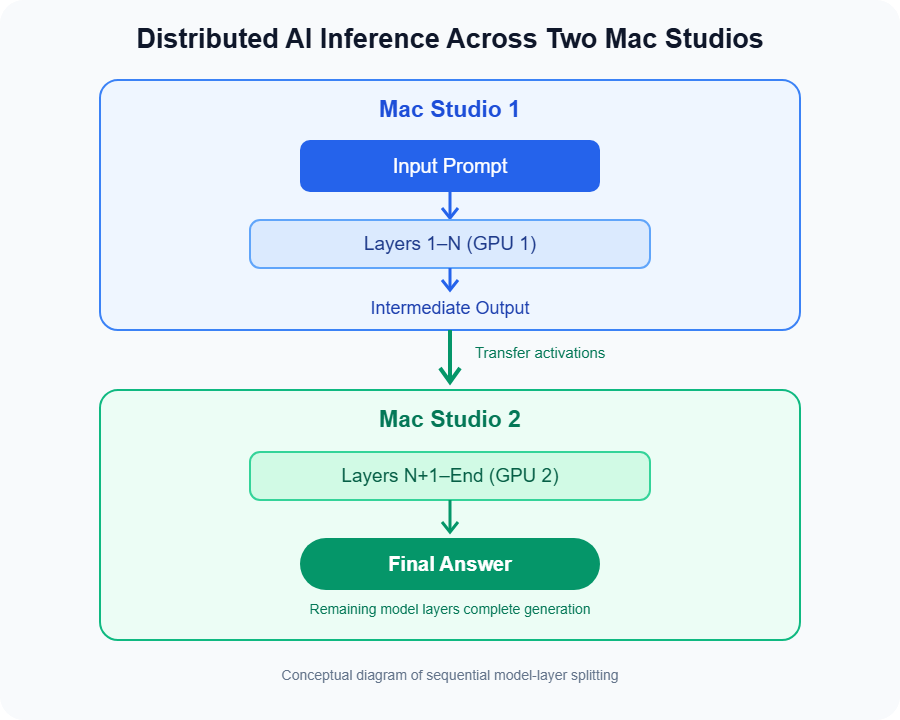
In practice, Meta demonstrated exactly this: two M5 Ultra Mac Studios (each 512 GB) were linked and ran Muse Spark Open end-to-end. They also showed a four-machine setup (tensor parallelism) to further increase throughput, reaching about 36 tokens/sec at context=8192. (By comparison, two machines achieved ~15.7 tokens/sec.) These speeds are usable for development and research, though not as fast as purpose-built GPU clusters. The headline, however, is that it works at all on consumer hardware.
Getting Started: Software and Hardware Requirements
- Mac Hardware: At minimum, two Mac Studio desktops with Apple’s M5 Ultra chips and 512 GB unified RAM each. (Alternatively, four 256GB Macs could pool 1TB, but Apple demonstrated with 512GB units.) These are currently Apple’s most powerful desktops, roughly $11–15K each depending on options.
- macOS and Drivers: macOS 26.2 or later (with built-in RDMA-over-Thunderbolt support). Connect the Macs via Thunderbolt 5 cables (USB4 Gen3x2) to form the high-speed link.
- MLX Installation: Install Apple’s MLX Python library (e.g.
pip install mlx-framework). Use the MLX-LM or similar package to load and run LLMs. Meta provides an MLX Adapter on GitHub for Muse Spark Open. - Model Weights: Download Muse Spark Open weights from Hugging Face or Meta’s Model Garden. (The model is open-weight but large; you’ll need ~500 GB of storage for it in quantized form.) The MLX tool can fetch weights directly.
- Other Software: ML frameworks like PyTorch or Hugging Face Transformers are optional – MLX runs the model itself. But having Python and ML libraries up-to-date is recommended.
Key Benefits of Local AI on Mac
Running AI models like Muse Spark Open on a local Mac cluster brings several advantages:
- Data Privacy & Control: Sensitive code, documents, or data never have to leave your network or organization. Everything is processed on-device. You avoid sending proprietary source code or user data to a third-party cloud API.
- No Per-Token Costs: Unlike cloud APIs that charge per query or per token, a local setup only has the fixed hardware cost. As Johny Srouji put it, “there’s no cost per token. You’re just using the machine again and again”. For heavy workloads, this can save money over time.
- Lower Latency: Inference happens right on your network, so you avoid round-trip delays to cloud servers. Once loaded, responses can come back quickly.
- Offline and Embedded Use: You can run the model without any internet connection if needed (after initial setup). This is useful for isolated environments or field deployments.
- Customization: With local weights and MLX, you have full flexibility. You can tweak inference parameters, add custom code hooks, or even fine-tune the model (using frameworks like TorchTitan) without waiting for cloud provider support.
- Scalable Research: Academic labs and startups can experiment with state-of-the-art models in-house, fostering innovation without big cloud budgets.
At the same time, remember that local AI has trade-offs. The hardware setup is complex and costly, and you must manage and maintain it yourself. Security still matters – owning the hardware doesn’t automatically make everything safe. You need to secure physical machines and ensure your software stays up-to-date. But for organizations concerned about data control and long-term costs, on-device AI can be very appealing.

Real-World Use Cases
What can developers and businesses do with Muse Spark Open on Mac Studios? Here are some possibilities:
- AI-Assisted Coding: With its long context window, Muse Spark Open can read entire codebases (thousands of files) and help refactor, debug, or generate code across multiple files. Imagine asking the model to “rename this class and update all usages” or “add input validation to every API endpoint” and having it make systematic changes. Meta built it for exactly these multi-file workflows.
- Autonomous AI Agents: Muse Spark Open was explicitly trained as an agent. It can plan multi-step processes, call tools, and integrate with software. On a Mac, you could script it to manage tasks: for instance, it could monitor a code repository, file bug reports, or even coordinate builds and deployments, all locally. During demos, Meta showed it reviewing and cropping video footage in DaVinci Resolve frame-by-frame—an example of combining AI with creative workflows.
- Working with Large Text or Code: If you have huge documents, logs, or data sets, Muse Spark Open’s 1M-token context lets it analyze them without cutting them up. For example, a legal firm could run it on large case files, or a data scientist could use it to parse lengthy research papers or data dumps, all on-premises. Future Implications
- This partnership highlights a broader shift in AI: powerful models are gradually becoming portable. As chips like the M5 Ultra push memory limits (512GB and beyond) and frameworks like MLX evolve, more AI workloads can move closer to end-users. For Apple, it strengthens the Mac as a platform for professional AI work, potentially attracting developers and enterprises worried about cloud costs and data privacy. For Meta, releasing open weights and enabling local use demonstrates their commitment to an “AI for everyone” ethos.
- Will we see AI workstations become a trend? Perhaps. If Apple eventually offers a 1TB-memory Mac Studio or Mac Rack, running Muse Spark Open on a single machine might be possible. Also, if Meta and others release more memory-efficient models (or use techniques like quantization and pruning), the hardware bar could drop. Meanwhile, Google, Nvidia, and AMD are also competing with their own hardware and models (DGX Station, Cloud TPUs, etc.). The advantage of Apple’s path is that it leverages a widely used platform (macOS) and heterogeneous hardware (CPU+GPU unified memory) in a novel way.
- For now, the practical impact might be on innovation and perception. Startups and researchers see that they can experiment with one of the most advanced models on a Mac, which may spur creative uses or even new startups doing private cloud AI. It’s also a marketing point: Apple can say “our machines run AI models that needed rack servers yesterday,” which may influence buyer thinking. Overall, expect the line between “cloud-only” and “on-device” AI to blur further.
- Private AI Tools: Companies could build proprietary AI assistants for internal use. For example, a business might create a secure chat assistant that knows all of its private documentation and code but never exposes data outside the LAN. Muse Spark Open on Mac Studio is a way to have that strength of AI without risking data leakage.
- Education and Research: Universities and labs can experiment with cutting-edge LLMs on their own machines. Students can learn about AI internals, perform fine-tuning experiments with Apple’s Metal-accelerated frameworks, and test multi-agent systems without needing expensive GPU clusters.The Apple and Meta AI partnership highlights how powerful AI models can run on high-end Mac Studio computers. By combining Meta’s open-weight model with Apple’s MLX framework, developers can explore local AI inference while maintaining greater control over their workloads. The Apple and Meta AI partnership highlights how powerful AI models can run on high-end Mac Studio computers. By combining Meta’s open-weight model with Apple’s MLX framework, developers can explore local AI inference while maintaining greater control over their workloads.
Meta’s own examples emphasize coding tasks and video editing, but the core point is broad: Any application that benefits from a powerful reasoning model and can tolerate slightly slower inference could run locally. In each case, the advantage is doing AI-heavy work without external cloud dependencies.
Future Implications
This partnership highlights a broader shift in AI: powerful models are gradually becoming portable. As chips like the M5 Ultra push memory limits (512GB and beyond) and frameworks like MLX evolve, more AI workloads can move closer to end-users. For Apple, it strengthens the Mac as a platform for professional AI work, potentially attracting developers and enterprises worried about cloud costs and data privacy. For Meta, releasing open weights and enabling local use demonstrates their commitment to an “AI for everyone” ethos.
Will we see AI workstations become a trend? Perhaps. If Apple eventually offers a 1TB-memory Mac Studio or Mac Rack, running Muse Spark Open on a single machine might be possible. Also, if Meta and others release more memory-efficient models (or use techniques like quantization and pruning), the hardware bar could drop. Meanwhile, Google, Nvidia, and AMD are also competing with their own hardware and models (DGX Station, Cloud TPUs, etc.). The advantage of Apple’s path is that it leverages a widely used platform (macOS) and heterogeneous hardware (CPU+GPU unified memory) in a novel way.
For now, the practical impact might be on innovation and perception. Startups and researchers see that they can experiment with one of the most advanced models on a Mac, which may spur creative uses or even new startups doing private cloud AI. It’s also a marketing point: Apple can say “our machines run AI models that needed rack servers yesterday,” which may influence buyer thinking. Overall, expect the line between “cloud-only” and “on-device” AI to blur further.
Frequently Asked Questions (FAQ)
What exactly did Apple and Meta announce?
They announced that Meta’s Muse Spark Open model (816B/42B parameters) can run locally on Apple’s Mac Studio computers using Apple’s MLX framework. Meta released the model weights as open-weight (under a shared license), and Apple demonstrated the technical setup.
What is Muse Spark Open?
Muse Spark Open is a multimodal AI model by Meta, trained for coding and long-horizon reasoning. It supports up to 1 million tokens of context and can work with text, code, images, audio, and even tools. It’s the open-weight version of Meta’s Muse Spark series, designed to be safe and useful for developers.
Can I run Muse Spark Open on my MacBook or Mac mini?
Not the full 816B model. It requires Mac Studio systems with Apple M5 Ultra chips and very large RAM (at least 512GB each). Regular MacBooks or Mac minis don’t have enough memory. Only Mac Studio (and possibly future Mac Pro/Xserve) setups meet the requirements.
Do I need an internet connection to use it?
No, once the model is downloaded and set up, inference can run completely offline on your machines. You just need internet initially to download MLX and the model weights. All actual computation happens on the Macs.
Is running AI locally more secure or private?
Generally, yes: your data stays on your hardware, not on external servers. This reduces the risk of leaks. However, you must still secure your own machines. Local execution can enhance privacy compared to sending data to a cloud API.
Is it cheaper to run AI locally than in the cloud?
It depends. Upfront, the hardware is expensive (tens of thousands of dollars). But if you do a lot of inference, you avoid per-query cloud fees. Johny Srouji notes that with owned hardware, “there’s no cost per token”. Over time, heavy users may save money locally, but for light or sporadic use, cloud pay-as-you-go is cheaper.
Can I use Muse Spark Open for commercial projects?
Yes, within the Muse Model License terms. Non-commercial and many commercial uses are allowed. However, if you plan to offer it as a paid “model-as-a-service,” the license requires a separate agreement with Meta after you hit certain revenue thresholds. Always review Meta’s license and usage policy for details.
What if I don’t have two Mac Studios – can I still benefit?
Not for Muse Spark Open. That particular model requires the multi-machine setup to even load. But for smaller models (like Llama 2, Stable Diffusion, etc.), one Mac Studio (or even a MacBook) can suffice. Apple’s MLX works with any size model up to the memory limit. The partnership specifically targeted Muse Spark Open because it’s so large.
How does this affect the cloud AI industry?
This announcement is more of a milestone and a capability demo than a knockout blow to cloud providers. Nvidia’s data-center GPUs are still vastly more powerful for general workloads. Local AI’s win here is the ability to host an enormous model on-premises, not raw speed. Most companies will still use cloud AI for convenience. But for privacy-sensitive or high-volume cases, local AI on Mac is now on the table.
Conclusion: Is This the Future of AI on Desktops?
Apple and Meta’s collaboration is exciting: for the first time, one of the world’s largest AI models can run on personal desktops. For developers and tech enthusiasts, it’s a clear signal that the boundaries between desktop and data-center AI are shifting. With Apple’s MLX and the immense memory of the M5 Ultra, your next project might not need any cloud credits – just a very beefy Mac Studio.
That said, local AI isn’t for everyone yet. It’s for tech-savvy organizations ready to invest in powerful hardware. For most users, cloud AI will remain easier and faster. But as hardware improves and these models evolve, we may indeed see more “personal supercomputers” in offices and studios.
Would you trade cloud AI for a local AI workstation? Apple and Meta are betting that some developers will. As Apple’s Johny Srouji suggests, once the machine is bought, every inference is “free”. The real question is: what will you do with that power? Let us know your thoughts in the comments!
Leave a Reply